



Nissan Frontier: Do-it-yourself - Air cleaner
Basic information
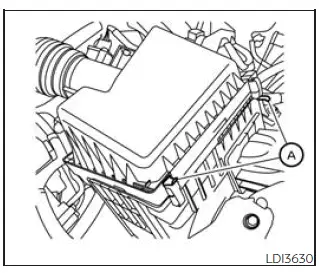
The dry paper-type air cleaner filter element may be cleaned and reused if it remains in acceptable condition. Replace the filter according to the maintenance log shown in the "Maintenance and schedules" section of this manual.
To remove the Nissan Frontier air cleaner filter:
1. Unlatch the clips A and move the air cleaner cover upward.
2. Remove the air cleaner filter from the housing.
3. Wipe the inside of the air cleaner filter housing and the cover with a damp cloth to remove dust and debris before reinstalling the filter.
NOTE:
After installing a new air cleaner filter, make sure the air cleaner cover is seated correctly in the housing, then securely latch the clips A.
WARNING
- Operating the engine with the air cleaner removed may cause you or others to be burned. The air cleaner not only filters incoming air, but also helps stop flame if the engine backfires. If the air cleaner is missing and the engine backfires, burns may occur. Do not drive the Nissan Frontier with the air cleaner removed, and use caution when working near the engine while the air cleaner is removed.
- Never pour fuel into the throttle body or attempt to start the engine with the air cleaner removed. Doing so may result in serious injury.
In-cabin microfilter
Your Nissan Frontier may be equipped with an in-cabin microfilter that captures dirt, pollen, dust, and other airborne particles, while also helping reduce some unpleasant outside odors entering the cabin.
The in-cabin microfilter is located inside the instrument panel. Replace the filter according to the specified maintenance intervals listed in the "Maintenance and schedules" section of this manual.
If replacement is required, it is recommended that you visit a NISSAN dealer for this service.
The filter should be replaced if airflow from the heater or air conditioner decreases noticeably, or if the windows fog up easily during climate control operation.
Keeping the engine air cleaner and cabin microfilter in good condition supports Nissan Frontier engine performance, cabin comfort, visibility, and overall driving quality.





