



Nissan Frontier: Starting and driving - Automatic Emergency Braking (AEB) with Pedestrian Detection
- Basic Information
- AEB with Pedestrian Detection system operation
- Turning the AEB with Pedestrian Detection system ON/OFF
- AEB with Pedestrian Detection system limitations
- System temporarily unavailable
- System maintenance
Basic Information Nissan Frontier 2022
WARNING
Failure to follow the warnings and instructions for proper use of the Automatic Emergency Braking (AEB) with Pedestrian Detection system may result in serious injury or death. This system must be used with full understanding of its limits.
- The AEB with Pedestrian Detection system in the Nissan Frontier is a supplemental driver-assistance
feature. It is not a substitute for the driver's attention, safe judgment, or responsibility to
monitor traffic conditions and operate the vehicle carefully.
It cannot prevent every accident, especially those caused by careless driving, unsafe following distance, distraction, or dangerous driving behavior.
- The AEB with Pedestrian Detection system does not operate in every driving, traffic, weather, visibility, or road surface condition. The driver must always remain prepared to steer, brake, or take corrective action.
The AEB with Pedestrian Detection system can assist the driver of the Nissan Frontier when there is a risk of a forward collision with a vehicle ahead in the same traveling lane or with a pedestrian detected ahead in the traveling path.
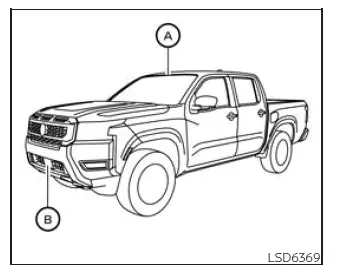
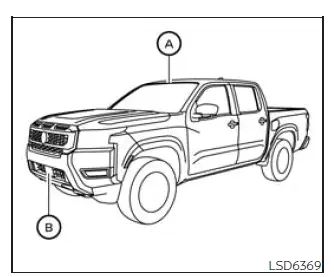
The AEB with Pedestrian Detection system uses a radar sensor located at the front of the vehicle B to measure the distance to a vehicle ahead in the same lane. For pedestrian detection, the Nissan Frontier also uses a camera installed behind the windshield A, working together with the radar sensor to help identify certain forward hazards.
AEB with Pedestrian Detection system operation Nissan Frontier
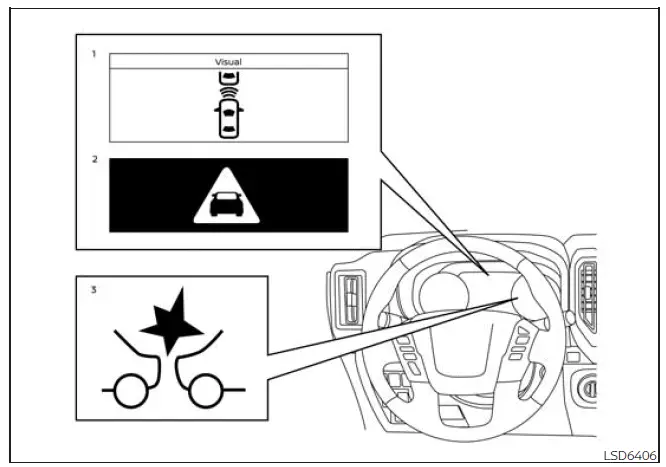
- Vehicle ahead detection indicator
- AEB with Pedestrian Detection emergency warning indicator
- AEB with Pedestrian Detection system warning light
The AEB system operates when the Nissan Frontier is traveling at speeds above approximately 3 mph (5 km/h). For the pedestrian detection function, the system operates at speeds between approximately 6 - 37 mph (10 - 60 km/h).
If the system detects a possible forward collision, the AEB with Pedestrian Detection system first alerts the driver by flashing the vehicle ahead detection indicator in yellow on the vehicle information display and sounding an audible warning. If the driver then applies the brakes quickly and firmly, and the system still determines that a forward collision may occur, it can automatically increase braking force to help reduce the risk.
If the driver does not respond to the initial warning, the AEB with Pedestrian Detection system provides a second visual warning with flashing red and white indicators, along with another audible alert. If the driver releases the accelerator pedal, the system may apply partial braking. When the risk of collision becomes imminent, the system can apply stronger automatic braking to help avoid the impact or reduce its severity.
While the AEB with Pedestrian Detection system is operating, the driver may hear the sound of brake activation. This is normal and indicates that the system is functioning as designed in the Nissan Frontier.
NOTE:
The vehicle's brake lights illuminate whenever braking is performed by the AEB with Pedestrian Detection system, helping alert traffic behind the Nissan Frontier.
Depending on the speed of the vehicle, the distance to the vehicle or pedestrian ahead, driver response, road surface, and surrounding driving conditions, the system may help the driver avoid a forward collision or may help reduce the damage and consequences if a collision cannot be avoided.
If the driver is actively turning the steering wheel, pressing the accelerator pedal, or applying the brakes, the AEB with Pedestrian Detection system may operate later than expected or may not operate at all. Driver input always has priority, so the driver must never wait for the system to respond.
Automatic braking will stop under the following conditions:
- When the steering wheel is turned to help avoid a collision.
- When the accelerator pedal is pressed.
- When a vehicle or pedestrian is no longer detected ahead.
If the AEB with Pedestrian Detection system brings the Nissan Frontier to a complete stop, the vehicle will remain stopped for approximately 2 seconds before the brakes are released. The driver must press the brake pedal as needed to keep the vehicle stopped and maintain safe control.
Turning the AEB with Pedestrian Detection system ON/OFF Nissan Frontier SUV
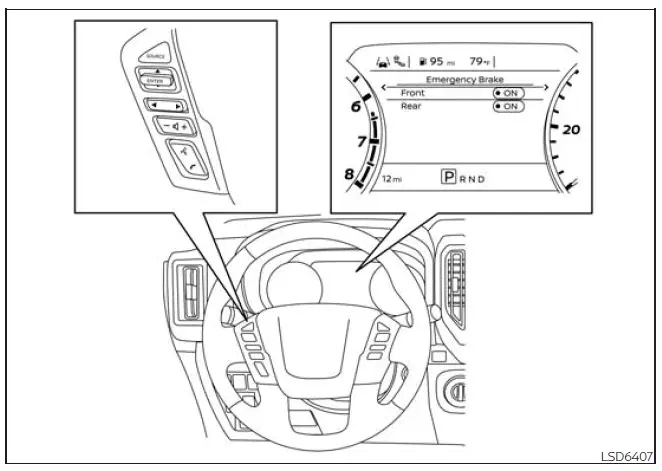
Use the following procedure to enable or disable the Automatic Emergency Braking (AEB) with Pedestrian Detection system in the Nissan Frontier. Before changing this setting, make sure the vehicle is safely parked or that the vehicle information display can be operated without distracting the driver.
1. Press the
 button until
"Settings" appears
in the vehicle information display.
button until
"Settings" appears
in the vehicle information display.
Use the
 button to select "Driver
Assistance." Then press the ENTER
button to open the driver assistance settings menu.
button to select "Driver
Assistance." Then press the ENTER
button to open the driver assistance settings menu.
2. Select "Emergency Brake" and press the ENTER button to access the emergency braking options available for the Nissan Frontier.
3. Select "Front" and press the ENTER button to turn the AEB with Pedestrian Detection system on or off.
When the AEB with Pedestrian Detection system is turned off, the AEB with Pedestrian Detection system warning light illuminates. This reminder helps the driver recognize that forward automatic emergency braking assistance is not currently active.
NOTE:
- The AEB with Pedestrian Detection system will be automatically turned back on when the engine is restarted. If you turned the system off intentionally, check the setting again after restarting the Nissan Frontier.
- The Intelligent Forward Collision Warning (I-FCW) system is integrated into the AEB with Pedestrian
Detection system.
There is no separate selection in the vehicle information display for the I-FCW system. When the AEB system is turned off, the I-FCW system is also turned off, so the Nissan Frontier will not provide that related forward collision warning assistance while the AEB system remains disabled.
AEB with Pedestrian Detection system limitations Nissan Frontier third generation
WARNING
The following points describe important limitations of the AEB with Pedestrian Detection system in the Nissan Frontier. Failure to operate the vehicle with these limitations in mind could result in serious injury or death. This feature is designed to support the driver, but it cannot replace careful observation, safe speed control, or proper braking judgment.
- The AEB with Pedestrian Detection system cannot identify every vehicle, pedestrian, or road hazard in every situation. Detection performance depends on visibility, object shape, movement, sensor condition, road environment, and driver operation.
- The AEB with Pedestrian Detection system in the Nissan Frontier is not designed to detect the
following:
- Small pedestrians, such as children, pedestrians in a sitting position, people riding toys or skateboards, people on scooters, persons in wheelchairs, or anyone who is not in an upright standing or walking posture.
- Animals of any size, whether moving or stationary.
- Roadway or roadside obstacles, such as cargo, debris, loose objects, construction materials, or similar items.
- Oncoming vehicles or vehicles crossing in front of the Nissan Frontier.
- Vehicles where the tires are difficult to see, or where the rear shape is unclear, unusual, covered, or obstructed.
- Parked vehicles that may not be recognized in time depending on speed and approach conditions.
- The AEB with Pedestrian Detection system has specific performance limits that must be understood
before relying on the feature:
- If a stationary vehicle is in the vehicle's path, the system will not function when the Nissan Frontier approaches that stationary vehicle at speeds above approximately 50 mph (80 km/h).
- Pedestrian detection will not function when the vehicle is driven above approximately 37 mph (60 km/h) or below approximately 6 mph (10 km/h).
- The AEB with Pedestrian Detection system may not function properly, or may fail to detect a vehicle
or pedestrian ahead, in the following conditions:
- Visibility is poor because of rain, snow, fog, dust storms, sand storms, smoke, mist, or road spray from other vehicles.
- Dirt, ice, snow, fogging, road film, stickers, or other material covers the radar sensor area or the camera area of the windshield.
- Strong light, such as direct sunlight or high beams, enters the front camera, or there is a sudden brightness change, such as when entering or exiting a tunnel or driving during lightning.
- Driving takes place in dark or dimly lit conditions, including nighttime driving or tunnels, especially when the Nissan Frontier headlights are off, weak, dirty, or when the tail lights of the vehicle ahead are not illuminated.
- The front camera direction is misaligned or its view is affected by windshield condition, mounting position, or impact.
- The vehicle is traveling down a steep slope, through sharp curves, or over bumpy, rough, unpaved, or dirt roads.
- Other radar sources interfere with the system's ability to measure objects ahead accurately.
- The position or movement of the Nissan Frontier changes quickly or significantly, such as during a lane change, vehicle turn, abrupt steering input, sudden acceleration, or sudden deceleration.
- Wheels or tires other than those recommended by NISSAN are installed, which may affect vehicle behavior and system judgment.
- Your vehicle, the vehicle ahead, or the pedestrian ahead moves quickly or unpredictably, preventing the system from detecting and reacting in time. Examples include a pedestrian moving quickly toward the vehicle at close range, another vehicle cutting in, a vehicle changing lanes, making a turn, steering abruptly, or accelerating or decelerating suddenly.
- The vehicle or pedestrian is offset from the forward path of the Nissan Frontier and is not directly aligned with the system's detection area.
- The speed difference between the Nissan Frontier and the vehicle ahead is small, making the closing risk harder for the system to judge.
- The pedestrian's outline is partly hidden or difficult to identify, such as when the person is carrying luggage, pushing a stroller, wearing bulky or loose clothing, using large accessories, or standing in an unusual posture, including raising the hands.
- The person has poor contrast against the background, for example when clothing color or pattern blends with nearby scenery, shadows, road surfaces, or roadside objects.
- The engine has been started within approximately the last 15 seconds and the system has not yet completed its initial operating process.
- The vehicle ahead has an unusual shape, very low or very high ground clearance, unusual cargo loading, a narrow body, or a profile similar to a motorcycle.
- The vehicle or pedestrian is near a traffic sign, reflective surface, water on the road, bright object, or is located within a shadow.
- Multiple pedestrians are grouped close together, making individual outlines difficult for the system to distinguish.
- The pedestrian is hidden by another vehicle, a roadside object, a barrier, vegetation, or any other obstruction.
- The Nissan Frontier is towing a trailer or another vehicle.
- System performance may be reduced in the following conditions:
- The vehicle is driven on a slippery road surface, including wet, icy, snowy, or loose gravel conditions.
- The vehicle is driven on a slope, grade, or uneven road where braking response and sensor angle may be affected.
- Excessively heavy baggage or cargo is loaded in the rear seat or cargo area, changing the vehicle posture and braking characteristics of the Nissan Frontier.
- The system is designed to automatically check the functionality of the radar sensor and camera within certain limits. However, it may not detect every type of obstruction on the sensor areas, such as ice, snow, stickers, film, dirt, or other coverings. In these cases, the system may not warn the driver correctly. Regularly inspect, clean, and clear the radar sensor area and windshield camera area to support proper AEB operation.
- In certain road and traffic situations, the AEB with Pedestrian Detection system may unexpectedly apply partial braking. If acceleration is necessary to maintain safe vehicle control, press the accelerator pedal to override the system.
- The AEB with Pedestrian Detection system may operate when it detects a pattern, object, shadow, reflection, or lights that resemble the outline of a vehicle or pedestrian, or when an object appears to be the same size and position as a vehicle or motorcycle's tail lights.
- The system may continue operating when the vehicle ahead is turning right or left, especially if the system still judges that the object remains in the forward path.
- The system may operate when the Nissan Frontier is approaching and passing a vehicle ahead, depending on relative speed, lane position, and the shape of the road.
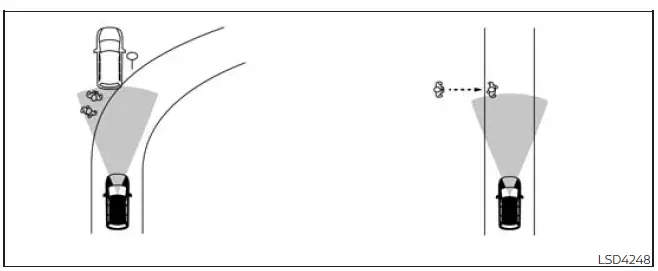
- Depending on road layout, including curved roads, curve entrances and exits, winding roads, lane restrictions, construction zones, temporary lane markings, or narrow travel lanes, the system may temporarily respond to an oncoming vehicle in front of your vehicle.
WARNING
The following points describe additional limitations of the AEB with Pedestrian Detection system. Failure to operate the Nissan Frontier with these system limitations in mind could result in serious injury or death. The driver must always remain alert, watch the road carefully, and be ready to brake or steer when necessary.
- The AEB with Pedestrian Detection system may react unexpectedly to certain objects, road layouts, or
surrounding movements, including the following:
- Objects positioned along the roadside, such as traffic signs, guardrails, pedestrians, motorcycles, parked vehicles, roadside equipment, or similar items near the travel lane
- Pedestrians detected while the Nissan Frontier is driven through narrow alleys, tight streets, or confined areas where people are close to the vehicle path
- Pedestrians who temporarily step into, lean toward, or approach the driving lane while avoiding obstacles on the road shoulder
- Objects located above the road, including low bridges, overhead traffic signs, hanging structures, or similar items that may be interpreted by the system as a forward obstacle
- Objects on the road surface, such as railroad tracks, metal grates, steel plates, raised covers, construction plates, or uneven road hardware
- Objects inside a parking garage, including beams, pillars, walls, low ceilings, ramps, and structural supports
- Pedestrians or motorcycles approaching the traveling lane from the side or moving close to the expected path of the Nissan Frontier
- Vehicles, pedestrians, motorcycles, bicycles, or other objects in adjacent lanes or positioned very close to the vehicle
- Oncoming pedestrians whose position or movement may be interpreted as a possible forward hazard
- Objects near or over the road, such as trees, branches, roadside posts, signs, or similar shapes that may resemble a vehicle or pedestrian outline
- Braking distances increase on slippery surfaces. Wet pavement, snow, ice, gravel, mud, and other low-traction conditions can reduce braking effectiveness, so the driver of the Nissan Frontier must allow more distance and avoid depending on automatic braking alone.
- Excessive noise can interfere with the warning chime, and the alert may not be heard clearly. Loud music, open windows, wind noise, heavy traffic, rain, construction noise, or conversations inside the cabin can make audible warnings harder to notice.
System temporarily unavailable Nissan Frontier 2022
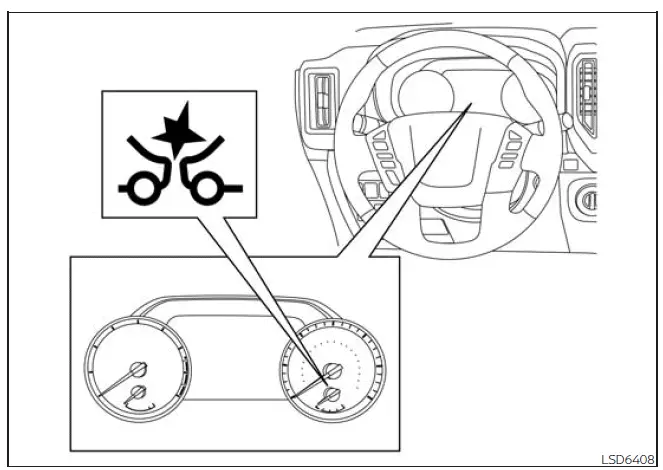
Condition A:
Under the following conditions, the AEB with Pedestrian Detection system warning light in the Nissan Frontier may blink, and the system will automatically turn off because the front camera cannot accurately monitor the road ahead:
- The camera area of the windshield is misted, fogged, or frozen.
- Strong light, such as direct sunlight or intense glare, is shining from the front of the vehicle.
- The cabin temperature rises above approximately 104ºF (40ºC) while the vehicle is parked or driven in direct sunlight.
- The windshield glass in front of the camera area is continuously covered with dirt, road film, moisture, frost, or other material.
Action to take:
When the conditions listed above are corrected or no longer present, the AEB with Pedestrian Detection system will resume automatically. In the Nissan Frontier, this may occur after the windshield clears, the cabin temperature drops, or the camera area becomes visible again.
NOTE:
If the inside of the windshield near the camera area is misted or frozen, it may take some time for the defroster or A/C system to clear the glass after it is turned on. If dirt, film, or contamination appears on this area and cannot be cleaned properly, it is recommended that you visit a NISSAN dealer for inspection and service.
Condition B:
In the following condition, the AEB with Pedestrian Detection system warning light illuminates and the system automatically turns off to prevent incorrect operation:
The front radar sensor detects interference from another radar source nearby, which may prevent the Nissan Frontier from measuring the distance to vehicles or objects ahead accurately.
Action to take:
When the radar interference is no longer present, the AEB with Pedestrian Detection system will resume automatically. Continue driving carefully and do not rely only on the system while the warning light is illuminated.
Condition C:
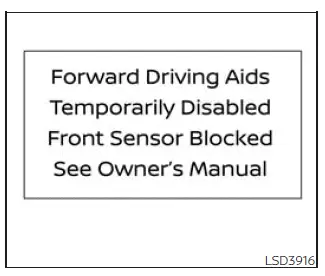
When severe or inclement weather, such as rain, fog, snow, road spray, or similar conditions, blocks the front radar sensor, the AEB with Pedestrian Detection system will be canceled. The AEB with Pedestrian Detection system warning light will illuminate, and the "Forward Driving Aids Temporarily Disabled Front Sensor Blocked See Owner's Manual" warning message will appear in the Nissan Frontier vehicle information display.
Action to take:
When the weather or road conditions that caused the blockage are no longer present, the warning message should disappear from the vehicle information display. If the "Forward Driving Aids Temporarily Disabled Front Sensor Blocked See Owner's Manual" message continues to appear after conditions improve, the system should be checked. It is recommended that you visit a NISSAN dealer for this service.
Condition D:
If the radar sensor in the front bumper is covered with dirt, mud, snow, ice, road salt, or any other obstruction, the AEB with Pedestrian Detection system will automatically cancel operation. The system warning light will illuminate, and the "Forward Driving Aids Temporarily Disabled Front Sensor Blocked See Owner's Manual" warning message will appear in the Nissan Frontier vehicle information display.
Action to take:
If this warning message appears, stop the vehicle in a safe location, place the shift lever in the P (Park) position, and turn the engine off. If the radar signal has been temporarily interrupted, carefully clean the sensor area on the front bumper and then restart the engine. If the "Forward Driving Aids Temporarily Disabled Front Sensor Blocked See Owner's Manual" warning message continues to be displayed, have the system inspected. It is recommended that you visit a NISSAN dealer for this service.
Condition E:
When the Nissan Frontier is driven on roads with limited roadside structures or few surrounding reference points, such as long bridges, deserts, open snowfields, or roads beside long continuous walls, the system may illuminate the warning light and display the "Forward Driving Aids Temporarily Disabled Front Sensor Blocked See Owner's Manual" message.
Action to take:
When these driving conditions no longer exist, turn the system back on if needed and confirm that the warning message has cleared from the vehicle information display.
Condition F:
When the Vehicle Dynamic Control (VDC) system is turned off, automatic braking by the AEB with Pedestrian Detection system will not operate. In this condition, only the visual and audible warnings will function.
The AEB with Pedestrian Detection system warning light (orange) will illuminate to remind the driver that braking assistance is not available.
Action to take:
When the VDC system is turned back on, the AEB with Pedestrian Detection system in the Nissan Frontier will resume automatically.
NOTE:
If the AEB with Pedestrian Detection system stops working, the Intelligent Forward Collision Warning (I-FCW) system will also stop working because the systems are linked.
System malfunction
If the AEB with Pedestrian Detection system malfunctions, it will turn off automatically. A warning chime will sound, the AEB with Pedestrian Detection system warning light (orange) will illuminate, and the warning message "System fault See Owner's Manual" will appear in the Nissan Frontier vehicle information display.
Action to take
If the warning light (orange) comes on, stop the Nissan Frontier in a safe location, turn the engine off, and restart the engine. If the warning light continues to illuminate after restarting, have the AEB with Pedestrian Detection system checked by a qualified technician. It is recommended that you visit a NISSAN dealer for this service, especially if the warning returns repeatedly or the forward driving aids remain unavailable.
System maintenance Nissan Frontier 2026
Basic Information
The radar sensor for the AEB with Pedestrian Detection system is positioned at the front of the Nissan Frontier B. The forward camera is installed on the upper area of the windshield A, where it can monitor the road ahead and support the system's detection functions.
To help keep the AEB with Pedestrian Detection system operating accurately and reliably in the Nissan Frontier, observe the following maintenance requirements:
- Always keep the sensor areas on the front bumper, front emblem area, and windshield clean and free from mud, snow, ice, road film, bugs, wax, stickers, or other materials that may interfere with detection.
- Do not strike, press, scratch, or damage the areas around the sensors, including the bumper and windshield. Even minor damage or misalignment can affect how the Nissan Frontier forward safety systems read the road ahead.
- Do not cover the sensors, attach stickers, apply transparent film, or install accessories near the sensor areas. Blocking the radar or camera view may interrupt sensor signals and can cause improper operation, system failure, or warning messages.
- Do not attach metallic objects near the radar sensor, such as a brush guard, decorative metal trim, or other front-mounted equipment. Metallic parts may interfere with radar operation and can cause the AEB with Pedestrian Detection system to malfunction.
- Do not place reflective materials, including white paper, mirrors, shiny accessories, or reflective decorations, on the instrument panel. Reflected sunlight can enter the camera field of view and reduce the camera unit's ability to identify vehicles, pedestrians, or road conditions correctly.
- Do not alter, remove, repaint, modify, or repair the front bumper in a way that may affect the sensor area. Before customizing, replacing, painting, or restoring the front bumper of the Nissan Frontier, it is recommended that you visit a NISSAN dealer to help ensure the sensors remain properly positioned and calibrated.
Radio frequency statement
FCC Notice
USA
This device complies with Part 15 of the FCC Rules with Industry Canada licenceexempt RSS standard(s).
Operation is subject to the following two conditions:
1. This device may not cause harmful interference, and
2. This device must accept any interference received, including interference that may cause undesired operation.
Radio frequency radiation exposure Information:
This equipment complies with FCC and IC radiation exposure limits set forth for an uncontrolled environment.
This equipment should be installed and operated with minimum distance of 30 cm between the radiator and your body.
This transmitter must not be co-located or operating in conjunction with any other antenna or transmitter.
FCC Notice
Changes or modifications not expressly approved by the party responsible for compliance could void the user's authority to operate the equipment.
CANADA
This device complies with Part 15 of the FCC Rules and Industry Canada licenceexempt RSS standard(s).
Operation is subject to the following two conditions:
1. This device may not cause harmful interference, and
2. This device must accept any interference received, including interference that may cause undesired operation.
Radio frequency radiation exposure
Information:
This equipment complies with FCC and IC radiation exposure limits set forth for an uncontrolled environment.
This equipment should be installed and operated with minimum distance of 30 cm between the radiator and your body.
This transmitter must not be co-located or operating in conjunction with any other antenna or transmitter.
FCC Notice
Changes or modifications not expressly approved by the party responsible for compliance could void the user's authority to operate the equipment.





