



Nissan Frontier: Starting and driving - Blind Spot Warning (BSW)
Basic Information Nissan Frontier SUV
WARNING
Failure to follow the warnings and instructions for proper use of the BSW system can result in serious injury or death.
- The BSW system is not a substitute for careful driving, mirror checks, and direct visual confirmation. It is not designed to prevent contact with vehicles, motorcycles, bicycles, or other objects. Before changing lanes in the Nissan Frontier, always check the side and rear mirrors, use the turn signal, and look over your shoulder in the direction the vehicle will move to confirm that the lane change is safe. Never rely only on the BSW system.
- Do not use the BSW system when towing a trailer. Trailer length and movement can affect radar detection, and the system may not function properly.
The Blind Spot Warning system in the Nissan Frontier is designed to help alert the driver when another vehicle is traveling in an adjacent lane during a lane change. It adds useful awareness in traffic, but the driver must still make the final decision before moving from one lane to another.
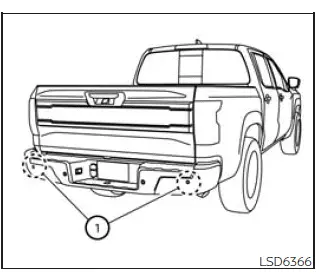
The BSW system uses radar sensors 1 installed near the rear bumper to detect vehicles positioned in an adjacent lane where they may be difficult to see with mirrors alone.
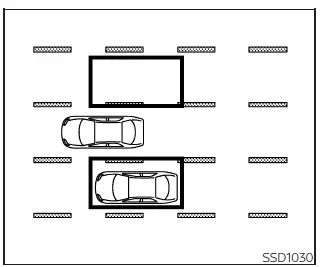
Detection zone
The radar sensors can detect vehicles on either side of the Nissan Frontier within the detection zone shown in the illustration. This detection zone begins near the outside mirror of the vehicle and extends approximately 10 ft (3.0 m) behind the rear bumper, as well as approximately 10 ft (3.0 m) sideways.
BSW system operation Nissan Frontier 2022
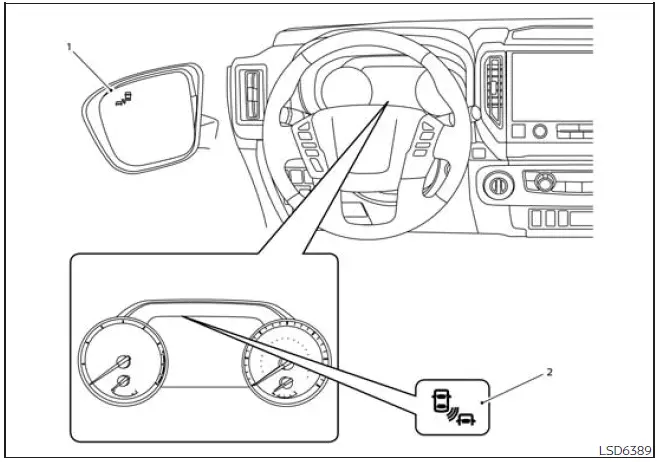
- Side BSW/RCTA Indicator Light
- BSW Indicator
The BSW system operates when the Nissan Frontier is driven above approximately 20 mph (32 km/h).
If the radar sensors detect a vehicle in the detection zone, the side BSW/RCTA indicator light (1) illuminates. If the driver then activates the turn signal toward that side, the system sounds a chime twice, the side BSW/RCTA indicator light flashes, and the BSW indicator blinks in yellow in the vehicle information display. The side BSW/RCTA indicator light continues to flash until the detected vehicle leaves the detection zone.
The side BSW/RCTA indicator light illuminates for a few seconds when the ignition switch is placed in the ON position. This brief illumination helps confirm that the indicator is able to operate.
The brightness of the side BSW/RCTA indicator light is adjusted automatically according to surrounding light conditions, making it easier to see during both daytime and nighttime driving.
If another vehicle enters the detection zone after the driver has already activated the turn signal, the side BSW/RCTA indicator light and the BSW indicator will flash, but the chime will not sound.
How to enable/disable the BSW system
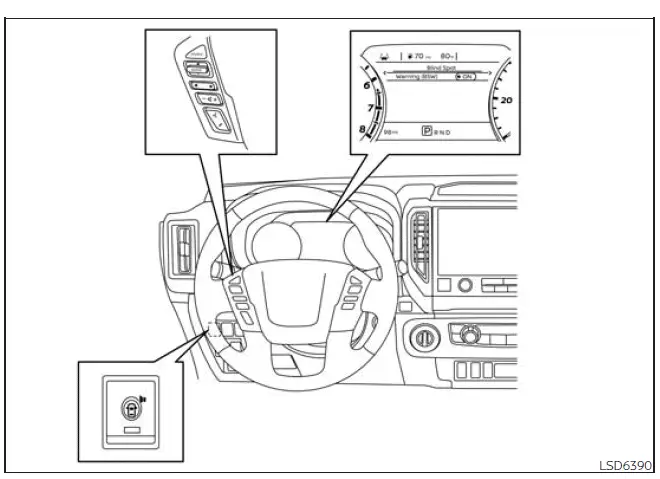
When the BSW system is enabled in the vehicle information display, it can be temporarily turned off by pressing the warning systems switch.
Use the following steps to enable or disable the BSW system in the Nissan Frontier:
1. Press the
 button until
"Settings" appears
in the vehicle information display.
button until
"Settings" appears
in the vehicle information display.
Use the
 button to select "Driver
Assistance" and press ENTER.
button to select "Driver
Assistance" and press ENTER.
2. Select "Blind Spot" and press ENTER.
3. Select "Warning (BSW)" and press ENTER.
4. Press the Warning systems switch to turn the system on or off.
NOTE:
- When the system is enabled or disabled, the current setting will be retained even after the engine is restarted.
- When the BSW system is turned on, the BSW/RCTA indicator (white) in the vehicle information display illuminates.
For best performance, keep the rear bumper area around the radar sensors clean and free of stickers, heavy dirt, snow, ice, or accessories that could block radar signals. Even when the Nissan Frontier BSW system is active, safe lane changes still depend on mirrors, signals, shoulder checks, and careful driver judgment.
BSW system limitations Nissan Frontier D41
WARNING
The following information explains important limitations of the BSW system. If the Nissan Frontier is operated without considering these limits, the driver may misjudge surrounding traffic, which could result in serious injury or death.
- The BSW system cannot detect every vehicle in every driving situation, weather condition, or traffic environment.
- The radar sensors may be unable to
detect certain objects or may not activate BSW when the following are present:
- Pedestrians, bicycles, animals, or other non-vehicle objects.
- Vehicles such as motorcycles, low-profile vehicles, or vehicles with high ground clearance that may not reflect radar signals in the expected way.
- Oncoming vehicles traveling toward the Nissan Frontier.
- Vehicles that remain in the detection zone as you accelerate from a stop.
- A vehicle merging into an adjacent lane at approximately the same speed as your vehicle.
- A vehicle approaching very quickly from behind.
- A vehicle that the Nissan Frontier overtakes rapidly.
- A vehicle that passes through the detection zone quickly and remains there only briefly.
- When several vehicles are overtaken in a row, vehicles after the first one may not be detected if they are traveling close together.
- The radar sensor detection zone is based on a standard lane width. When driving in a wider lane, the radar sensors may fail to detect vehicles in the adjacent lane. When driving in a narrow lane, the radar sensors may detect vehicles traveling two lanes away.
- The radar sensors are designed to ignore most stationary objects. However, guardrails, walls, roadside foliage, parked vehicles, or similar objects may occasionally be detected. This is considered normal system behavior.
- The following conditions may reduce
the radar system's ability to detect other
vehicles near the Nissan Frontier:
- Severe weather, including heavy rain, snow, fog, or storm conditions.
- Road spray from nearby vehicles or wet pavement.
- Ice, frost, snow, mud, dust, or dirt build-up on the rear area of the vehicle near the radar sensors.
- Do not attach stickers, including transparent material, install accessories, or apply additional paint near the radar sensors. These changes can reduce the radar sensors' ability to detect other vehicles correctly.
- Excessive noise, such as high audio system volume or an open vehicle window, can interfere with the warning chime and may prevent the driver from hearing it.
BSW driving situations
Basic Information
- Indicator on

- Indicator off

- Indicator flashing

Another vehicle approaching from behind
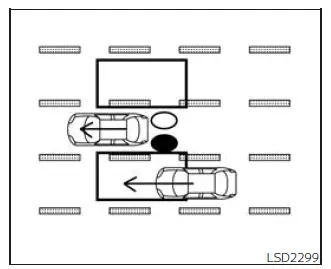
Illustration 1 - Approaching from behind
Illustration 1: The side BSW/RCTA indicator light illuminates when a vehicle enters the detection zone from behind in an adjacent lane. This alert helps the driver notice a vehicle that may be difficult to see before changing lanes in the Nissan Frontier.
NOTE:
- The radar sensors may not detect vehicles that are approaching very rapidly from behind, especially if they enter and leave the detection zone quickly.
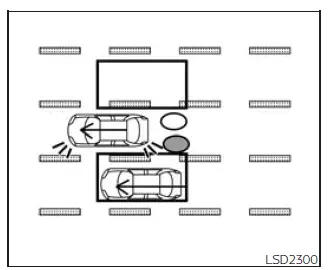
Illustration 2 - Approaching from
behind
Always confirm the lane with mirrors and a shoulder check before moving over. The BSW system in the Nissan Frontier is helpful support, but safe lane changes still depend on the driver's judgment and awareness.
Illustration 2: If the driver switches on the turn signal while another vehicle is already positioned within the detection zone, the Nissan Frontier BSW system gives a double audible chime. At the same time, the side BSW/RCTA indicator light and the yellow BSW indicator flash to draw the driver’s attention before a lane change is attempted.
NOTE:
- The radar sensors may not always recognize vehicles that are closing in very quickly from behind, especially when the speed difference is significant.
- If the driver turns on the signal before another vehicle actually enters the detection zone, the side BSW/RCTA indicator light and the yellow BSW indicator will flash once that vehicle is detected, but the warning chime will not sound. For this reason, drivers should always confirm traffic conditions visually and use the Nissan Frontier mirrors before changing lanes.
Overtaking another vehicle
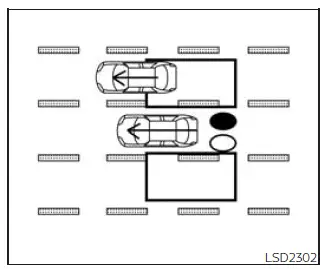
Illustration 3 - Overtaking another
vehicle
Illustration 3: When you pass another vehicle and that vehicle remains inside the detection zone for about 2 seconds, the side BSW/RCTA indicator light turns on. This warning helps the Nissan Frontier driver recognize that the vehicle being overtaken is still close enough to be a concern during a lane change.
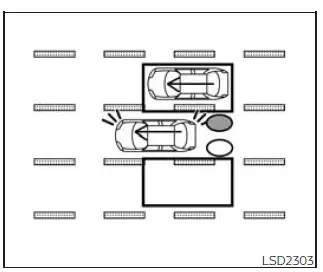
Illustration 4 - Overtaking another
vehicle
Illustration 4: If the driver operates the turn signal while another vehicle remains in the detection zone, the system sounds two warning chimes. The side BSW/RCTA indicator light and the yellow BSW indicator also flash, providing both visual and audible alerts that a lane change may not be safe.
NOTE:
- When the Nissan Frontier overtakes several vehicles one after another, vehicles behind the first one may not be detected if they are traveling very close together with little separation between them.
- The radar sensors may also fail to identify slower vehicles if they are passed rapidly, because the time spent inside the detection area may be too short for consistent recognition.
- If the driver activates the turn signal before a vehicle enters the detection zone, the side BSW/RCTA indicator light and the yellow BSW indicator will flash when the other vehicle is detected, but no chime will be heard. The warning is useful, but it does not replace careful mirror checks and a direct shoulder check when driving the Nissan Frontier.
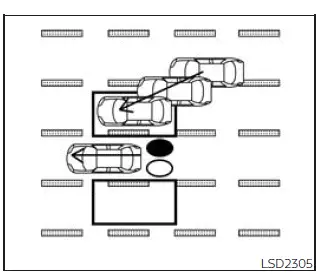
Illustration 5 - Entering from the side
Entering from the side
Illustration 5: The side BSW/RCTA indicator light illuminates when a vehicle moves into the detection zone from either side of the Nissan Frontier. This can occur when traffic in an adjacent lane shifts position or when another vehicle approaches from the side area near the rear of the truck.
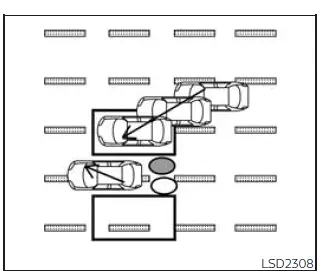
Illustration 6 - Entering from the side
Illustration 6: If the driver turns on the turn signal while another vehicle is present in the detection zone, the Nissan Frontier BSW system sounds two chimes. The side BSW/RCTA indicator light and the yellow BSW indicator flash together, warning the driver that a vehicle may be beside or near the rear side of the truck.
NOTE:
- If the driver activates the turn signal before a vehicle enters the detection zone, the side BSW/RCTA indicator light and the yellow BSW indicator will flash after the vehicle is detected, but the chime will not sound.
- The radar sensors may not detect a vehicle entering the detection zone if it is traveling at approximately the same speed as your vehicle. This is one reason the Nissan Frontier BSW system should be treated as driver assistance, not as a substitute for attentive driving.
System temporarily unavailable Nissan Frontier D41
Basic Information
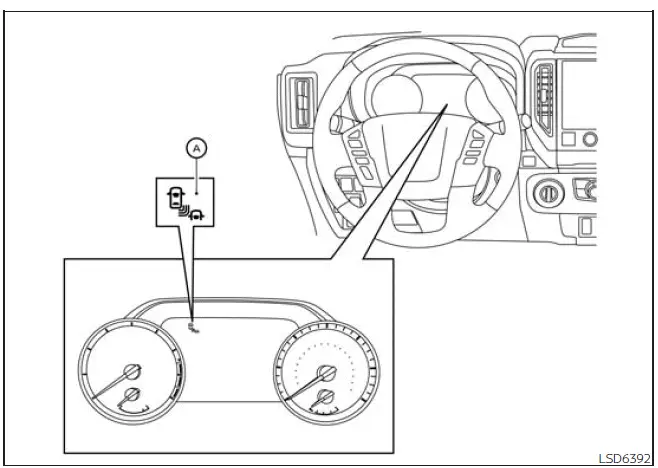
When the Nissan Frontier detects that the side radar area is blocked, the system automatically disables the related driver assistance function to prevent unreliable warnings. The "Unavailable Side Radar Obstruction" warning message appears in the vehicle information display, and the white BSW/RCTA indicator blinks at position A to let the driver know that the system is temporarily unable to operate as intended.
The system will remain unavailable until the obstruction or environmental condition is no longer present. During this time, the driver must rely on mirrors, direct visual checks, and normal safe driving judgment when changing lanes or backing up.
The radar sensors can be affected by temporary outside conditions, including splashing water, heavy spray, mist, fog, or similar weather-related interference. The blocked condition may also occur when ice, frost, road salt, mud, dirt, or other debris covers the radar sensor area and prevents the Nissan Frontier BSW and RCTA systems from reading the surrounding traffic correctly.
NOTE:
If the BSW system stops operating, the RCTA system (if so equipped) will also stop working, because both functions depend on the same rear side radar sensor information.
Action to take:
When the conditions described above are cleared, the system will resume operation automatically. If the warning was caused by dirt, snow, frost, or moisture around the rear bumper area, cleaning the sensor zone may help the Nissan Frontier system return to normal more quickly.
Malfunction
If the BSW system develops a malfunction, it will shut itself off automatically. A system malfunction warning message will appear in the vehicle information display together with the orange BSW/RCTA indicator. This warning means the system has detected a fault that is different from a temporary radar obstruction.
NOTE:
If the BSW system stops working because of a malfunction, the RCTA system will also stop working. The Nissan Frontier should not be driven as though these warning functions are active until the message is resolved.
Action to take:
Stop the vehicle in a safe location, move the shift position to P (Park), turn the engine off, and then restart the engine. If the warning message continues to appear after restarting, the system should be inspected by a qualified technician. It is recommended that you visit a NISSAN dealer for this service, especially if the warning appeared after rear bumper damage, a collision, or recent repair work near the radar sensor area.
System maintenance
Basic Information
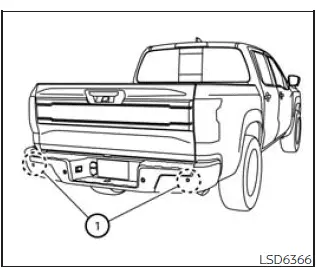
The two radar sensors 1 used by the BSW and RCTA systems are positioned near the rear bumper. To help these Nissan Frontier safety assistance systems operate correctly, always keep the area around the radar sensors clean and free from anything that could block the radar signal.
Temporary ambient conditions, such as splashing water, mist, dense fog, road spray, or moisture accumulation, may interfere with the radar sensors for a short period of time.
A blocked condition may also be caused by ice, frost, snow, mud, dust, road grime, or other objects that cover or obstruct the sensor area. Even a thin layer of buildup can reduce detection performance in some driving situations.
Check the area around the radar sensors regularly and remove any objects, dirt, ice, or other material that may prevent the Nissan Frontier BSW and RCTA systems from monitoring the side and rear areas properly.
Do not attach stickers, decals, protective films, or transparent material near the radar sensors. Do not install accessories, aftermarket trim, bumper covers, or apply additional paint in the sensor area, because these changes may interfere with radar operation.
Do not strike, bend, drill into, repaint, or otherwise damage the area around the radar sensors. It is recommended that you visit a NISSAN dealer if the rear bumper or sensor area has been damaged in a collision, because sensor alignment and radar performance may need to be checked before the Nissan Frontier driver assistance systems can work reliably again.
Radio frequency statement
For USA
This device complies with Part 15 of the FCC Rules. Operation is subject to the following two conditions:
1. This device may not cause harmful interference, and
2. This device must accept any interference received, including interference that may cause undesired operation.
CAUTION TO USERS
Changes or modifications not expressly approved by the party responsible for compliance could void the user's authority to operate the equipment.
For Canada
This device contains licence-exempt transmitter(s)/receiver(s) that comply with Innovation, Science and Economic Development Canada's licence-exempt RSS(s). Operation is subject to the following two conditions:
1. This device may not cause interference.
2. This device must accept any interference, including interference that may cause undesired operation of the device.
Radiofrequency radiation exposure information:
This equipment complies with radiation exposure limits set forth for an uncontrolled environment. This equipment should be installed and operated with minimum distance of 20 cm between the radiator and the body of any persons, user or bystander.





