



Nissan Frontier: Starting and driving - Driving the vehicle
Engine protection mode Nissan Frontier 2026
The Nissan Frontier is equipped with an engine protection mode designed to help reduce the risk of engine damage when coolant temperature rises beyond a safe operating range. This may happen during demanding driving conditions, such as climbing long or steep grades in hot weather, carrying heavy cargo, or towing a trailer. When the engine temperature reaches a critical level, the vehicle may respond in several ways:
- The engine coolant temperature gauge will move toward the H position, warning the driver that the engine is getting too hot.
- Engine power may be reduced to lower the load on the engine and help control heat buildup.
- The air conditioning cooling function may be switched off automatically for a short time, although the blower fan will continue to operate and circulate air.
When engine protection mode is active, engine output and, in some situations, vehicle speed will decrease. The driver can still control speed with the accelerator pedal, but the Nissan Frontier may not accelerate as quickly or as strongly as expected. The transmission may also downshift or upshift at its programmed shift points to help manage the engine load. If needed, manual shifting can be used to better match the road, grade, and traffic conditions.
As the driving load decreases and the engine coolant temperature begins to return to a safer range, vehicle speed can gradually be increased with the accelerator pedal. The air conditioning cooling function will also turn back on automatically once the system determines that normal operation can resume.
The Malfunction Indicator Light (MIL) may come on if the engine coolant temperature does not drop or if the air conditioning cooling function does not return to normal operation. If the MIL remains on by itself, the Nissan Frontier usually does not need to be towed, but it should be inspected as soon as practical. It is recommended that you visit a NISSAN dealer for diagnosis and service.
WARNING
Engine overheating can cause reduced engine power and lower vehicle speed. The reduced speed may be slower than surrounding traffic, which can increase the risk of a collision. Drive with extra caution when this occurs. If the Nissan Frontier cannot maintain a safe speed with traffic, move to the side of the road in a safe location. Allow the engine to cool before continuing normal operation.
CAUTION
Operating the engine while the engine oil pressure warning light is illuminated can cause severe engine damage very quickly. This type of damage is not covered by warranty. Turn off the engine as soon as it is safe to do so.
To help avoid overheating in the Nissan Frontier, monitor the temperature gauge during heavy towing, steep climbs, or hot-weather driving, and reduce load or speed if the vehicle begins to show signs of excessive heat.
Automatic transmission (A/T) Nissan Frontier
Basic Information
WARNING
- Do not press the accelerator pedal while shifting from P (Park) or N (Neutral) to R (Reverse) or D (Drive). Keep the brake pedal firmly depressed until the shift is fully completed. If this precaution is ignored, the Nissan Frontier could move unexpectedly, which may cause loss of control and an accident.
- When the engine is cold, idle speed may be higher than normal. Use extra care when selecting a forward or reverse gear before the engine has reached normal operating temperature.
- Never shift into P (Park) or R (Reverse) while the vehicle is moving forward, and never shift into P (Park) or D (Drive) while the vehicle is moving backward. Doing so could cause an accident and may seriously damage the transmission.
- Do not downshift suddenly on slippery roads. A harsh downshift can disturb traction and may cause a loss of control.
- Except in an emergency, do not shift
to N (Neutral) while driving.
Coasting with the transmission in N (Neutral) can reduce vehicle control and may cause serious internal damage to the transmission.
CAUTION
- To avoid possible damage to the Nissan Frontier, do not hold the vehicle on an uphill grade by pressing the accelerator pedal. Use the foot brake instead, or the parking brake when appropriate, to keep the vehicle stationary.
The automatic transmission in the Nissan Frontier is electronically controlled to deliver strong power, smooth gear changes, and confident response in everyday driving.
The recommended operating procedures for this transmission are described on the following pages. Following these instructions helps preserve transmission durability, maintain good vehicle performance, and make driving the Nissan Frontier more comfortable and predictable.
Starting the vehicle
1. After the engine has started, fully depress the foot brake pedal before moving the shift lever out of the P (Park) position.
2. Keep the foot brake pedal depressed and move the shift lever into the desired driving gear.
3. Release the foot brake smoothly, then gradually allow the vehicle to begin moving.
The automatic transmission is designed so the foot brake pedal MUST be depressed before shifting from P (Park) to any drive position while the ignition switch is in the ON position.
The shift lever cannot be moved out of the P (Park) position and into any of the other gear positions if the ignition switch is placed in the ACC, LOCK or OFF position.
The shift lever may not be moved out of the P (Park) position and into any of the other gear positions if the ignition switch is placed in the ON position, but the engine is not running and the outside temperature is extremely low.
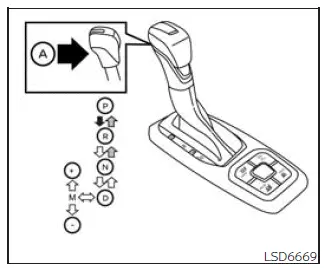
Shifting
Basic Information
To move the shift lever correctly, follow the shift pattern and button instructions shown below:
 Press the button A while
depressing
the brake pedal
Press the button A while
depressing
the brake pedal
 Press the button A to shift
 Shift without depressing the
brake
pedal
Shift without depressing the
brake
pedal
Shifting
After starting the engine, fully depress the brake pedal and move the shift lever out of the P (Park) position only when you are ready to drive.
WARNING
Apply the parking brake if the shift lever is in any position while the engine is not running. Failure to do so could allow the Nissan Frontier to move unexpectedly or roll away, resulting in serious personal injury or property damage.
If the ignition switch is placed in the OFF position for any reason while the vehicle is in N (Neutral), or in any D (Drive) position, the ignition switch cannot be placed in the LOCK position. Move the shift lever to the P (Park) position first; then the ignition switch can be placed in the LOCK position.
For smooth automatic transmission operation, always shift deliberately, avoid forcing the lever, and confirm the selected range before pressing the accelerator. This is especially important when parking, reversing, or maneuvering the Nissan Frontier in tight spaces.
P (Park)
CAUTION
To help prevent automatic transmission damage, use the P (Park) position only after the Nissan Frontier has come to a complete stop.
Use the P (Park) shift lever position when the vehicle is parked or when you are preparing to start the engine. Before selecting this position, make sure the Nissan Frontier is fully stopped and is not rolling forward or backward.
The brake pedal should be depressed to move the shift lever from N (Neutral) or any drive position to P (Park).
Apply the parking brake whenever the vehicle is parked. When parking the Nissan Frontier on a hill, set the parking brake first, then move the shift lever into the P (Park) position to help reduce load on the transmission parking mechanism.
R (Reverse)
CAUTION
To avoid transmission damage, use the R (Reverse) position only when the vehicle is completely stopped.
Select R (Reverse) only when you need to back up the Nissan Frontier.
Make sure the vehicle is fully stopped before moving the shift lever to the R (Reverse) position. The brake pedal must be depressed to move the shift lever from P (Park), N (Neutral), or any drive position to R (Reverse).
N (Neutral)
In N (Neutral), neither a forward gear nor reverse gear is engaged.
The engine can be started in this position. If the engine stalls while the vehicle is moving, you may shift to N (Neutral) and restart the engine, while keeping full attention on steering, braking, and traffic conditions.
D (Drive)
Use this position for normal forward driving in most everyday conditions.
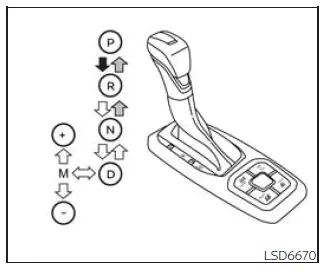
Manual shift mode
Basic Information
Move the shift lever sideways into the manual shift gate to activate manual shift mode. After that, select "+" or "-" to shift up or down through the available ranges. This lets the driver choose shift ranges manually while the Nissan Frontier still protects the transmission from unsuitable gear changes.
In manual shift mode, the selected shift range is shown on the position indicator in the meter. After the shift lever is moved to the manual shift gate, the display may change depending on the selected gear position, vehicle speed, engine load, and driving conditions.
- In manual shift mode, the transmission may not shift into the selected gear immediately if the current vehicle speed is not suitable. The transmission will upshift or downshift only when vehicle speed matches the programmed transmission shift points. This logic helps protect driving performance and reduces the risk of vehicle damage or loss of control.
- In manual shift mode, the transmission will not automatically upshift to a higher gear than the one manually selected by the driver. When vehicle speed decreases, the transmission automatically shifts down and will return to 1st gear before the Nissan Frontier comes to a stop.
Shift ranges can be moved up or down one step at a time as follows:
M1 ↔ M2 ↔ M3 ↔ M4 ↔ M5 ↔ M6 ↔ M7 ↔ M8 ↔ M9 ↔ D
M9 (Ninth)
Use this range for normal forward driving at highway speeds when road conditions are steady and higher gearing is appropriate.
M1 ↔ M2 ↔ M3 ↔ M4 ↔ M5 ↔ M6 ↔ M7 ↔ M8 ↔ M9
M9 will be shown on the position indicator in the meter.
M8 (Eighth)
Use this range for normal forward driving at highway speeds, especially when a slightly lower range than M9 gives better response.
M1 ↔ M2 ↔ M3 ↔ M4 ↔ M5 ↔ M6 ↔ M7 ↔ M8
M8 will be shown on the position indicator in the meter.
M7 (Seventh)
Use this range for forward driving at highway speeds when moderate engine response or added control is preferred.
M1 ↔ M2 ↔ M3 ↔ M4 ↔ M5 ↔ M6 ↔ M7 M7 will be shown on the position indicator in the meter.
M6 (Sixth)
Use this range for forward driving at higher speeds when the Nissan Frontier may benefit from stronger response than the upper ranges provide.
M1 ↔ M2 ↔ M3 ↔ M4 ↔ M5 ↔ M6
M6 will be shown on the position indicator in the meter.
M5 (Fifth)
Use this range when driving up or down long slopes where additional engine braking or more controlled power delivery would be useful.
Shift ranges move up or down one step at a time as follows:
M1 ↔ M2 ↔ M3 ↔ M4 ↔ M5
M5 will be shown on the position indicator in the meter.
M4 (Fourth)
Use this range when climbing hills or when additional engine braking is needed on downhill grades. In the Nissan Frontier, M4 can give the driver more control than the higher ranges when speed must be managed carefully.
Shift ranges can be moved up or down one step at a time as follows:
M1 ↔ M2 ↔ M3 ↔ M4
M4 will be shown on the position indicator in the meter.
M3 (Third)
Use this range for hill climbing, controlled low-speed driving, or engine braking on downhill grades where stronger restraint is needed.
Shift ranges can be moved up or down one step at a time as follows:
M1 ↔ M2 ↔ M3
M3 will be shown on the position indicator in the meter.
M2 (Second)
Use this range when the Nissan Frontier needs stronger pulling control on hills or more noticeable engine braking on downhill grades.
Shift ranges can be moved up or down one step at a time as follows:
M1 ↔ M2
M2 will be shown on the position indicator in the meter.
M1 (First)
Use this range when climbing steep hills slowly, moving carefully through deep snow, sand, or mud, or when maximum engine braking is required on steep downhill grades. This range is intended for slow, controlled movement rather than normal cruising.
M1 will be shown on the position indicator in the meter.
- Avoid driving at high speeds for long periods in any range lower than M4. Doing so can reduce fuel economy and may make the Nissan Frontier feel less smooth during steady driving.
When shifting up
Move the shift lever to the + (up) side. This selects a higher range when vehicle speed and transmission conditions allow it.
When shifting down
Move the shift lever to the − (down) side.
This selects a lower range for stronger response, better control, or increased engine braking.
- The transmission will automatically downshift through the gears as needed. For example, if you select the 3rd range, the transmission can shift down between 3rd and 1st gear depending on vehicle speed and driving demand.
- Moving the shift lever quickly to the same side twice will shift the ranges in succession, allowing faster manual range selection.
When canceling the manual shift mode
Return the shift lever to the D (Drive) position to switch the transmission back to normal automatic driving mode.
Starting
Accelerator downshift - in D (Drive) position -
For passing another vehicle or climbing a hill, press the accelerator pedal fully to the floor. The automatic transmission will shift down to a lower gear according to vehicle speed, engine load, and road conditions, giving the Nissan Frontier stronger acceleration when it is needed.
High fluid temperature protection mode
This transmission includes a high fluid temperature protection mode. If the transmission fluid temperature becomes too high, such as during long climbs in hot weather with heavy loads or while towing a trailer, engine power and, in some conditions, vehicle speed will be reduced automatically. This helps lower the chance of transmission damage. Vehicle speed can still be controlled with the accelerator pedal, but both engine response and vehicle speed may be limited until the transmission cools.
Fail-safe
If the Nissan Frontier is driven under extreme conditions, such as excessive wheel spinning followed by hard braking, the fail-safe system may be activated to protect the transmission.
The Malfunction Indicator Light (MIL) may come on to show that fail-safe mode has been activated.
This can occur even when all electrical circuits are operating correctly.
If this happens, place the ignition switch in the OFF position and wait for 10 seconds.
Then push the switch back to the ON position. The vehicle should return to normal operating condition. If normal operation does not return, have the transmission inspected and repaired if necessary. It is recommended that you visit a NISSAN dealer for this service.
WARNING
When high fluid temperature protection mode or fail-safe operation occurs, vehicle speed may be reduced gradually. The reduced speed may be lower than surrounding traffic, which can increase the risk of a collision. Drive with extra caution. If needed, pull off the road in a safe place and allow the transmission to cool and return to normal operation, or have the Nissan Frontier repaired if normal operation does not resume.
Manual shift mode is useful when the road demands more control than ordinary D (Drive) operation, but it should be used smoothly and only within conditions that match the selected range.





