



Nissan Frontier: Do-it-yourself - Engine oil
Checking engine oil level Nissan Frontier 2026
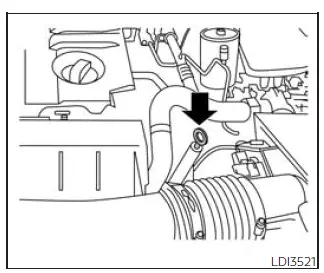
1. Park the Nissan Frontier on a level surface and apply the parking brake securely.
2. Start the engine and allow it to idle until it reaches normal operating temperature.
3. Turn the engine off. Wait more than 10 minutes so the engine oil can drain back into the oil pan for an accurate reading.
4. Remove the dipstick and wipe it completely clean with a lint-free cloth.
Reinsert the dipstick fully into its tube.
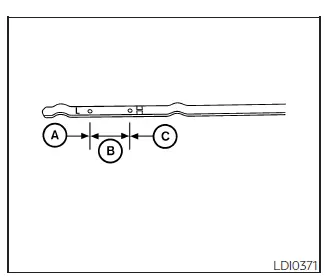
5. Remove the dipstick again and check the oil level. The oil should be between the H (High) and L (Low) marks B. This area represents the normal operating oil level range. If the oil level is below the L (Low) mark A, remove the oil filler cap and add the recommended engine oil through the filler opening. Do not overfill beyond the correct level C.
6. Recheck the engine oil level with the dipstick after adding oil.
It is normal for the Nissan Frontier engine to require a small amount of oil between scheduled maintenance intervals or during the break-in period, depending on driving style, towing, temperature, and other operating conditions.
CAUTION
The engine oil level should be checked regularly.
Operating the engine with an insufficient amount of oil can cause serious engine damage, and this type of damage is not covered by warranty.
Changing engine oil and oil filter Nissan Frontier third generation
Basic information
For proper Nissan Frontier engine oil and oil filter replacement, follow the procedures described in this section carefully. Correct oil service helps protect the engine, maintain lubrication performance, and support long-term reliability.
Vehicle set-up
1. Park the vehicle on a level surface and apply the parking brake firmly.
2. Run the engine until it reaches normal operating temperature.
3. Turn the engine off and wait approximately 15 minutes before beginning the oil change.
4. Raise and support the Nissan Frontier using a suitable floor jack and approved safety jack stands.
- Place the safety jack stands only under the vehicle jack-up points.
- A suitable adapter should be attached to the jack stand saddle to support the vehicle properly.
CAUTION
Make sure the correct lifting and support points are used. Incorrect support can damage the Nissan Frontier body, frame, or underbody components.
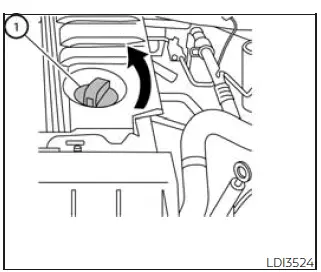
- Oil filler cap
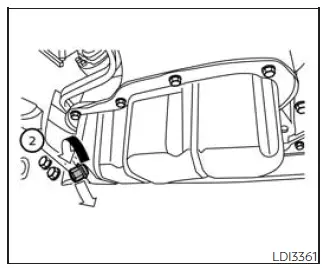
-
Oil drain plug
-
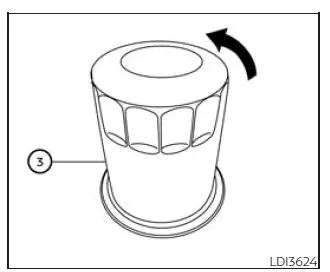
Oil filter
-
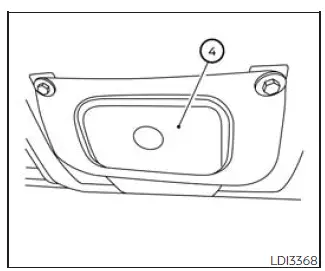
Oil filter access cover (Type A) (if so equipped)
-
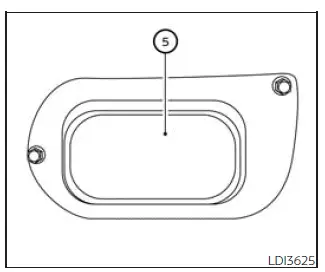
Oil filter access cover (Type B) (if so equipped)
-
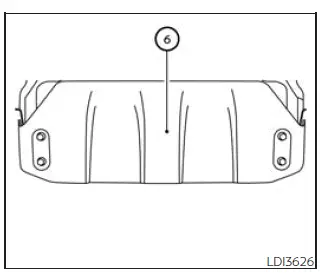
Skid plate (if so equipped)
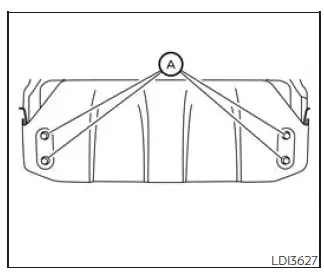
Skid plate (if so equipped)
Removal of under-engine protectors
1. Remove bolts A and remove the skid plate, if equipped, to access the engine oil service area.
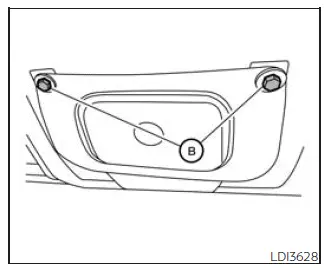
Oil filter access cover (Type A) (if so
equipped)
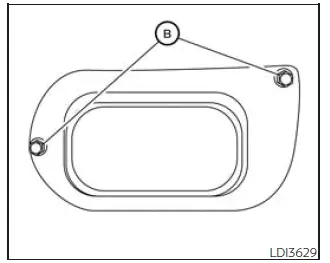
Oil filter access cover (Type B) (if so
equipped)
2. Remove bolts B and remove the oil filter access cover.
Engine oil and filter
1. Place a large drain pan under the oil drain plug and oil filter to catch used oil during the service procedure.
2. Remove the oil filler cap.
3. Remove the drain plug with a wrench by turning it counterclockwise, then allow the engine oil to drain completely.
CAUTION
Use caution to avoid burns, because the engine oil may be hot.
WARNING
- Prolonged and repeated contact with used engine oil may cause skin cancer.
- Avoid direct skin contact with used oil whenever possible. If used oil contacts your skin, wash thoroughly with soap or hand cleaner as soon as possible.
- Keep used engine oil out of the reach of children.
4. Loosen the oil filter using an oil filter wrench by turning it counterclockwise.
Remove the oil filter by turning it by hand after it has been loosened.
5. Wipe the engine oil filter mounting surface with a clean rag.
CAUTION
Make sure all old gasket material is removed from the engine sealing surface. If gasket material remains, an oil leak may occur and engine damage could result.
- The dipstick must remain inserted in place to prevent oil from spilling out of the dipstick tube when the Nissan Frontier engine is being refilled with oil.
6. Apply a light coat of clean engine oil to the gasket on the new oil filter.
It is recommended that you use a Genuine NISSAN oil filter or an equivalent replacement. Visit your NISSAN dealer parts department for the correct filter for your Nissan Frontier.
7. Screw the oil filter clockwise onto the mounting surface until slight resistance is felt, then tighten it an additional amount of more than 2/3 turn.
Oil filter tightening torque: 11 to 15 ft-lb (15 to 21 N·m)
8. Clean and reinstall the drain plug with a new washer. Tighten the drain plug securely with a wrench, but do not use excessive force.
Drain plug tightening torque: 22 to 29 ft-lb (29.4 to 39.2 N·m)
9. Refill the Nissan Frontier engine with the recommended oil through the oil filler opening, then install the oil filler cap securely.
CAUTION
Do not spill fluids on the engine cover. Fluids may damage the engine cover surface. If any fluid is spilled, clean the surface immediately with a neutral detergent. Do not use organic solvents such as brake cleaner.
The drain and refill capacity may vary depending on oil temperature, drain time, and service conditions. Use the listed specifications only as a reference. Always use the dipstick to confirm that the correct amount of oil is in the Nissan Frontier engine.
10. Start the engine and inspect the area around the drain plug and oil filter for leaks.
Correct any leakage as required. Turn the engine off and wait more than 15 minutes. Check the oil level again with the dipstick and add engine oil if necessary.
After the operation
1. Reinstall the under-engine protectors in the reverse order of removal.
2. Lower the Nissan Frontier carefully to the ground.
3. Reset the oil and oil filter maintenance reminder.
- Dispose of used engine oil and the old oil filter properly.
- Check and follow all local regulations for waste oil and filter disposal.
Correct oil level, proper filter installation, and careful leak inspection are essential for maintaining Nissan Frontier engine performance, lubrication quality, and long-term durability after every oil service.





