



Nissan Frontier: Instruments and Controls - Headlight and Turn Signal Switch
Headlight Control Switch Nissan Frontier 2022
Basic Information
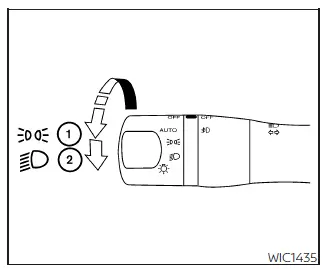
Type A (if so equipped)
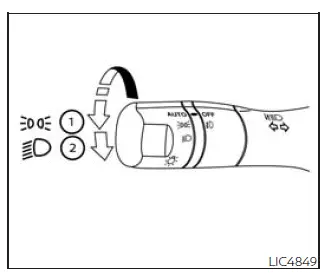
Type B (if so equipped)
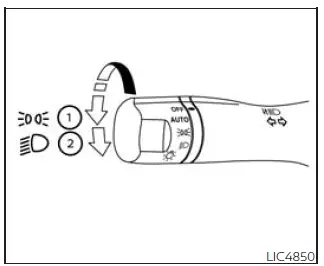
Type C (if so equipped)
The Nissan Frontier headlight control switch provides convenient management of the vehicle's exterior lighting systems. Depending on equipment level, different switch configurations may be available, but all are designed to provide quick access to lighting functions while maintaining safe vehicle operation.
Lighting
- Rotate the switch to the
 position to activate the front parking lights, rear tail lamps, license plate illumination, and instrument
panel lighting. This setting is useful during low-light conditions when full headlight operation is not
required.
position to activate the front parking lights, rear tail lamps, license plate illumination, and instrument
panel lighting. This setting is useful during low-light conditions when full headlight operation is not
required.
- Rotate the switch to the
 position to turn on the Nissan Frontier headlights. All other exterior lighting remains illuminated
simultaneously, providing maximum visibility during nighttime driving or poor weather conditions.
position to turn on the Nissan Frontier headlights. All other exterior lighting remains illuminated
simultaneously, providing maximum visibility during nighttime driving or poor weather conditions.
The Nissan Frontier lighting system is designed to provide excellent road illumination while helping other road users clearly see your vehicle.
Autolight System
The Nissan Frontier autolight system automatically controls exterior lighting based on surrounding environmental conditions.
This intelligent feature increases convenience by eliminating the need to manually switch headlights on and off during changing daylight conditions.
The autolight system can perform the following functions:
- Automatically switch on the headlights, front parking lights, tail lamps, license plate lights, and instrument panel illumination when ambient light levels become low.
- Automatically turn exterior lighting off when sufficient daylight is detected.
- Keep selected Nissan Frontier lights illuminated for a short period after the ignition switch is turned OFF and all doors have been closed.
To activate the autolight system:
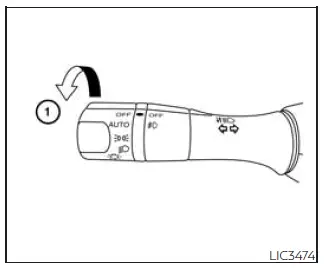
-
For USA models: Turn the Nissan Frontier headlight switch to the AUTO position.
For Canadian models: Turn the switch to the AUTO position or the
 position.
- Place the ignition switch in the ON position.
- The Nissan Frontier autolight system will automatically manage headlight operation based on ambient lighting conditions.
Initially, if the ignition switch is moved to the OFF position and a door remains open, the headlights continue operating for a period of time. If another door is opened during this period, the timer resets automatically.
This delayed shutoff feature helps illuminate the area around the Nissan Frontier when exiting the vehicle at night.
To deactivate the autolight system:
For USA models: Turn the switch to the OFF,
 , or
, or
 position.
For Canadian models: Turn the switch to the
 position.
The Nissan Frontier headlights may also activate automatically at dusk, during periods of reduced visibility, or when the windshield wipers operate continuously during rainy weather (if equipped).
If the ignition switch is moved to the OFF position and a door remains open, the headlights can remain illuminated for approximately five minutes before shutting off automatically.
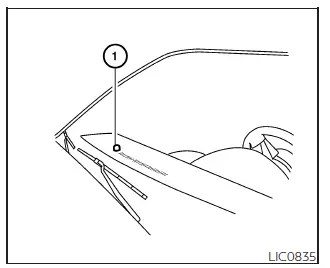
Never place objects on top of the autolight sensor located on the upper surface of the instrument panel. The Nissan Frontier autolight sensor continuously monitors ambient lighting conditions. If the sensor is covered, the system may interpret the condition as darkness and automatically activate the headlights. If the vehicle remains parked with the engine off and the lights stay on, battery discharge may occur.
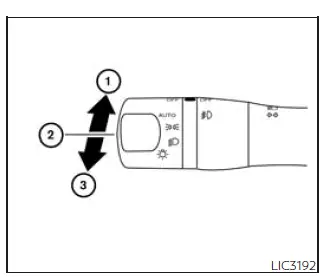
Headlight Beam Select
- To activate the Nissan Frontier high-beam headlights, first switch on the headlights and then push the control lever forward. The high beams illuminate and the corresponding high-beam indicator appears in the instrument cluster.
- Pull the lever rearward to return the Nissan Frontier headlights to normal low-beam operation.
- Pulling and releasing the lever quickly activates the headlight flash function. This allows the driver to momentarily flash the high beams even when the headlights themselves are not switched on.
This signaling function can be useful for alerting other road users or providing temporary additional visibility.
High Beam Assist
Basic Information
The Nissan Frontier High Beam Assist system is designed to improve nighttime visibility while reducing glare for other drivers.
The system generally becomes operational when the vehicle is traveling at approximately 25 mph (40 km/h) or higher.
When the Nissan Frontier high beams are active and the system detects an approaching vehicle or a vehicle traveling ahead, the headlights automatically switch from high beam to low beam to help avoid dazzling other road users.
Once the road ahead is clear again, the system may automatically reactivate the high beams when conditions permit.
WARNING
- The Nissan Frontier High Beam Assist system is intended as a convenience feature only and is not a substitute for attentive driving. Drivers must remain alert at all times and manually operate the headlights whenever necessary.
- The system may not automatically switch between high and low beams under certain conditions. Manual
headlight operation may be required.
- During severe weather conditions such as rain, fog, snow, or strong winds.
- When nearby light sources resemble vehicle headlights or taillights.
- When oncoming or leading vehicle lights are partially obscured, dirty, damaged, or improperly aimed.
- When sudden and continuous changes in surrounding brightness occur.
- When driving over rolling hills, dips, crests, or roads with significant elevation changes.
- When traveling on roads with numerous curves and bends.
- When highly reflective signs, mirrors, or surfaces direct bright light toward the Nissan Frontier.
- When a trailer, cargo container, or other reflective object ahead reflects intense light.
- When the Nissan Frontier headlights are dirty, damaged, or obstructed.
- When the vehicle is tilted due to a flat tire, towing situation, uneven loading, or other abnormal operating condition.
- The timing of automatic switching between low beams and high beams may vary depending on multiple
environmental factors.
- The brightness of approaching or leading vehicle lights.
- The speed, movement, and direction of surrounding traffic.
- Situations where only one light from another vehicle is visible.
- When the approaching vehicle is a motorcycle, scooter, bicycle, or other two-wheeled vehicle.
- Road geometry, surface conditions, slopes, curves, and elevation changes.
- The number of occupants and the amount of cargo carried in the Nissan Frontier.
The Nissan Frontier High Beam Assist system helps improve nighttime driving comfort and visibility, but drivers should always remain prepared to manually control the headlight system whenever road, weather, or traffic conditions require additional attention.
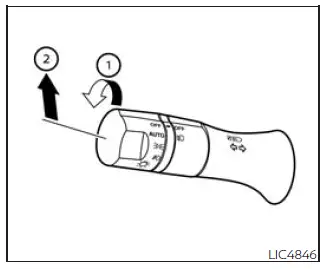
High Beam Assist Operation
The Nissan Frontier High Beam Assist system is designed to automatically manage high-beam and low-beam headlight operation, helping improve nighttime visibility while reducing glare for other road users.
When activated, the system continuously monitors traffic and ambient lighting conditions to determine the most appropriate headlight setting.
To activate the Nissan Frontier High Beam Assist system:
- Turn the headlight switch to the AUTO position 1.
- Push the multifunction lever forward to position 2, which activates the high-beam setting.
- When the system is operating correctly, the Nissan Frontier High Beam Assist indicator light illuminates in the instrument cluster whenever the headlights are turned on.
Once activated, the system automatically switches between high beams and low beams according to traffic conditions, road illumination, and vehicle speed.
If the High Beam Assist indicator light fails to illuminate under the conditions described above, the Nissan Frontier system may not be functioning correctly.
If a malfunction is suspected, the system should be inspected by qualified service personnel. It is recommended that you visit an authorized NISSAN dealer for diagnosis and repair.
When vehicle speed decreases below approximately 16 mph (25 km/h), the Nissan Frontier automatically switches to low-beam operation.
This feature helps ensure appropriate lighting performance during low-speed driving situations, including residential areas, parking facilities, and urban environments.
To deactivate the Nissan Frontier High Beam Assist system, either turn the headlight switch to the
 position or move the control lever back to its neutral position to select standard low-beam operation.
The driver may manually override the system whenever road, weather, or traffic conditions make manual control preferable.
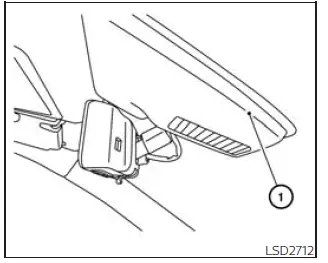
Ambient Image Sensor Maintenance
The Nissan Frontier High Beam Assist system utilizes an ambient image sensor located in front of the interior rearview mirror.
This sensor continuously analyzes surrounding lighting conditions and detects oncoming or preceding vehicles in order to control automatic headlight operation.
Proper maintenance of the ambient image sensor is essential for reliable Nissan Frontier High Beam Assist performance.
To help prevent system malfunctions and maintain optimal operation, observe the following precautions:
- Always keep the Nissan Frontier windshield clean and free from dirt, ice, snow, insects, road film, and other contaminants that could obstruct the sensor's field of view.
- Do not place stickers, decals, transparent films, windshield accessories, electronic devices, or other objects near the ambient image sensor.
- Avoid striking, scratching, or otherwise damaging the area surrounding the sensor assembly.
- Do not touch, clean aggressively, or apply pressure directly to the sensor lens located on the Nissan Frontier ambient image sensor unit.
Even minor contamination or obstruction may reduce the sensor's ability to accurately detect surrounding traffic and lighting conditions.
If the ambient image sensor becomes damaged as the result of an accident, windshield replacement, or any other incident, it is recommended that the Nissan Frontier be inspected by an authorized NISSAN dealer.
Battery Saver System
The Nissan Frontier battery saver system is designed to help prevent excessive battery discharge when electrical components are accidentally left on after the vehicle has been parked.
This automatic protection feature helps preserve battery life and reduces the possibility of returning to a vehicle with a discharged battery.
When the ignition switch is moved to the OFF position and all doors are closed, the battery saver system automatically turns off selected electrical components after a predetermined period of time.
The following Nissan Frontier lighting systems may be automatically deactivated:
- Headlights, when the headlight switch remains in the
 or
or
 position.
- Interior lighting that has been left in the ON position (if equipped).
After the Nissan Frontier battery saver system automatically switches off the headlights while the switch remains
in the
 or
or
 position, the headlights can be reactivated by first moving the switch to OFF and then returning it to the
 or
or
 position.
This reset procedure allows normal headlight operation to resume if additional lighting is required after the automatic shutdown occurs.
The Nissan Frontier battery saver system provides an additional layer of protection for the vehicle's electrical system and helps ensure reliable engine starting performance after extended parking periods.
CAUTION
Although the Nissan Frontier battery saver system automatically switches off the headlights after a period of time, drivers should always manually turn the headlight switch to the OFF position whenever the engine is not running. Relying solely on the battery saver feature may still contribute to unnecessary battery discharge under certain conditions and could reduce battery service life.
Regularly verifying that all unnecessary electrical accessories are switched off before leaving the Nissan Frontier can help maximize battery longevity and maintain dependable vehicle operation.
LED Daytime Running Lights (DRL) System Nissan Frontier
The Nissan Frontier LED Daytime Running Lights (DRL) system is designed to improve vehicle visibility during daytime driving conditions. These high-efficiency LED lights help make the Nissan Frontier more noticeable to other road users, enhancing overall driving safety.
The LED DRL automatically illuminate at full intensity whenever the engine is started and the parking brake is released.
The Nissan Frontier LED Daytime Running Lights operate when the headlight switch is in the OFF position, the
 position, or the AUTO position when ambient lighting conditions are sufficiently bright.
When the headlight switch is rotated to the
 position for full headlight operation, the LED lighting automatically changes from daytime running light mode to
parking light functionality.
position for full headlight operation, the LED lighting automatically changes from daytime running light mode to
parking light functionality.
If the parking brake is engaged before the Nissan Frontier engine is started, the LED DRL system remains inactive.
Once the parking brake is released, the LED Daytime Running Lights automatically illuminate and remain active until the ignition switch is placed in the OFF position.
This automatic operation allows Nissan Frontier drivers to benefit from increased daytime visibility without requiring manual activation.
It is important to remember that during dusk, dawn, or nighttime conditions, the headlight switch should be turned on manually because interior controls, switch illumination, and other lighting features remain off while the switch is left in the OFF position.
WARNING
When the Nissan Frontier LED Daytime Running Light system is operating, the rear tail lamps are not illuminated. As daylight fades, it is necessary to switch on the headlights manually. Failure to activate the headlights during low-light conditions may reduce vehicle visibility and increase the risk of an accident involving yourself or other road users.
Instrument Brightness Control
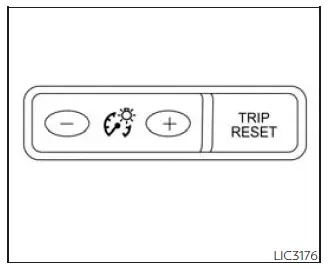
The Nissan Frontier instrument brightness control allows drivers to adjust the illumination level of the instrument cluster and dashboard lighting for improved visibility and comfort.
Press the "+" button to increase the brightness of the instrument panel lights.
Press the "-" button to reduce the brightness level of the instrument panel lights.
Proper brightness adjustment can improve nighttime driving comfort and reduce eye fatigue during extended journeys.
Turn Signal Switch
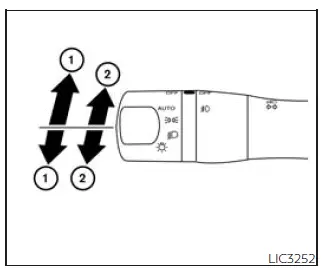
Turn Signal:
- Move the Nissan Frontier turn signal lever upward or downward to indicate the intended direction of a turn. Once the steering wheel returns to its normal position after completing the turn, the turn signal automatically cancels.
The turn signal system helps communicate driving intentions to surrounding traffic and contributes to safer road operation.
Lane Change Signal:
- Move the lever upward or downward until the signal lamps begin flashing without allowing the lever to lock into position. Hold the lever during the lane change maneuver and release it once the lane change is complete.
This feature provides convenient signaling during highway driving and lane transitions without fully engaging the turn signal mechanism.
Fog Light Switch
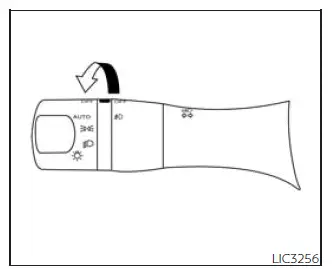
Fog lights provide additional illumination during adverse weather conditions such as fog, rain, snow, or mist.
To activate the Nissan Frontier fog lights, first rotate the headlight switch to the
 position. Then rotate the fog light switch to the
 position.
For Nissan Frontier models equipped with the AUTO headlight feature, the headlights must already be illuminated
before the fog lights can be activated. Once the headlights are on, rotate the fog light switch to the
 position.
To switch off the fog lights, rotate the fog light control back to the OFF position.
The Nissan Frontier fog lights operate only when the low-beam headlights are selected.
For safety reasons, the fog lights automatically turn off whenever the high-beam headlights are activated.
Proper use of fog lights can improve visibility in poor weather while minimizing glare for other drivers.





