



Nissan Frontier: Monitor, climate, audio, phone and voice recognition systems - Heater and air conditioner (automatic)
Basic Information Nissan Frontier third generation
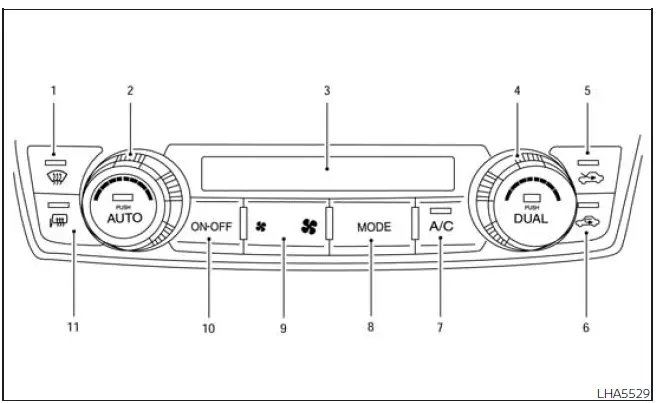
-
 Front defroster button
- Temperature control dial (driver's side) / AUTO button
- Display screen
- Temperature control dial (passenger's side) / DUAL button
-
 Fresh air intake button
-
 Air recirculation button
- A/C (air conditioner) button
- MODE (manual air flow control) button
-
 Fan speed control buttons
- ON-OFF button
-
 Outside mirror defroster
switch
(if so equipped)
Outside mirror defroster
switch
(if so equipped)
WARNING
- The Nissan Frontier air-conditioning cooling function operates only while the engine is running. Cooling performance will not be available when the engine is completely shut down.
- Never leave children, elderly passengers, individuals requiring assistance, or pets unattended inside a
Nissan Frontier.
On warm or sunny days, temperatures inside a closed vehicle can rise extremely quickly.
This may result in heat-related injuries, severe medical emergencies, or even fatal consequences. In addition, occupants may accidentally operate vehicle controls and create dangerous situations for themselves or others.
- Avoid using air recirculation mode continuously for extended periods, as this may cause cabin air to become stale and increase the likelihood of window fogging inside the Nissan Frontier.
The Nissan Frontier automatic climate control system is engineered to maintain a comfortable cabin temperature with minimal driver input. By automatically regulating blower speed, airflow distribution, air conditioning operation, and temperature settings, the system helps create a consistently comfortable environment in a wide range of weather conditions.
The dual-zone design allows the driver and front passenger to select individual temperature preferences, enhancing comfort during long trips and daily driving.
NOTE:
Odors originating from either inside or outside the Nissan Frontier may accumulate within the HVAC system and eventually enter the passenger compartment through the air vents.
For best results, periodically allow fresh outside air to circulate through the cabin to help reduce odor buildup and improve interior air quality.
While the engine is temporarily stopped by the Nissan Frontier Idling Stop System, activating the front windshield defroster will automatically restart the engine to ensure adequate climate-control performance.
Likewise, when the engine is running, activating either the front windshield defroster or the outside mirror defroster may prevent the Idling Stop System from shutting the engine off automatically.
This strategy helps ensure that the Nissan Frontier continues to provide sufficient airflow, heating performance, and window-clearing capability whenever visibility is a priority.
When the interior temperature exceeds approximately 86°F (30°C), automatic engine stop through the Idling Stop System may be temporarily disabled to maintain proper air-conditioning performance and passenger comfort. If the air-conditioning system is switched off, the Idling Stop System can continue operating normally.
When the Nissan Frontier engine has been stopped by the Idling Stop System, heating and cooling effectiveness may be reduced because the climate-control system has less available energy.
To restore full heater and air-conditioner performance immediately, restart the engine by pressing the Idling Stop OFF switch.
Under certain operating conditions, the blower motor may automatically reduce fan speed to prevent excessive hot or cold air from entering the cabin too quickly.
Once normal engine operation resumes, the Nissan Frontier climate-control system will automatically restore the previous blower setting and continue maintaining the selected cabin temperature.
This intelligent climate-management strategy helps balance passenger comfort, fuel efficiency, and HVAC performance while maximizing the effectiveness of the Nissan Frontier automatic air-conditioning system.
Automatic operation Nissan Frontier 3rd Gen
Cooling or heating (auto)
The Nissan Frontier automatic climate-control mode can be used comfortably throughout the year. In this setting, the system automatically works to maintain the selected cabin temperature while also controlling airflow distribution, blower speed, and air-conditioning operation as needed.
1. Press the AUTO button.
2. Turn the temperature dial to the left or right to select the desired interior temperature.
Driver and front passenger temperatures can be adjusted independently. To use separate temperature settings, press the DUAL button to activate dual-zone climate control. Then turn the passenger-side temperature control dial left or right to set the desired passenger-side temperature.
- For normal Nissan Frontier automatic climate operation, set the temperature dial to approximately 75ºF (24ºC).
- The passenger compartment temperature will be maintained automatically.
Airflow distribution, blower fan speed, and A/C operation are also managed automatically by the system.
The A/C button indicator will remain in the most recent user-selected setting. Under this condition, the indicator light on the A/C button may not illuminate if the driver previously selected A/C OFF. If the A/C button is pressed while operating in AUTO mode, the indicator may turn off, but the Nissan Frontier A/C compressor can still remain automatically enabled when required for temperature and humidity control.
- During hot and humid weather, a light mist may be visible from the vents as the air is cooled quickly. This is normal operation and does not indicate a malfunction of the Nissan Frontier climate-control system.
Heating
Use this mode when cabin heating is needed without manually managing every climate-control setting.
1. Press the AUTO button.
2. Turn the temperature control dial left or right to select the desired heating level.
Driver and passenger temperatures can be set independently for improved comfort inside the Nissan Frontier cabin.
Press the DUAL button to activate dual climate control functions. Then turn the passenger-side temperature control dial to the left or right to choose the preferred passenger-side temperature.
- The passenger compartment temperature will be maintained automatically.
Airflow distribution and blower fan speed are also automatically controlled by the Nissan Frontier system.
- Do not set the selected temperature lower than the outside air temperature. If this is done, the system may not provide the expected heating performance.
- This mode is not recommended when the windows begin to fog. In that situation, use a defogging or defrosting mode for clearer visibility.
Dehumidified defrosting or defogging
1. Press the
 defroster control button to activate
the system. The indicator light in the button will illuminate.
defroster control button to activate
the system. The indicator light in the button will illuminate.
2. The blower fan will automatically switch to speed 5. If stronger windshield clearing is required, the blower
speed can be changed manually by pressing the fan speed control button. Increase the
 fan to 6 or 7 for more aggressive
defogging performance.
fan to 6 or 7 for more aggressive
defogging performance.
This mode helps remove moisture from the air while directing airflow toward the windshield, making it especially useful in cold, rainy, or humid driving conditions. For best visibility in the Nissan Frontier, keep the windshield area clear and allow the system a short time to stabilize airflow and temperature.
3. Turn the Nissan Frontier temperature dial to the left or right until the desired cabin temperature is selected.
- To remove ice from the outside of the windows more quickly, press the
 fan speed control button to the
maximum setting.
fan speed control button to the
maximum setting.
- As soon as the windshield is clear and safe visibility has been restored, press the AUTO button to return the Nissan Frontier climate system to automatic operation.
- When the
 control is activated, the air conditioner turns
on automatically. This removes moisture from the air and helps clear fog from the windshield more
effectively. Under this condition, the A/C button indicator may not illuminate if the driver selected A/C
OFF before entering this mode. The air conditioner cannot be manually turned off with the A/C button while
this defrosting mode is active. If the A/C indicator was on before selecting this mode and the A/C button is
pressed, the indicator may turn off, but the Nissan Frontier A/C compressor will continue operating
automatically.
control is activated, the air conditioner turns
on automatically. This removes moisture from the air and helps clear fog from the windshield more
effectively. Under this condition, the A/C button indicator may not illuminate if the driver selected A/C
OFF before entering this mode. The air conditioner cannot be manually turned off with the A/C button while
this defrosting mode is active. If the A/C indicator was on before selecting this mode and the A/C button is
pressed, the indicator may turn off, but the Nissan Frontier A/C compressor will continue operating
automatically.
The air recirculation mode automatically switches off, allowing fresh outside air to enter the passenger compartment. This improves defogging performance and helps clear the windshield faster during cold, rainy, or humid driving conditions.
Remote Engine Start with Intelligent Climate Control (if so equipped)
Nissan Frontier models equipped with automatic climate control and Remote Engine Start may automatically enter a heating or cooling mode when Remote Engine Start is activated. The selected mode depends on the outside temperature and the temperature inside the cabin.
During Remote Engine Start operation, the climate-control display and control buttons may remain unavailable until the ignition switch is placed in the ON position.
When Remote Engine Start operates in defrosting mode, the outside mirror defroster (if so equipped) and heated steering wheel (if so equipped) may activate automatically to help improve visibility and comfort before the driver enters the Nissan Frontier.
This intelligent climate feature helps prepare the cabin in advance, making the vehicle more comfortable during very cold mornings, hot afternoons, or changing weather conditions.
Voice Recognition logic (if so equipped)
When the Nissan Frontier climate-control system is operating, the front fan speed and rear fan speed (if so equipped) may be automatically reduced to help the voice recognition system detect spoken commands more clearly.
If additional airflow is desired, the fan speed can still be adjusted manually using the fan speed
 decrease and
 increase
buttons.
increase
buttons.
This automatic adjustment helps balance cabin comfort with reliable voice-command performance, allowing Nissan Frontier occupants to use supported voice features with fewer interruptions from blower noise.
Manual operation Nissan Frontier D41
Fan speed control
Use the
 fan speed control buttons to manually
adjust blower speed according to personal comfort preferences.
fan speed control buttons to manually
adjust blower speed according to personal comfort preferences.
Press the AUTO button at any time to return the Nissan Frontier climate-control system to fully automatic blower operation.
When blower speed is adjusted manually while the system is operating in AUTO mode, the Nissan Frontier will continue to automatically manage airflow direction (vent, bi-level, floor, or floor/defrost modes). To manually lock the airflow to a specific outlet location, select the desired mode using the MODE button.
Temperature control dial
The Nissan Frontier temperature control dial allows precise adjustment of outlet air temperature. Turn the dial to the left for cooler air or to the right for warmer air.
Driver and passenger temperature settings can be adjusted independently, providing enhanced comfort for both front-seat occupants.
Air recirculation
Press the
 air recirculation button to circulate interior cabin
air when:
air recirculation button to circulate interior cabin
air when:
- driving on dusty roads or construction areas.
- helping prevent outside traffic fumes and odors from entering the passenger compartment.
- obtaining maximum cooling efficiency while using the Nissan Frontier air-conditioning system.
Press the AUTO button to return the intake system to automatic operation.
The air recirculation button cannot be activated when the air conditioner is operating in
 mode.
mode.
When outside temperatures rise above approximately 70°F (21°C), the Nissan Frontier climate-control system may automatically select air recirculation mode to improve cooling efficiency and reduce overall energy consumption.
To leave recirculation mode, press the fresh-air intake button and switch the system back to fresh-air operation.
In Floor/Defrost mode, recirculation may be selected to help block unpleasant outside odors. However, for the most effective windshield clearing and defogging performance, Nissan Frontier drivers should leave recirculation turned off whenever practical.
Fresh air intake
Press the
 fresh air intake button to draw outside air into the
Nissan Frontier passenger compartment.
fresh air intake button to draw outside air into the
Nissan Frontier passenger compartment.
Automatic intake air control
When the Nissan Frontier climate-control system is operating in AUTO mode, intake-air selection is managed automatically.
When outside temperatures exceed approximately 70°F (21°C), the system may automatically switch to air recirculation mode to improve efficiency and reduce climate-control workload.
To exit recirculation mode manually, press the fresh-air intake button. The recirculation indicator will switch off and the fresh-air indicator will illuminate.
To manually control intake airflow, press the
 fresh air intake button.
To return to automatic intake-air control when the
 fresh
air indicator is illuminated, press and hold the
fresh
air indicator is illuminated, press and hold the
 fresh air intake button for approximately 2 seconds.
The fresh-air and recirculation indicators will flash twice, confirming that the Nissan Frontier intake system has returned to automatic operation.
To restore automatic intake control when the
 air
recirculation icon is illuminated, press and hold either the
air
recirculation icon is illuminated, press and hold either the
 air recirculation button or the AUTO button for approximately 2 seconds.
The
 air
recirculation indicator and
air
recirculation indicator and
 fresh air intake
indicator will flash twice, indicating that automatic intake-air management has resumed.
fresh air intake
indicator will flash twice, indicating that automatic intake-air management has resumed.
When OFF mode is selected, the intake door automatically switches to recirculation mode. To allow fresh outside
air into the Nissan Frontier while OFF mode is active, press the
 fresh air intake button.
The MODE setting can still be changed while OFF mode is selected to direct incoming airflow whenever intake is
set to
 fresh-air operation.
A/C (air conditioner) button
Start the engine, adjust the
 fan
speed control buttons to the desired setting, and press the
fan
speed control buttons to the desired setting, and press the
 button to activate the air conditioner.
To switch the air-conditioning system off, press the
 button again.
In Nissan Frontier AUTO mode, the air conditioner may remain operational even when the
 button indicator appears off, particularly when temperatures are
near or above freezing and humidity control is required.
button indicator appears off, particularly when temperatures are
near or above freezing and humidity control is required.
The Nissan Frontier air-conditioning cooling function operates only while the engine is running.
Air flow control
Press the MODE button to manually control airflow direction and choose the desired air outlet location.
 - Air flows through the center and side dashboard vents.
 - Air flows through the center and side vents as
well as the floor outlets.
- Air flows through the center and side vents as
well as the floor outlets.
 - Air flows primarily through the floor outlets.
 - Air flows through both the defroster
outlets and floor outlets.
- Air flows through both the defroster
outlets and floor outlets.
To turn system off
Press the ON-OFF button to completely switch off the Nissan Frontier climate-control system.
Operating tips
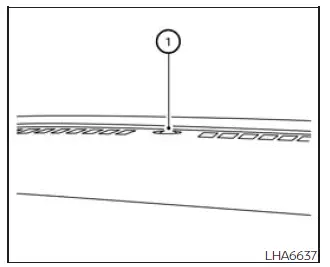
The sunload sensor (if so equipped) 1, located at the top center of the Nissan Frontier instrument panel, helps the climate-control system maintain a consistent cabin temperature. Avoid placing objects on or near this sensor, as doing so may affect system performance.
- When the Nissan Frontier climate system is operating automatically and both engine coolant temperature and
outside temperature are low, airflow may temporarily default to defroster mode for approximately 2 minutes
and 30 seconds. This is normal operation and does not indicate a malfunction.
After the engine warms sufficiently, airflow automatically returns to floor mode and normal climate-control operation continues.
- When outside and cabin temperatures are moderate to high, the intake setting may automatically disable
recirculation and allow fresh air into the passenger compartment. During this process, airflow may briefly
be directed through floor, bi-level, or side-demist vents for up to 15 seconds. This condition may occur
when the previous climate setting was OFF and is considered normal Nissan Frontier operation.
After warm air has been purged from the HVAC system, intake control returns to automatic mode and previous airflow settings are restored. To cancel this operation immediately, press any climate-control button.
- Keep all Nissan Frontier windows closed while the air conditioner is operating to maximize cooling efficiency.
- If the airflow mode selected does not seem to match the vent outlets currently delivering air, select the
 mode manually.
- When changing airflow modes, brief airflow from the floor outlets may occur momentarily. This is normal system operation.
- When the ignition is switched to the ON position, air may automatically flow through the floor outlets for approximately 3 to 7 seconds under certain fogging or high-cabin-temperature conditions. This helps purge hot air from the Nissan Frontier HVAC system and does not indicate a malfunction.





