Nissan Frontier: Monitor, climate, audio, phone and voice recognition systems - Heater and air conditioner (manual)
Basic Information Nissan Frontier D41
WARNING
- The Nissan Frontier air-conditioning cooling function operates only while the engine is running.
- Never leave children or adults who require supervision unattended inside your Nissan Frontier.
Pets should never be left alone inside the vehicle.
Accidental operation of vehicle controls may result in injury. In addition, temperatures inside a parked vehicle can rise rapidly on warm or sunny days, creating potentially life-threatening conditions for both people and animals.
- Avoid using air recirculation mode continuously for extended periods. Prolonged use may cause cabin air to become stale and increase the likelihood of window fogging.
The Nissan Frontier heating and air-conditioning system is designed to provide comfortable cabin temperatures while helping maintain clear visibility in various weather conditions.
For best performance, periodically allow fresh outside air to enter the passenger compartment.
NOTE:
- Odors from both inside and outside the Nissan Frontier may accumulate within the HVAC system and enter the passenger compartment through the air vents.
- When parking the vehicle, it is recommended to switch off air recirculation mode and allow fresh outside air to circulate through the cabin. This practice may help reduce odor buildup inside the Nissan Frontier.
Controls Nissan Frontier SUV
Basic Information
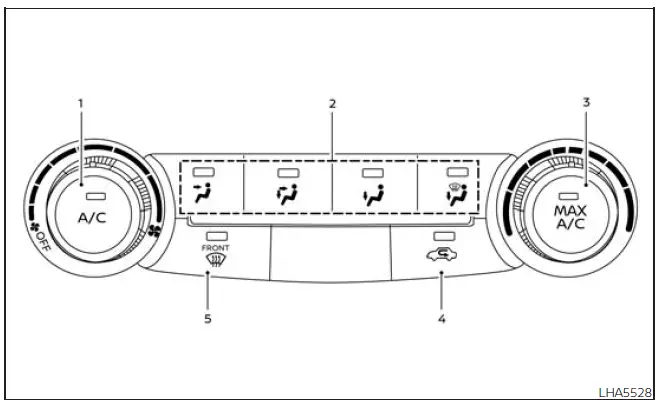
-
 Fan speed control dial /
system OFF dial / A/C (air conditioning) button
Fan speed control dial /
system OFF dial / A/C (air conditioning) button
- Air flow control buttons
- Temperature control dial / MAX A/C button
-
 Air recirculation button
-
 Front windshield defrost button
The Nissan Frontier manual climate-control system is designed to provide efficient heating, cooling, ventilation, and windshield defogging for a comfortable driving environment in a wide variety of weather conditions.
Fan speed control dial
The
 fan speed control dial activates or deactivates the blower fan and allows precise adjustment of airflow volume
throughout the Nissan Frontier cabin.
fan speed control dial activates or deactivates the blower fan and allows precise adjustment of airflow volume
throughout the Nissan Frontier cabin.
Rotating the dial increases or decreases airflow intensity according to driver preference and environmental conditions.
Fan speed control dial - OFF mode
Turning the
 fan speed control dial to the OFF position shuts off the
blower motor. When this occurs, the air recirculation indicator light automatically illuminates.
fan speed control dial to the OFF position shuts off the
blower motor. When this occurs, the air recirculation indicator light automatically illuminates.
To introduce fresh outside air while operating in fan OFF mode, press the
 air recirculation button to switch off the
indicator.
air recirculation button to switch off the
indicator.
Even with the blower fan turned off, the Nissan Frontier allows selection of different airflow modes to change vent distribution whenever recirculation mode is disabled.
Air flow control buttons
The Nissan Frontier airflow control buttons allow drivers to direct conditioned air to specific areas of the cabin for enhanced comfort and visibility.
Available airflow modes:
MAX A/C - Delivers maximum cooling performance through the center and side vents for rapid cabin temperature reduction.
 - Air is directed through the center and side
dashboard vents.
- Air is directed through the center and side
dashboard vents.
 - Air is distributed through the center
vents, side vents, and floor outlets.
- Air is distributed through the center
vents, side vents, and floor outlets.
 - Air is directed primarily toward the footwell outlets and side vents.
 - Air flows through both the floor outlets
and windshield defroster outlets.
- Air flows through both the floor outlets
and windshield defroster outlets.
 - Air is directed primarily through the windshield
defroster outlets for maximum glass clearing performance.
- Air is directed primarily through the windshield
defroster outlets for maximum glass clearing performance.
Temperature control dial
The Nissan Frontier temperature control dial allows adjustment of outlet air temperature.
To decrease cabin temperature, rotate the dial toward the left. To increase cabin warmth, rotate the dial toward the right.
This control provides smooth adjustment for maintaining a comfortable interior environment throughout the year.
Air recirculation button
ON position (Indicator light on)
When activated, the Nissan Frontier recirculates interior cabin air rather than drawing air from outside.
Press the
 button to activate recirculation mode when:
- driving on dusty, unpaved, or dirty roads.
- helping prevent traffic fumes and external odors from entering the passenger compartment.
- achieving maximum cooling efficiency while operating the Nissan Frontier air-conditioning system.
When outside temperatures exceed approximately 70°F (21°C), the Nissan Frontier climate-control system may automatically switch to air recirculation mode to improve cooling efficiency and reduce overall energy consumption.
To return to fresh-air mode, select the fresh-air intake function and deactivate recirculation.
OFF position (Indicator light off)
If fresh outside air is preferred, press the recirculation button until the indicator light turns off.
Fresh-air mode helps maintain cabin air quality and may reduce window fogging under certain driving conditions.
If windshield fogging occurs, press the
 front windshield defrost button.
A/C (air conditioner) button
Start the Nissan Frontier engine, rotate the
 fan speed control dial to the desired
setting, and press the
fan speed control dial to the desired
setting, and press the
 button to activate air conditioning.
To switch the air-conditioning system off, press the
 button again.
The Nissan Frontier air-conditioning cooling function operates only while the engine is running.
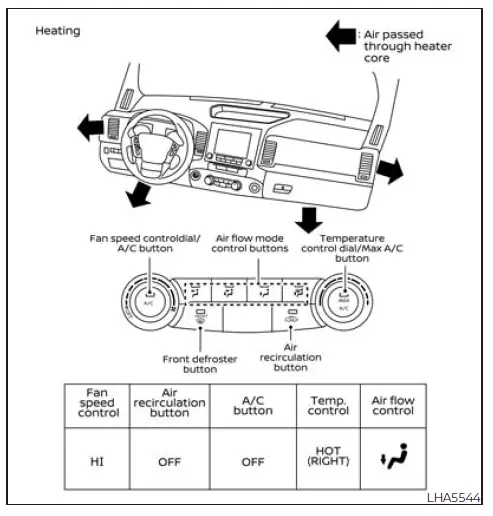
Heater operation
Heating
This Nissan Frontier operating mode directs heated air primarily to the floor outlets while also sending a portion of airflow toward the windshield defroster outlets.
1. Press the
 button to the OFF position for standard heating operation. The indicator light on the
 button will switch off.
2. Press the
 air flow control button.
3. Rotate the
 fan speed control dial to the desired airflow level.
4. Adjust the temperature control dial to the preferred setting between the center position and the full warm position.
Ventilation
This Nissan Frontier mode supplies fresh outside air through the center and side dashboard vents.
1. Press the
 button to the OFF position.
The indicator light on the
 button will turn off.
2. Press the
 air flow control button.
3. Rotate the
 fan speed control dial to the desired airflow setting.
This ventilation mode helps maintain a continuous flow of fresh air into the Nissan Frontier cabin and can improve occupant comfort during mild weather conditions.
4. Turn the Nissan Frontier temperature control dial to the desired setting to achieve the preferred cabin temperature.
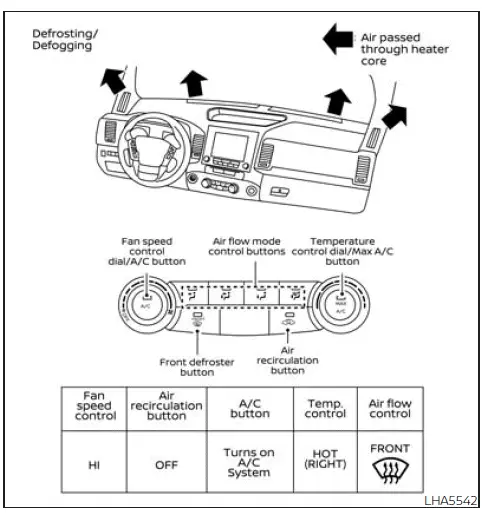
Defrosting or defogging
This Nissan Frontier climate-control mode directs airflow primarily to the windshield defroster outlets to help remove condensation, frost, or ice from the windows and improve visibility.
1. Press the
 defrost/defog button.
2. Rotate the
 fan speed control dial to the desired airflow setting.
3. Adjust the temperature control dial to the preferred position between the center setting and the full HOT position.
- For rapid removal of ice, frost, or window fogging, turn the
 fan speed control dial to its highest setting and move
the temperature control to the maximum HOT position.
fan speed control dial to its highest setting and move
the temperature control to the maximum HOT position.
- When the
 position is selected, the Nissan Frontier
air-conditioning system automatically activates. This helps dehumidify incoming air, significantly improving
windshield defogging performance. The
position is selected, the Nissan Frontier
air-conditioning system automatically activates. This helps dehumidify incoming air, significantly improving
windshield defogging performance. The
 mode is automatically enabled, allowing outside air to enter the cabin and further improve glass-clearing
efficiency.
mode is automatically enabled, allowing outside air to enter the cabin and further improve glass-clearing
efficiency.
Under these conditions, the A/C indicator light may remain off if the driver previously selected A/C OFF. In this operating mode, manually disabling the air conditioner is not permitted. If the A/C indicator was illuminated before entering this mode and the A/C button is pressed, the indicator may switch off, but the Nissan Frontier A/C compressor will continue operating automatically to maintain optimal defogging performance.
The recirculation indicator will not illuminate if the recirculation button is pressed while this mode is active.
- Windshield clearing performance can be further improved by increasing the blower fan speed.
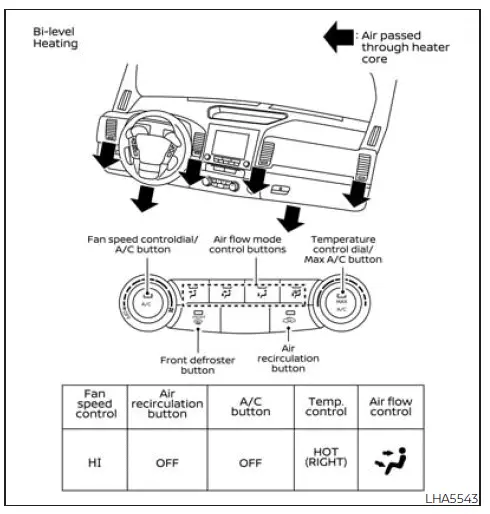
Bi-level heating
The Nissan Frontier bi-level mode distributes warm air through the center and side dashboard vents while simultaneously directing heated airflow to both the front and rear floor outlets.
1. Press the
 button to the OFF position.
The indicator light on the
 button will switch off.
2. Press the
 air flow control button.
3. Rotate the
 fan speed control dial to the desired airflow level.
4. Adjust the Nissan Frontier temperature control dial to the preferred temperature setting.
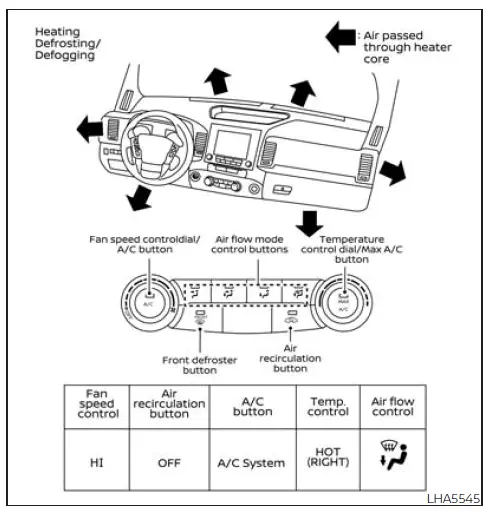
Heating and defogging
This operating mode simultaneously heats the Nissan Frontier cabin while helping maintain a clear windshield.
1. Press the
 air flow control button.
2. Rotate the
 fan speed control dial to the desired airflow setting.
3. Turn the temperature control dial to the preferred position between the center setting and the full HOT position.
- When the
 position is selected, the Nissan Frontier
air-conditioning system automatically engages.
position is selected, the Nissan Frontier
air-conditioning system automatically engages.
Under these operating conditions, the A/C indicator light may remain off if A/C OFF was previously selected. However, the air-conditioning compressor will continue operating automatically to provide maximum windshield-clearing performance. If the A/C indicator was illuminated before entering this mode and the A/C button is pressed, compressor operation will continue automatically.
For the most effective windshield defogging, it is recommended that
 recirculation mode remain turned off whenever
possible.
recirculation mode remain turned off whenever
possible.
The recirculation feature may still be selected to help block unpleasant outside odors; however, fresh-air mode generally provides superior defogging performance in the Nissan Frontier.
- Defrosting and defogging effectiveness can be enhanced by increasing the blower fan speed.
Operating tips
Always remove accumulated snow, ice, leaves, and debris from the windshield wiper blades and the exterior air intake area located at the base of the windshield.
Keeping these areas clear helps maximize Nissan Frontier heater efficiency, improves airflow, and enhances overall defrosting performance during cold-weather operation.
Air conditioner operation
Basic Information
Start the Nissan Frontier engine, rotate the
 fan speed control dial to the desired
setting, and press the
fan speed control dial to the desired
setting, and press the
 button to activate the air-conditioning system.
When activated, the Nissan Frontier air-conditioning system adds both cooling and dehumidifying functions to normal climate-control operation, improving passenger comfort and helping reduce window fogging.
The Nissan Frontier air-conditioner cooling function operates only while the engine is running.
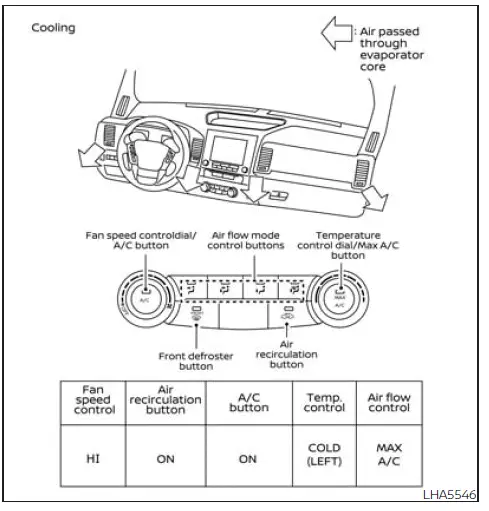
Cooling
This Nissan Frontier operating mode is designed to cool and dehumidify interior air for maximum occupant comfort during warm-weather driving.
1. Press the
 button to the OFF position.
2. Press the
 air flow control button.
3. Rotate the
 fan speed control dial to the desired airflow level.
4. Press the
 button.
For maximum cooling performance in the Nissan Frontier, use air recirculation mode and adjust the blower speed according to cabin temperature and passenger comfort requirements.
5. Rotate the Nissan Frontier temperature control dial to the desired setting between the center position and the full COLD position to achieve the preferred cabin temperature.
- For rapid cooling during hot weather conditions, press the
 button to the ON position. Once the cabin reaches a
comfortable temperature, return the
button to the ON position. Once the cabin reaches a
comfortable temperature, return the
 to the OFF position for normal cooling operation. The indicator light on the
 button will switch off. For even faster cabin
cooling, Nissan Frontier drivers may also select the MAX A/C function.
button will switch off. For even faster cabin
cooling, Nissan Frontier drivers may also select the MAX A/C function.
Dehumidified heating
This Nissan Frontier operating mode is designed to provide warm cabin air while simultaneously reducing humidity levels inside the passenger compartment.
1. Press the
 button to the OFF position.
The indicator light on the
 button will turn off.
2. Press the
 air flow control button.
3. Rotate the
 fan speed control dial to the desired airflow level.
4. Press the
 button.
5. Turn the Nissan Frontier temperature control dial to the desired comfort setting.
This operating mode helps maintain a comfortable interior environment while reducing moisture that could otherwise contribute to window fogging.
Dehumidified defogging
This Nissan Frontier mode is specifically designed to clear fogged windows while simultaneously removing excess moisture from the cabin air.
1. Press the
 front defroster button.
2. Rotate the
 fan speed control dial to the desired airflow setting.
When the
 or
or
 positions are selected, the Nissan Frontier
air-conditioning system automatically activates.
positions are selected, the Nissan Frontier
air-conditioning system automatically activates.
The air-conditioning compressor will continue operating until the
 fan speed control dial is moved to the OFF position, the
air-conditioning system is switched off, or the vehicle itself is turned off.
fan speed control dial is moved to the OFF position, the
air-conditioning system is switched off, or the vehicle itself is turned off.
If a mode other than the
 front defrost airflow setting is selected, the A/C
compressor may continue operating even if the driver had previously chosen A/C OFF before entering defrost mode.
front defrost airflow setting is selected, the A/C
compressor may continue operating even if the driver had previously chosen A/C OFF before entering defrost mode.
When operating in
 front defrost or
 foot-defrost mode, the A/C indicator light may
remain off even though the Nissan Frontier air-conditioning compressor continues operating automatically.
foot-defrost mode, the A/C indicator light may
remain off even though the Nissan Frontier air-conditioning compressor continues operating automatically.
Manual deactivation of the air-conditioning system is not available while this mode is active. If the A/C indicator was illuminated before entering this mode and the A/C button is pressed, the indicator may turn off; however, the compressor will remain automatically engaged to maximize windshield-clearing performance.
This process removes moisture from the cabin air and significantly improves windshield defogging efficiency. The
 mode automatically switches off, allowing fresh outside air to enter the Nissan Frontier cabin for enhanced
window-clearing performance.
mode automatically switches off, allowing fresh outside air to enter the Nissan Frontier cabin for enhanced
window-clearing performance.
3. Adjust the Nissan Frontier temperature control dial to the desired setting.
Operating tips
- Keep all Nissan Frontier windows closed while the air-conditioning system is operating to maximize cooling efficiency.
- After parking in direct sunlight, drive for approximately two to three minutes with the windows open to
release accumulated heat from the passenger compartment.
Afterward, close the windows. This allows the Nissan Frontier air-conditioning system to cool the cabin more rapidly and efficiently.
- The Nissan Frontier air-conditioning system should be operated for approximately ten minutes at least once each month. Regular operation helps maintain internal lubrication and can prevent premature component wear.
- A light mist may occasionally be visible coming from the air vents during hot and humid weather conditions as the air is cooled rapidly. This is normal and does not indicate a malfunction.
- If the Nissan Frontier engine coolant temperature gauge indicates temperatures above the normal operating range, switch off the air-conditioning system to reduce engine load.
Air flow charts
The following Nissan Frontier airflow charts illustrate recommended button selections and dial positions for achieving maximum and rapid heating, cooling, defrosting, and defogging performance.
The air recirculation (
 ) button should always remain in the OFF position when
heating or defrosting the Nissan Frontier interior and windshield.
) button should always remain in the OFF position when
heating or defrosting the Nissan Frontier interior and windshield.
This allows fresh outside air to enter the cabin and provides the most effective window-clearing performance.