



Nissan Frontier: Instruments and Controls - HomeLink Universal Transceiver
Basic Information
The HomeLink Universal Transceiver in the Nissan Frontier offers a convenient way to combine the functions of multiple remote controls into one integrated in-vehicle system. Instead of carrying several handheld transmitters, drivers can operate compatible devices directly from the built-in HomeLink controls.
The Nissan Frontier HomeLink system allows programming of up to three separate devices and is designed to provide quick access to commonly used automated systems at home or work.
HomeLink Universal Transceiver:
- Can operate a wide variety of Radio Frequency (RF) devices, including garage door openers, automatic gates, exterior and interior lighting systems, electronic door locks, and compatible security systems.
- Receives power directly from the Nissan Frontier electrical system and does not require replaceable batteries. Even if the vehicle battery becomes discharged or is temporarily disconnected, previously stored HomeLink programming information will remain محفوظ and available for future use.
After successfully programming the HomeLink Universal Transceiver, always retain the original handheld transmitter for future programming requirements, system updates, or use with another vehicle.
When selling, trading, or transferring ownership of the Nissan Frontier, all programmed HomeLink buttons should be erased to help protect personal security and prevent unauthorized access to your property.
WARNING
- Do not use the HomeLink Universal Transceiver with any garage door opener that does not include the required safety stop and automatic reverse functions specified by federal safety regulations. Garage door systems manufactured after April 1, 1982, are generally required to include these safety features. Using an outdated system may increase the risk of serious injury or death.
- During the HomeLink programming process, garage doors, security gates, and other connected devices may move unexpectedly if they are within operating range. Always ensure that people, pets, vehicles, and other objects remain clear of moving equipment.
- The Nissan Frontier engine should remain turned off while programming HomeLink. Never operate the vehicle
in an enclosed area while programming. Exhaust gases contain carbon monoxide, which is colorless,
odorless, and potentially fatal.
Exposure to carbon monoxide may result in unconsciousness, serious injury, or death.
Programming HomeLink
The following procedure provides general instructions for programming a HomeLink button in the Nissan Frontier. Some devices may require additional steps depending on manufacturer specifications and security features.
If you experience difficulties while programming the HomeLink system or have questions regarding compatibility, visit the HomeLink website at www.homelink.com/nissan or contact HomeLink customer support at 1-800-355-3515.
NOTE:
For best programming results, it is recommended that a fresh battery be installed in the handheld transmitter before beginning the learning process. A strong battery signal can improve programming speed and transmission accuracy.
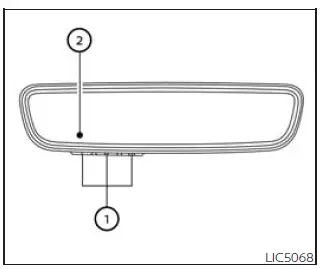
- HomeLink buttons (1-3)
- Indicator light (appears above each HomeLink button)
The Nissan Frontier HomeLink control panel is conveniently positioned for quick driver access and includes three programmable buttons, allowing operation of multiple compatible devices from a single location.
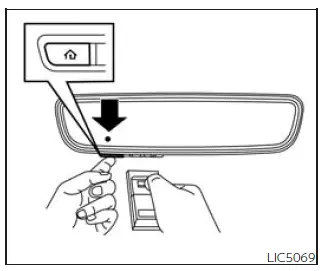
1. Position the handheld transmitter approximately 1-3 inches (2-8 cm) away from the HomeLink button you intend to program while keeping the HomeLink indicator light clearly visible.
2. Simultaneously press and hold both the selected HomeLink button and the corresponding handheld transmitter button.
Continue holding both buttons until the HomeLink indicator light changes from a slow blinking pattern to a rapid flashing pattern.
Once the rapid flashing signal appears, release both the HomeLink button and the handheld transmitter button.
NOTE:
Some garage door opener transmitters may perform better when positioned slightly farther away from the HomeLink system. If programming difficulties occur, try increasing the distance to approximately 6-12 inches (15-20 cm) and repeat the procedure.
3. Firmly press and hold the newly programmed HomeLink button for approximately five seconds, then release it. Repeat this process up to two additional times if necessary to activate the connected device.
If the device does not respond, press and hold the programmed HomeLink button again while carefully observing the indicator light behavior.
- If the indicator light remains steadily illuminated, programming has been completed successfully and the programmed device should operate whenever the HomeLink button is pressed and released.
- If the indicator light flashes rapidly for approximately two seconds and then changes to a steady illumination, continue with Programming Steps 4-6 to complete setup of a rolling-code device. Rolling-code technology is commonly used by modern garage door opener systems and provides enhanced security.
The Nissan Frontier HomeLink Universal Transceiver helps reduce clutter inside the vehicle by eliminating the need for multiple remotes while providing convenient, secure access to compatible home automation and access-control systems.
NOTE:
Some devices may require an alternative programming procedure instead of Programming Step 2. This is particularly common with certain gate operators and systems used in Canada. Refer to the "Programming HomeLink for Canadian customers and gate openers" section for additional instructions. If the Nissan Frontier HomeLink indicator light does not change from a slow blink to a rapid blinking pattern after following the programming steps, visit www.homelink.com for further assistance.
4. Locate the "Learn," "Smart," or "Set" button on the garage door opener motor, security gate controller, or other compatible device.
This button is typically positioned near the antenna wire connection on the motor housing. Consult the device owner's manual if assistance is needed identifying the correct button.
The exact appearance, labeling, and color of the button may vary depending on the manufacturer and model.
NOTE:
Using a ladder and having a second person available may make the programming process easier. Never stand on the Nissan Frontier, its bumpers, running boards, or any other vehicle surface while attempting to program a garage door opener or gate operator.
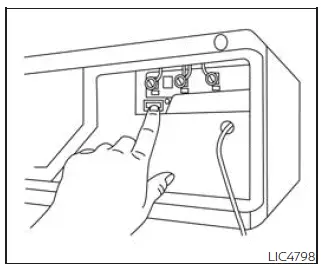
Example
5. Firmly press and release the "Learn" or "Set" button. Once activated, the indicator on the device will typically illuminate or begin flashing.
After pressing the button, you generally have approximately 30 seconds to complete the next step before the programming mode automatically expires.
6. Return to your Nissan Frontier and firmly press the programmed HomeLink button. Hold it for approximately two seconds and then release it. Repeat this process up to three times if necessary.
Do not rapidly press the HomeLink button, as this may interrupt the programming sequence.
At this stage, programming should be complete and the connected device should respond whenever the appropriate Nissan Frontier HomeLink button is pressed and released.
7. If programming difficulties continue or if additional assistance is required, visit the HomeLink website at www.homelink.com/nissan or contact HomeLink customer support at 1-800-355-3515.
Programming HomeLink for Canadian customers and gate openers
Canadian radio-frequency regulations require many transmitters to automatically stop transmitting after several seconds. This "time-out" feature can sometimes prevent the Nissan Frontier HomeLink system from receiving a long enough signal during the normal programming process.
Similar transmission limitations are also found in certain gate operators and access-control systems used in the United States.
If you live in Canada or are experiencing difficulty programming a garage door opener or gate operator using the standard HomeLink procedure, replace Programming HomeLink Step 2 with the following alternative method:
NOTE:
When programming a garage door opener or similar device, unplug the device during the cycling procedure whenever recommended by the manufacturer. This may help prevent unnecessary wear or damage to system components.
Step 2: Continue pressing and holding the selected Nissan Frontier HomeLink button while repeatedly pressing and releasing the handheld transmitter button approximately every two seconds.
This repeated process is commonly referred to as "cycling" the transmitter.
Continue cycling the transmitter until the HomeLink indicator light changes from a slow blinking pattern to a rapid blinking pattern. Once this occurs, release both the HomeLink button and the handheld transmitter button.
After completing this step, continue with Programming HomeLink Step 3 to finish the setup procedure.
When programming is complete, remember to reconnect or plug the device back into its power source if it was disconnected during the process.
Operating the HomeLink Universal Transceiver
Once the Nissan Frontier HomeLink Universal Transceiver has been successfully programmed, it can be used to control the stored devices at any time.
To operate a programmed device, firmly press the corresponding HomeLink button assigned to that device.
The indicator light will illuminate green with three parenthesis symbols

on the mirror while the signal is actively being transmitted to the programmed garage door opener, security gate, lighting system, or other compatible device.
This visual confirmation helps verify that the Nissan Frontier HomeLink system is sending a command successfully.
Programming trouble-shooting
If the Nissan Frontier HomeLink system does not quickly learn the information from the handheld transmitter, try the following recommendations:
- Install fresh batteries in the handheld transmitter to ensure maximum signal strength.
- Position the handheld transmitter so that the battery compartment faces away from the HomeLink button during programming.
- Maintain continuous pressure on both the HomeLink button and the handheld transmitter button throughout each programming step without interruption.
- Initially position the handheld transmitter approximately 1 to 3 inches (2 to 8 cm) from the HomeLink button. Hold the transmitter steady in that position for up to 15 seconds. If the Nissan Frontier HomeLink system does not program successfully, try increasing the distance to approximately 6 to 12 inches (15 to 20 cm) while keeping the indicator light visible throughout the process.
Following these recommendations can significantly improve programming success rates and help ensure reliable operation of the Nissan Frontier HomeLink Universal Transceiver with a wide variety of compatible remote-control devices.
For optimum performance of the Nissan Frontier HomeLink system, it is recommended that metal objects not be placed near the garage door opener antenna. Metallic items may interfere with radio-frequency transmission and could reduce communication range or programming reliability.
If you have questions regarding operation, compatibility, or programming of the Nissan Frontier HomeLink buttons, visit the HomeLink website at www.homelink.com/nissan or contact HomeLink Customer Support at 1-800-355-3515 for additional assistance.
Clearing the programmed information
Basic Information
The following procedure completely removes all programming information stored within the Nissan Frontier HomeLink Universal Transceiver.
All three HomeLink buttons are erased simultaneously. Individual buttons cannot be cleared separately; however, they can be overwritten and reprogrammed with new devices whenever necessary.
To clear all programming
1. Press and hold the two outer HomeLink buttons simultaneously until the indicator light begins flashing green. This typically occurs after approximately 10 seconds.
Do not continue holding the buttons for more than 20 seconds.
2. Release both buttons.
The Nissan Frontier HomeLink system is now reset and has entered programming mode. New devices can be programmed at any time by following the standard "Programming HomeLink" procedure beginning with Step 1.
Clearing all stored information is recommended when transferring ownership of the vehicle or whenever security-sensitive devices have been changed.
Reprogramming a single HomeLink button
To assign a new device to an existing Nissan Frontier HomeLink button, perform the following procedure:
1. Press and hold the desired HomeLink button. Do NOT release the button during this process.
2. After approximately 20 seconds, the indicator light will begin flashing. Without releasing the selected HomeLink button, immediately continue with "Programming HomeLink" Step 1.
This procedure allows the selected HomeLink button to be updated while leaving all other programmed buttons unchanged.
For questions, troubleshooting assistance, or additional support, contact HomeLink through www.homelink.com/nissan or by calling 1-800-355-3515.
Once the procedure is completed successfully, the Nissan Frontier HomeLink button will be programmed to operate the newly assigned device.
The new garage door opener, gate operator, lighting system, or other compatible device can then be activated simply by pressing the HomeLink button that was reprogrammed.
This process does not affect any other stored HomeLink settings or programmed devices.
If no new device is successfully programmed during the procedure, the selected HomeLink button will automatically revert to its previously stored programming information.
If your vehicle is stolen
If your Nissan Frontier is stolen, it is strongly recommended that you immediately change the access codes of any non-rolling-code devices that were programmed into the HomeLink system.
Consult the owner's manual for each affected device or contact the manufacturer, installer, dealer, or service provider for instructions regarding security code replacement procedures.
Taking these precautions can help prevent unauthorized access to garages, gates, security systems, or other property connected to the Nissan Frontier HomeLink Universal Transceiver.
When your vehicle is recovered, you will need to reprogram the HomeLink Universal Transceiver using your new transmitter information and updated security codes.
FCC Notice:
For USA:
This device complies with Part 15 of the FCC Rules. Operation is subject to the following two conditions: (1) this device may not cause harmful interference, and (2) this device must accept any interference received, including interference that may cause undesired operation.
NOTE:
Changes or modifications not expressly approved by the party responsible for regulatory compliance may void the user's authority to operate this equipment.
For Canada:
This device contains licence-exempt transmitter(s) and receiver(s) that comply with Innovation, Science and Economic Development Canada licence-exempt RSS standards. Operation is subject to the following two conditions: (1) this device may not cause interference, and (2) this device must accept any interference received, including interference that may cause undesired operation.
These regulations are intended to ensure reliable operation of wireless communication equipment while minimizing interference with other electronic devices. The Nissan Frontier HomeLink system has been designed to meet these requirements while providing convenient control of compatible remote-operated equipment.





