



Nissan Frontier: Starting and driving - Idling Stop System
Basic Information Nissan Frontier 2026
The Idling Stop System in the Nissan Frontier is designed to reduce unnecessary fuel consumption, exhaust emissions, and engine noise during short stops. When operating conditions are suitable, this system automatically stops the engine while the vehicle is stationary and restarts it when the driver is ready to move again.
- When the Nissan Frontier comes to a complete stop and the required conditions are met, the engine shuts off automatically to help conserve fuel.
- When the driver releases the brake pedal to begin driving again, the engine restarts automatically and the vehicle is ready to move forward.
WARNING
The engine may restart if the Nissan Frontier begins to move at approximately 1 mph (2 km/h) or more, such as when the vehicle rolls on a downhill grade while the engine has been stopped by the Idling Stop System. If this occurs, immediately depress the brake pedal to stop the vehicle and help prevent an accident.
CAUTION
- At the end of each trip, the engine must be fully stopped and the ignition switch must be pushed to
the OFF position. Lock the Nissan Frontier as usual after leaving the vehicle. Switching the
ignition OFF shuts down the electrical systems properly.
Failure to turn the ignition off correctly may cause the battery to become discharged.
- Always place the ignition switch in the OFF position before opening the hood or performing any inspection or maintenance. Failure to do so may result in serious injury because the engine could restart automatically.
NOTE:
The Idling Stop System in the Nissan Frontier will not activate under the following conditions:
- When the vehicle is operating in TOW mode.
- When the 4LO mode switch is ON. The Idling Stop System reactivates after approximately 4 hours from ignition OFF. If the battery is removed, the Idling Stop System also reactivates.
- When ROCK, MUD, or SAND mode is selected in the Terrain Mode Selector, if equipped.
- When the engine continues idling after startup without the Nissan Frontier being driven.
- When the engine coolant temperature is too low for proper system operation.
- When the battery charge level is low.
- When the battery temperature is low.
- When the vehicle is still moving.
- When brake booster negative pressure decreases.
- When the engine hood is opened while the engine is running.
- When the engine is started with the hood open.
- When the driver’s seat belt is not fastened.
- When the driver’s door is open.
- When the steering wheel is being operated, or when the steering wheel was turned 45 degrees or more while the Nissan Frontier was stopped or immediately before it stopped.
- When the Idling Stop System indicator blinks slowly at low speed.
If the Idling Stop System indicator blinks rapidly, approximately twice every 1 second, check whether the engine hood is open. If the hood is opened, the engine will be in the normal stopped state. In this situation, restart the engine using the ignition switch.
If the Idling Stop System indicator blinks slowly, approximately once every 2 seconds, have the system inspected and, if necessary, repaired promptly by a NISSAN dealer.
- When the fan speed control is set to any position other than "OFF" (0) while the air flow control is set to the front defroster position.
- When the front defroster switch is turned on.
- When the rear window defroster switch is turned on.
- When the cabin temperature inside the Nissan Frontier is below approximately 68ºF (20ºC).
- When the cabin temperature is above approximately 86ºF (30ºC). If the air conditioner is turned off, the Idling Stop System may operate.
- When the air conditioner fan speed is set to the maximum level.
- When the Idling Stop OFF switch is turned on.
- When electrical power consumption is high.
- When the vehicle is being driven at high altitude.
- When the accelerator pedal is depressed.
- When the shift lever is in any position other than D (Drive).
- When the brake pedal is not pressed firmly enough.
- When the Nissan Frontier is stopped on a steep sloping road.
For smooth operation, keep the battery, braking system, hood latch, and climate control system in proper condition. The Idling Stop System depends on several vehicle sensors, so unusual indicator behavior should always be checked rather than ignored.
NOTE:
The engine will not restart even when the brake pedal is released while the Nissan Frontier Idling Stop System is active under the following condition:
- When the engine hood is opened.
NOTE:
Under certain conditions, the Idling Stop System may require additional time before it becomes available and begins operating normally:
- When the battery is discharged or the battery charge level is insufficient.
- When the outside temperature is unusually low or unusually high.
- When the battery has been replaced, or when the battery terminal has been disconnected for an extended period and then reconnected.
NOTE:
When the Idling Stop System indicator is illuminated, the engine in the Nissan Frontier may restart automatically if at least one of the following conditions occurs:
- The driver's seat belt is unfastened, or the driver's door is opened.
- The battery voltage becomes low because of electrical demand from vehicle systems such as headlights, heaters, climate controls, or auxiliary equipment connected to the 12-volt power outlet inside the vehicle.
- The vehicle speed rises above approximately 1 mph (2 km/h).
- When the rear window defroster is operated.
- When the interior temperature of the Nissan Frontier is lower than approximately 68ºF (20ºC).
- When the interior temperature is higher than approximately 86ºF (30ºC). If the air conditioner is turned off, the Idling Stop System may still operate.
- When the front defroster is turned on.
- When more than 3 minutes have passed since the Idling Stop System became active.
- When the accelerator pedal is depressed.
- When the steering wheel is operated.
The steering wheel may feel heavier during this condition, but this does not indicate a malfunction.
- When the battery capacity is low.
- When overall electrical power consumption is high.
- When the Nissan Frontier is operating in TOW mode or 4LO mode.
- When ROCK, MUD, or SAND mode is selected in the Terrain Mode Selector, if so equipped.
- When the shift lever is moved to any range other than D (Drive).
- When the Idling Stop OFF switch is pressed.
NOTE:
The following condition will prevent the Idling Stop System from automatically restarting the engine. In this case, the engine must be started manually using the ignition switch:
- The hood is open.
Use the Nissan Frontier Idling Stop System during short stops, such as waiting at a traffic light or pausing briefly in slow traffic. If the vehicle will remain stopped for a longer period, it is better to turn the engine off normally rather than relying on the automatic stop function.
When the engine has been stopped by the Idling Stop System, heating, cooling, and dehumidifying performance may be deactivated or reduced. To keep the air conditioning system operating continuously, turn off the Idling Stop System by pressing the Idling Stop OFF switch.
Retrograde movement control function
This function is designed to reduce backward movement of the Nissan Frontier when the driver moves their foot from the brake pedal to the accelerator pedal while the Idling Stop System is active on a hill. It helps support smoother starts on inclines, but the driver must still remain ready to apply the brake pedal whenever necessary.
For the best driving experience, Nissan Frontier drivers should treat this function as an additional support feature rather than a substitute for careful brake and accelerator control on sloped roads.
Idling Stop System display Nissan Frontier 2022
The operating status of the Nissan Frontier Idling Stop System can be monitored directly through the vehicle information display. This screen helps the driver understand when the system is active, when it has been turned off, and why it may not be operating under certain conditions.
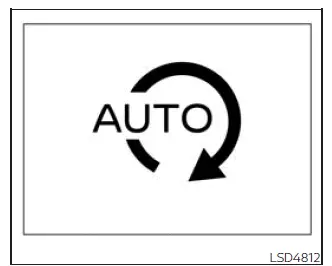
Idling Stop System indicator
The indicator appears when the Idling Stop System is active and the Nissan Frontier engine has been automatically stopped under the proper operating conditions.
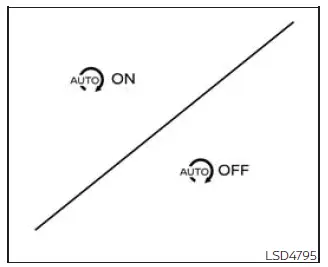
Idling Stop System ON or OFF
When the Idling Stop System is activated or deactivated by using the Idling Stop OFF switch, a message is shown in the vehicle information display so the driver can confirm the current system setting.
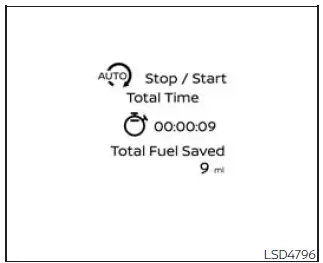
Fuel saved and engine stop time
The fuel saved and engine stop time mode provides useful information about how the Nissan Frontier Idling Stop System has contributed to reduced fuel use while the vehicle was stopped.
- The fuel saved value shows the estimated amount of fuel conserved each time the engine is automatically stopped by the Idling Stop System.
- The engine stop time shows how long the engine has remained stopped while the Idling Stop System was operating.
The total fuel saved and the total engine stop time can also be reviewed in the Nissan Frontier vehicle information display, giving the driver a clearer view of system operation over time.
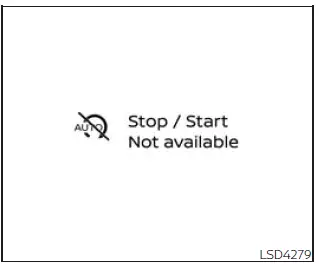
Auto start deactivation
If the engine stops while the Idling Stop System is active but cannot restart automatically, this warning message is displayed. In this situation, the driver should follow the displayed instructions and restart the Nissan Frontier as required.
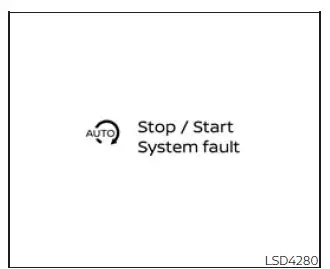
System fault
This message appears when the Idling Stop System detects a malfunction or abnormal operating condition.
If this message is displayed, it is recommended that the system be inspected. For proper diagnosis and repair, it is recommended that you visit a NISSAN dealer for this service.
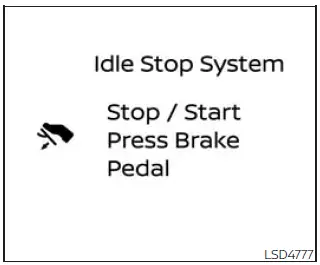
Idling Stop guidance display (further
depressing the brake pedal)
When the Nissan Frontier is stopped and the Idling Stop System screen is shown in the vehicle information display, this guidance message appears if the system is not activated because the brake pedal is not being pressed firmly enough.
If you want the Idling Stop System to activate, press the brake pedal more firmly while keeping the vehicle completely stopped.
This display appears when the fuel saved and engine stop time screen is selected in the vehicle information display.
The display disappears under the following conditions:
- The Idling Stop System becomes active.
- The Nissan Frontier begins moving again.
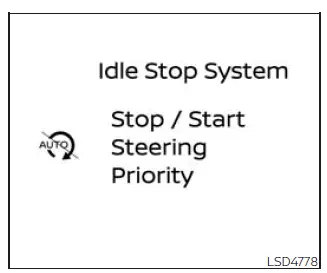
Idling Stop guidance display (detection
of the steering operation)
When the vehicle is stopped and the Idling Stop System screen is displayed, this guidance message appears if the system is temporarily deactivated because steering wheel operation has been detected.
The Nissan Frontier Idling Stop System is deactivated in this condition because steering input can require continued engine operation and power assistance.
The display appears when fuel saved and engine stop time is selected on the vehicle information display.
The display disappears under the following conditions:
- The Idling Stop System becomes active.
- The vehicle starts moving.
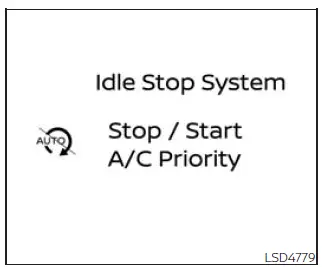
Idling Stop guidance display (placing
priority on the air conditioner)
When the Nissan Frontier is stopped and the Idling Stop System screen is visible in the vehicle information display, this guidance message appears if the system is deactivated because the air conditioner has priority.
The Idling Stop System may remain inactive when cooling, heating, or dehumidifying performance is needed to maintain cabin comfort inside the Nissan Frontier.
The display appears when fuel saved and engine stop time is selected on the vehicle information display.
The display disappears under the following conditions:
- The Idling Stop System becomes active.
- The Nissan Frontier begins driving again.
Idling Stop OFF switch
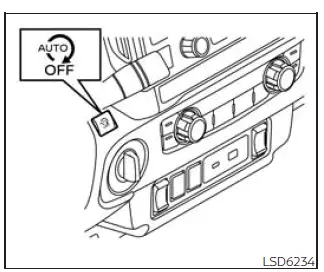
The Idling Stop System can be temporarily deactivated by pressing the Idling Stop OFF switch. Pressing the switch again, or restarting the engine with the ignition switch, will reactivate the Nissan Frontier Idling Stop System.
- When the Idling Stop System is turned off while the engine is running, the engine will not automatically stop during that driving cycle.
- When the Idling Stop System is turned off after the engine has already been automatically stopped, the engine will restart immediately if the required conditions are present. After that, the engine will be prevented from automatically stopping again during the same journey.
NOTE:
- The Idling Stop System ON or OFF message appears for a few seconds in the Nissan Frontier vehicle information display whenever the Idling Stop OFF switch is pressed.
- The Idling Stop System automatically resets to ON every time the ignition switch is changed from the OFF position to the ON position.
- It is recommended to disable the ISS system when towing a trailer. This can be done by pressing the Idling Stop OFF switch before towing begins.
For more predictable operation, Nissan Frontier drivers should check the display messages whenever the Idling Stop System does not activate as expected. These messages help explain whether the system is limited by brake pedal pressure, steering operation, climate control demand, towing conditions, or another vehicle requirement.





