



Nissan Frontier: Starting and driving - Intelligent Cruise Control (ICC)
- Basic Information
- Vehicle-to-vehicle distance control mode
- Vehicle-to-vehicle distance control mode switches
- Vehicle-to-vehicle distance control mode limitations
- System temporarily unavailable
- System maintenance
- Conventional (fixed speed) cruise control mode
Basic Information Nissan Frontier third generation
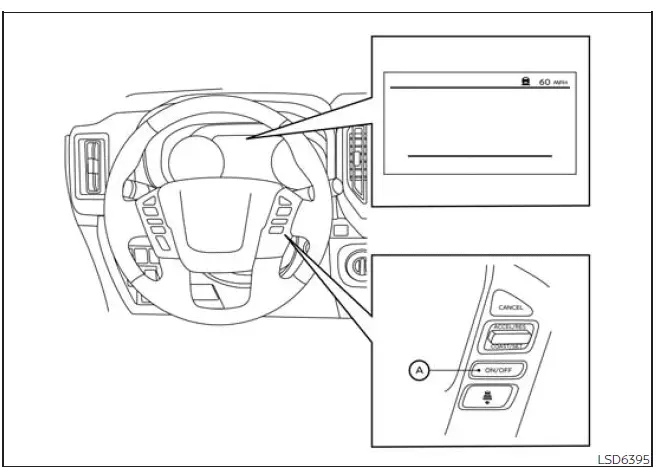
- ICC switch
WARNING
Failure to follow the warnings and instructions for the proper use of the ICC system may result in serious injury or death.
- The ICC system in the Nissan Frontier is only a driving assistance feature. It is not a collision warning system, an automatic collision avoidance device, or a replacement for the driver’s judgment. The driver remains fully responsible for staying alert, driving safely, watching the road, and keeping control of the vehicle at all times.
- Always obey posted speed limits and never set the cruise speed higher than the legal limit or higher than what is safe for current road, weather, and traffic conditions.
- Always drive carefully and attentively when using the ICC system.
Read and understand the Owner's Manual thoroughly before using the ICC system. To help avoid serious injury or death, do not rely on the system to prevent accidents, react to every traffic condition, or control the Nissan Frontier speed in emergency situations.
Do not use the ICC system except in suitable road and traffic conditions. The system should not be used when traffic is heavy and constantly changing, on winding roads, in poor visibility, on slippery surfaces, or in any situation where the driver must make frequent speed adjustments.
- In the conventional (fixed speed) cruise control mode, a warning chime will not sound to warn you if your vehicle is too close to the vehicle ahead. Pay close attention to the distance between the Nissan Frontier and the vehicle in front of you, because a collision could occur if the driver does not slow down in time.
The ICC system helps maintain a selected following distance from the vehicle ahead within a speed range of 0 to 90 mph (0 to 144 km/h), up to the speed set by the driver. The set speed can be selected between 20 and 90 mph (30 and 144 km/h), depending on driving conditions and the desired cruising speed.
When the road ahead is clear, the Nissan Frontier travels at the set speed selected by the driver. If a slower vehicle is detected ahead in vehicle-to-vehicle distance control mode, the system can adjust vehicle speed to help maintain the chosen distance.
The ICC system can be set to one of two cruise control modes:
- Vehicle-to-vehicle distance control mode: Used to help maintain a selected distance between your Nissan Frontier and the vehicle traveling ahead, up to the preset speed
- Conventional (fixed speed) cruise control mode: Used for driving at a preset speed without automatic following-distance control
Push the ICC switch A to choose the cruise control mode between the vehicle-to-vehicle distance control mode and the conventional (fixed speed) cruise control mode.
Once one control mode has been activated, it cannot be switched directly to the other cruise control mode. To change the mode, push the ICC switch A once to turn the system off. Then push the ICC switch A again to turn the system back on and select the desired cruise control mode for the Nissan Frontier.
Always confirm the selected setting in the ICC system display before relying on the cruise control function. This helps ensure that the system is operating in the mode the driver intends to use.
How to select the cruise control mode
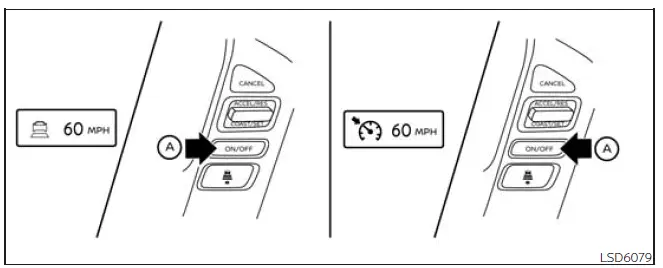
Selecting the vehicle-to-vehicle distance control mode: To choose the vehicle-to-vehicle distance control mode, quickly push and release the ICC switch A. This mode is the main Intelligent Cruise Control setting for helping the Nissan Frontier manage following distance during suitable highway or open-road driving.
Selecting the conventional (fixed speed) cruise control mode: To choose the conventional (fixed speed) cruise control mode, push and hold the ICC switch A for longer than approximately 1.5 seconds. In this mode, the driver must control the distance to the vehicle ahead manually, because the system does not provide vehicle-to-vehicle distance control.
Vehicle-to-vehicle distance control mode Nissan Frontier third generation
In vehicle-to-vehicle distance control mode, the Nissan Frontier ICC system automatically helps maintain a selected following distance from the vehicle traveling ahead. The system adjusts according to the speed of the vehicle in front, up to the speed set by the driver, and returns to the set cruising speed when the road ahead is clear.
The ICC system is designed to improve driving comfort when following a vehicle that is traveling in the same lane and in the same direction. It can reduce the need for repeated accelerator and brake pedal adjustments during steady traffic, but the Nissan Frontier driver must remain attentive and ready to take over at any time.
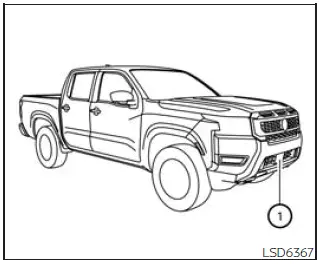
If radar sensor 1 detects a slower moving vehicle ahead, the system reduces the vehicle speed so that your Nissan Frontier can continue following the vehicle in front at the selected distance.
The system automatically controls the throttle and, when necessary, applies the brakes up to approximately 40% of the vehicle’s available braking power. Because braking capability is limited, the driver must still respond immediately if traffic conditions change suddenly.
Vehicle-to-vehicle distance control mode operation
The vehicle-to-vehicle distance control mode is designed to help maintain a selected distance from the vehicle ahead and can reduce the Nissan Frontier speed to match a slower vehicle traveling in front.
If the vehicle ahead slows down, the system decelerates the vehicle as needed. If the vehicle ahead comes to a complete stop, the Nissan Frontier can also decelerate to a standstill within the operating limits of the ICC system. However, the ICC system can apply only up to approximately 40% of the vehicle's total braking power, so it must not be treated as an emergency braking system.
This system should be used only when traffic conditions allow vehicle speeds to remain fairly constant or change gradually. If another vehicle suddenly moves into the lane ahead, or if the vehicle in front brakes sharply, the following distance may become shorter because the ICC system may not be able to decelerate the Nissan Frontier quickly enough.
If this happens, the ICC system sounds a warning chime and flashes the system display to alert the driver. The driver must then take the necessary action, such as applying the brakes, steering safely, or increasing the following distance according to the traffic situation.
The system will cancel and a warning chime will sound if the vehicle speed drops below approximately 15 mph (25 km/h) and no vehicle is detected ahead. The system will also disengage if the Nissan Frontier travels above the maximum set speed or if operating conditions are no longer suitable for ICC control.
The following items are controlled in the vehicle-to-vehicle distance control mode:
- When there are no vehicles traveling ahead, the vehicle-to-vehicle distance control mode maintains the speed set by the driver. The available set speed range is approximately 20 to 90 mph (30 to 144 km/h), depending on driving conditions and system status.
- When there is a vehicle traveling ahead, the vehicle-to-vehicle distance control mode adjusts the speed to help maintain the distance selected by the driver from the vehicle ahead. If the vehicle ahead comes to a stop, the Nissan Frontier decelerates to a standstill within the limitations of the system. The driver should always be prepared to brake manually if the situation requires stronger or faster braking.
- When the vehicle traveling ahead leaves its lane of travel, the vehicle-to-vehicle distance control mode allows the Nissan Frontier to accelerate and maintain vehicle speed up to the driver’s set speed.
The system will cancel once it determines that the vehicle has reached a standstill, and a warning chime will sound to notify the driver.
The ICC system does not control vehicle speed or provide a warning when the Nissan Frontier approaches stationary or very slow moving vehicles. The driver must remain attentive and actively control the vehicle to maintain a safe following distance when approaching toll gates, traffic congestion, stopped traffic, construction zones, or any situation where vehicles ahead may not be moving normally.
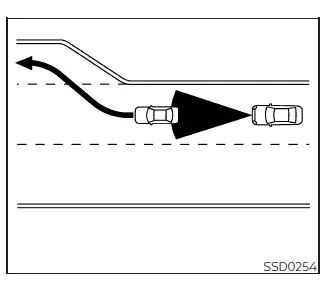
When driving on the freeway at a set speed and approaching a slower vehicle ahead, the ICC system adjusts the Nissan Frontier speed to help maintain the distance selected by the driver from the vehicle in front. If the vehicle ahead changes lanes or exits the freeway, the ICC system may accelerate the truck and maintain speed up to the preset value. The driver should pay close attention during this acceleration and be prepared to control the vehicle if traffic, road conditions, or lane position require a different response.
The vehicle may not always maintain the set speed on winding roads, steep grades, rolling hills, or roads where curves and elevation changes affect normal driving speed. If this occurs, the driver must manually control the Nissan Frontier speed by using the accelerator or brake pedal as needed.
During normal vehicle-to-vehicle distance control, the system automatically accelerates or decelerates your vehicle according to the speed of the vehicle ahead. This helps make steady highway driving more comfortable, but it does not remove the driver’s responsibility to watch the road and judge whether the selected following distance is appropriate.
Press the accelerator pedal when additional acceleration is needed, such as when changing lanes, merging, or safely passing another vehicle. Press the brake pedal when deceleration is required to maintain a safe distance because the vehicle ahead brakes suddenly, another vehicle cuts into the lane, or traffic conditions change quickly. Always stay alert when using the ICC system in the Nissan Frontier, and be ready to take full control whenever the situation requires it.
Vehicle-to-vehicle distance control mode switches Nissan Frontier
Basic Information
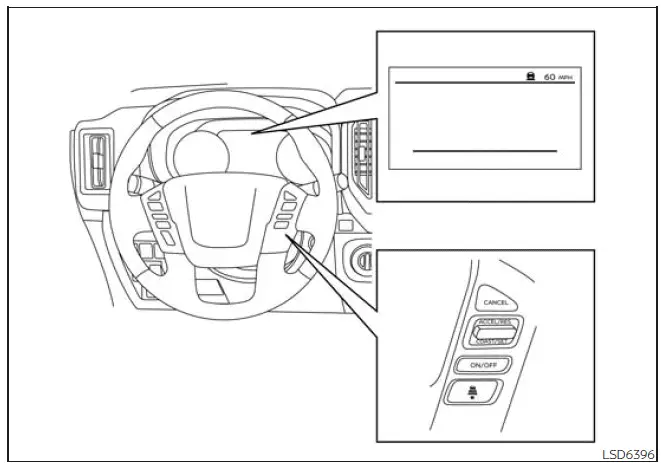
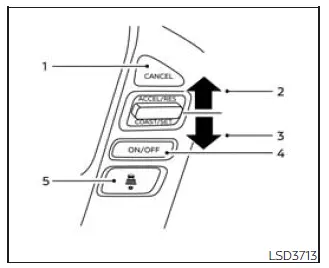
The system is operated by the ICC switch and four additional control switches, all positioned on the steering wheel for convenient access while driving the Nissan Frontier. These controls allow the driver to activate the system, set speed, adjust speed, cancel cruise control, and choose the following distance.
1. CANCEL switch:
Deactivates the system and cancels the current ICC control operation without erasing the basic system function from availability.
2. ACCEL/RES switch:
Resumes the previously set speed or increases the set speed in small increments. This switch is useful when the Nissan Frontier driver wants to return to a stored cruising speed after slowing down.
3. COAST/SET switch:
Sets the desired cruise speed or reduces the set speed incrementally. It is also used when the driver has accelerated to the preferred speed and wants the ICC system to begin maintaining that speed.
4. ICC switch:
Works as the master switch used to activate the Intelligent Cruise Control system.
5. DISTANCE switch:

Changes the selected following distance between the Nissan Frontier and the vehicle ahead:
- Long
- Middle
- Short
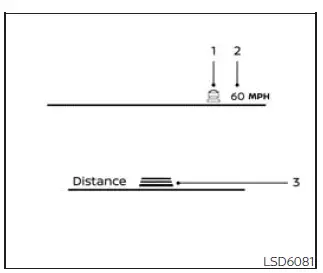
Vehicle-to-vehicle distance control mode display and indicators
The display is located between the speedometer and tachometer, where the driver can quickly confirm ICC status, selected speed, and following distance without looking away from the driving information area for too long.
1. This indicator shows the ICC system status by color:
- ICC system ON indicator (gray): Indicates that the ICC switch is on and the system is in standby or ready condition.
- ICC system SET indicator (green): Indicates that the cruising speed has been set and the Nissan Frontier ICC system is actively controlling speed according to the selected mode.
- ICC system warning (yellow): Indicates that a malfunction or abnormal condition has been detected in the ICC system.
2. Set vehicle speed indicator: Displays the vehicle speed selected by the driver for cruise control operation.
For Canadian models, the speed is displayed in km/h.
3. Set distance indicator: Displays the following distance selected with the distance switch. The chosen setting helps determine how much space the Nissan Frontier ICC system attempts to maintain from the vehicle ahead, within system limits.
Operating vehicle-to-vehicle distance control mode
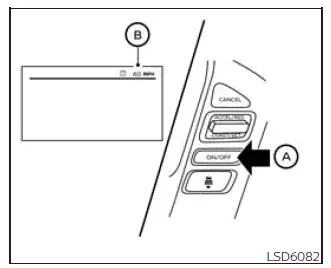
To turn on cruise control, quickly push and release the ICC switch A. The gray ICC system ON indicator, the set distance indicator, and the set vehicle speed indicator B illuminate in a standby state, showing that the Nissan Frontier system is ready to be set but has not yet started active speed control.
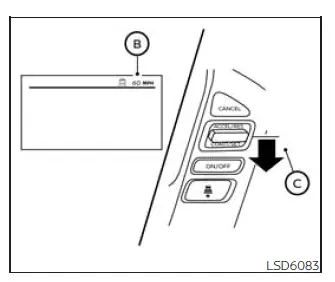
To set the cruising speed, accelerate the vehicle to the desired speed, then push the COAST/SET switch C and release it. The green ICC system set indicator, the vehicle ahead detection indicator, the set distance indicator, and the set vehicle speed indicator B will illuminate. After the speed is set, remove your foot from the accelerator pedal. The Nissan Frontier will then maintain the set speed or adjust speed according to the vehicle ahead, depending on traffic conditions.
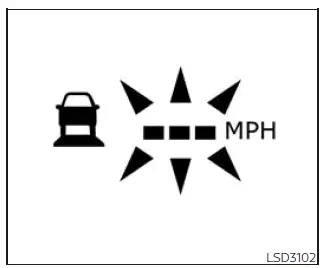
When the COAST/SET switch is pushed under the following conditions, the system cannot be set, and the set vehicle speed indicator will blink for approximately 2 seconds to show that ICC operation is not available:
- When traveling below 20 mph (30 km/h) and a vehicle ahead is not detected
- When the shift lever is not in the D (Drive) position or Manual mode
- When the parking brake is applied
- When the brakes are being operated by the driver
When the COAST/SET switch is pushed under the following conditions, the system cannot be set.
A warning message will appear in the display to explain why the Nissan Frontier ICC system is unavailable:
- When the VDC system is off. To use the ICC system, turn on the VDC system. Push the ICC switch to turn off the ICC system, and then reset it by pushing the ICC switch again.
- When VDC is operating, because the vehicle may already be correcting traction or stability.
- When a wheel is slipping. To use the ICC system, make sure the wheels are no longer slipping and that the road surface allows stable vehicle control.
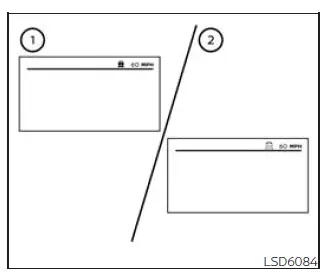
- System set display with vehicle ahead
- System set display without vehicle ahead
The driver selects the desired vehicle speed according to road, traffic, and weather conditions. When no vehicle is detected in the lane ahead, the Nissan Frontier ICC system maintains the selected speed in a way similar to standard cruise control. The selected speed is shown on the ICC system display so the driver can confirm the current setting at a glance.
Vehicle detected ahead
When a vehicle is detected in the same lane ahead, the ICC system reduces the Nissan Frontier speed by controlling the throttle and applying the brakes as needed to match the speed of the slower vehicle. The system then manages vehicle speed based on the movement of the vehicle ahead, helping maintain the following distance selected by the driver.
NOTE:
- The stop lights of the vehicle illuminate when braking is performed automatically by the ICC system.
- When the brake system operates during ICC control, a sound may be heard. This is normal and does not indicate a malfunction.
When a vehicle ahead is detected, the vehicle ahead detection indicator illuminates in the display.
The ICC system also continues to show the set speed and the selected following distance, allowing the Nissan Frontier driver to monitor how the system is currently operating.
Vehicle ahead not detected
When a vehicle is no longer detected ahead, the ICC system gradually accelerates your vehicle to return to the previously selected speed. After the Nissan Frontier reaches that speed, the system maintains it as long as the road ahead remains clear and operating conditions are suitable.
When a vehicle is no longer detected, the vehicle ahead detection indicator turns off.
If another vehicle appears ahead while the Nissan Frontier is accelerating back to the set speed, or at any time while the ICC system is operating, the system begins controlling the distance to that vehicle again.
When a vehicle is no longer detected at a speed below approximately 15 mph (25 km/h), the system will be canceled. The driver must then control acceleration, braking, and following distance manually.
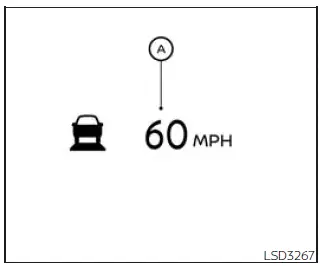
When passing another vehicle, the set speed indicator A flashes if the Nissan Frontier speed exceeds the set speed. The vehicle ahead detection indicator turns off when the area in front of the vehicle is clear. When the accelerator pedal is released, the vehicle returns to the previously set speed, provided the ICC system remains active and conditions allow normal operation.
Even though the vehicle speed is set in the ICC system, the driver can press the accelerator pedal whenever quick acceleration is necessary, such as when passing, merging, or adjusting position in traffic. The driver should always confirm that acceleration can be performed safely.
How to change the set vehicle speed
To cancel the preset speed, use one of the following methods:
- Push the CANCEL switch. The set vehicle speed indicator will turn gray, showing that active speed control has been canceled.
- Tap the brake pedal. The set vehicle speed indicator will turn gray, and the Nissan Frontier driver resumes direct speed control.
- Push the ICC switch to off. The ICC indicators will go out, and the system will no longer control cruising speed.
To reset at a faster cruising speed, use one of the following methods:
- Depress the accelerator pedal. When the vehicle reaches the desired speed, push and release the COAST/SET switch to store the new speed.
- Push and hold the ACCEL/RES switch.
The set vehicle speed will increase by approximately 5 mph (5 km/h), allowing the driver to raise the cruising speed in larger steps.
- Push, then quickly release the ACCEL/RES switch. Each time this is done, the set speed will increase by approximately 1 mph (1.6 km/h), which is useful for small speed adjustments.
To reset at a slower cruising speed, use one of the following methods:
- Lightly tap the brake pedal. When the Nissan Frontier reaches the desired lower speed, push the COAST/SET switch and release it to store the new cruising speed.
- Push and hold the COAST/SET switch.
The set vehicle speed will decrease by approximately 5 mph (5 km/h), allowing the driver to reduce the cruising speed in larger steps.
- Push, then quickly release the COAST/SET switch. Each time this is done, the set speed will decrease by approximately 1 mph (1.6 km/h), allowing fine adjustment of the selected speed.
To resume the preset speed, push and release the ACCEL/RES switch. The Nissan Frontier will resume the last set cruising speed when the vehicle speed is over 20 mph (30 km/h), as long as ICC operating conditions are met.
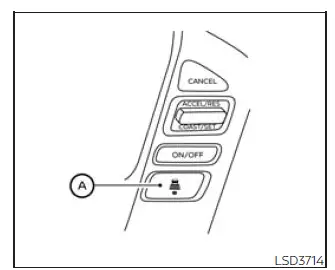
How to change the set distance to the vehicle ahead
The following distance to the vehicle ahead can be selected while the ICC system is in standby mode or actively controlling vehicle speed. The appropriate distance should always be chosen according to current traffic density, road conditions, weather, and overall driving circumstances.
Each time the distance
 switch A is
pressed, the selected following distance changes from long to middle, from middle to short, and then returns
to long again in a repeating sequence. This allows the Nissan Frontier driver to quickly select the
preferred spacing from the vehicle ahead.
switch A is
pressed, the selected following distance changes from long to middle, from middle to short, and then returns
to long again in a repeating sequence. This allows the Nissan Frontier driver to quickly select the
preferred spacing from the vehicle ahead.
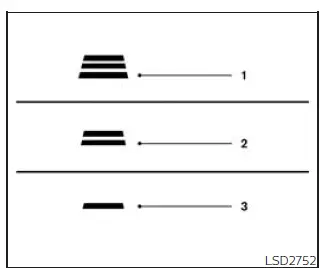
Approximate distance at 60 mph (100 km/h) [ft (m) ]
1. Distance: Long
- 200 (60)
2. Distance: Middle
- 150 (45)
3. Distance: Short
- 90 (30)
- The distance to the vehicle ahead automatically changes according to vehicle speed.
At higher speeds, the Nissan Frontier ICC system increases the following distance to provide additional reaction time and improve driving safety.
- The selected distance setting remains stored even if the engine is turned off and restarted, allowing the system to return to the previously chosen preference.
Approach warning
If the Nissan Frontier moves too close to the vehicle ahead because that vehicle decelerates rapidly or because another vehicle suddenly enters the lane, the ICC system warns the driver using both an audible chime and visual indications in the ICC display. In these situations, the driver should immediately evaluate traffic conditions and apply the brakes if necessary to maintain a safe following distance.
Decelerate by depressing the brake pedal to maintain a safe vehicle distance if:
- The warning chime sounds.
- The vehicle ahead detection indicator begins flashing.
The warning chime may not sound in every situation where vehicles are relatively close together. Some examples include:
- When both vehicles are traveling at approximately the same speed and the distance between them remains unchanged.
- When the vehicle ahead is traveling faster and the distance between the vehicles is increasing.
- When another vehicle cuts into the lane very close to your Nissan Frontier.
The warning chime will not sound when:
- The vehicle approaches parked vehicles or vehicles moving at very low speeds.
- The accelerator pedal is being pressed, temporarily overriding ICC system speed control.
NOTE:
The approach warning chime may sound and the ICC display may flash when the radar sensor detects objects located beside the vehicle or near the roadside. In some situations, this may cause the Nissan Frontier ICC system to accelerate or decelerate unexpectedly. The radar sensor may detect such objects while driving on winding roads, narrow roads, hilly terrain, or when entering and exiting curves. Under these conditions, the driver must manually maintain a safe following distance and remain fully attentive to surrounding traffic.
In addition, radar sensor performance may be influenced by vehicle operation, steering input, lane position, traffic flow, weather conditions, or vehicle condition. For example, sensor performance may be affected if the Nissan Frontier has sustained damage near the radar sensor area or if external conditions interfere with proper radar operation.
Automatic cancellation
An audible chime sounds and ICC control is automatically canceled under the following conditions:
- When a vehicle ahead is not detected and your Nissan Frontier is traveling below approximately 15 mph (25 km/h)
- When the system determines that the vehicle has come to a complete standstill
- When the shift lever is not in the D (Drive) position, Manual mode, or L (Low) range
- When the parking brake system is applied
- When the Vehicle Dynamic Control (VDC) system is turned off
- When the VDC system is actively operating
- When distance measurement is impaired because dirt, snow, ice, debris, or another obstruction is interfering with the radar sensor
- When one or more wheels are slipping due to reduced traction
- When the radar signal is temporarily interrupted because of environmental or operating conditions
Vehicle-to-vehicle distance control mode limitations Nissan Frontier
WARNING
Listed below are important system limitations for the ICC system. Failure to operate the Nissan Frontier in accordance with these limitations could result in serious injury or death.
- The ICC system is mainly intended for use on straight, dry, open roads with light and steady traffic. It is not recommended for city driving, congested traffic, or areas where vehicles frequently stop, merge, or change speed suddenly.
- The ICC system does not automatically adapt to every road or weather condition. This system should be used only in traffic that flows evenly. Do not use the system on roads with sharp curves, icy surfaces, heavy rain, snow, fog, or any condition that reduces visibility or traction.
- Because the distance control function has performance limits, never rely only on the ICC system. The system cannot correct careless, distracted, or inattentive driving, and it cannot overcome poor visibility caused by rain, fog, snow, spray, or other severe weather. Depending on the distance to the vehicle ahead and surrounding traffic conditions, the Nissan Frontier driver must slow the vehicle by pressing the brake pedal to maintain a safe following distance.
- If the vehicle ahead comes to a stop, the Nissan Frontier can decelerate to a standstill within the
operating limits of the system.
Once the system determines that the vehicle has come to a complete stop, it will cancel and sound a warning chime. To prevent the vehicle from moving, the driver must press and hold the brake pedal as needed.
- Always pay close attention to vehicle operation and be ready to manually control the proper following distance. In some situations, the ICC system may not be able to maintain the selected distance between vehicles or the selected vehicle speed.
- The system may fail to detect the vehicle in front of you under certain road, traffic, or weather
conditions. To help avoid accidents, never use the ICC system under the following conditions:
- On roads with heavy traffic, frequent merging, or sharp curves
- On slippery road surfaces such as ice, snow, wet leaves, or similar low-traction conditions
- During poor weather, including rain, fog, snow, or heavy road spray
- When wheels or tires other than those recommended by NISSAN are used
- When rain, snow, mud, dirt, or road debris adheres to the bumper area around the distance sensor
- On steep downhill roads, because the vehicle may exceed the set speed and repeated braking may overheat the brakes
- On roads with repeated uphill and downhill sections where vehicle speed changes frequently
- When traffic conditions make it difficult to keep a proper distance because of frequent acceleration, braking, or lane changes
- When interference from other radar sources may affect sensor operation
- Do not use the ICC system while towing a trailer. The system may not detect a vehicle ahead correctly, and the added trailer weight can affect braking distance and vehicle response.
- In some road or traffic conditions, a vehicle or object may unexpectedly enter the sensor detection zone and cause automatic braking. Always remain alert, keep your hands on the steering wheel, and avoid using the ICC system in any situation where it is not recommended in this warning section.
The radar sensor will not detect the following objects:
- Stationary vehicles and very slow moving vehicles
- Pedestrians, animals, or objects in the roadway
- Oncoming vehicles traveling in the same lane
- Motorcycles traveling offset from the center of the travel lane
The sensor generally works by detecting signals reflected from the vehicle ahead. Therefore, if the sensor cannot receive a clear reflection from the vehicle in front, the Nissan Frontier ICC system may not maintain the selected following distance.
The following are examples of conditions in which the sensor may not properly detect a vehicle ahead and the system may not operate as expected:
- When snow, heavy rain, road spray, or mist from other vehicles reduces the sensor’s detection ability.
- When your vehicle is towing a trailer or similar equipment.
- When excessively heavy baggage is loaded in the rear seat or cargo area, changing the vehicle’s angle and affecting sensor alignment.
The ICC system is designed to automatically check sensor operation within the limitations of the system.
When the sensor is covered with dirt or obstructed, the system will normally cancel automatically. However, if the sensor is covered with ice, a transparent or translucent vinyl bag, film, or similar material, the ICC system may not always detect the obstruction correctly.
In these situations, the vehicle-to-vehicle distance control mode may not cancel and may not be able to maintain the selected following distance from the vehicle ahead. The Nissan Frontier driver must be ready to take over immediately.
Be sure to check and clean the sensor regularly, especially after driving in snow, rain, mud, road salt, construction dust, or other conditions that may leave buildup on the front sensor area.
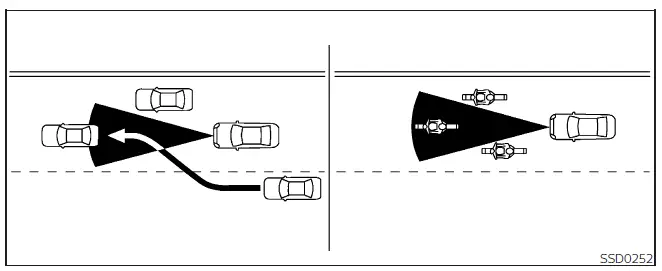
The radar sensor detection zone is limited. A vehicle ahead must be within this detection zone for the vehicle-to-vehicle distance control mode to maintain the selected distance from that vehicle.
A vehicle ahead may move outside the detection zone because of its position within the same lane. Motorcycles may not be detected when they are traveling offset from the lane center. A vehicle entering the lane ahead may not be detected until it has fully moved into the lane and is clearly positioned in front of the Nissan Frontier.
If this occurs, the ICC system may warn you by blinking the system indicator and sounding the chime. The driver may need to manually control the proper distance from the vehicle traveling ahead.
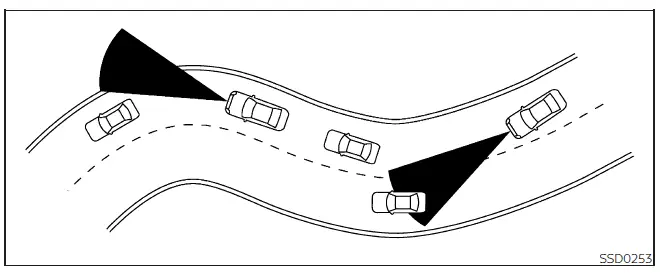
When driving on certain roads, such as winding, hilly, curved, narrow, or construction-zone roads, the radar sensor may detect vehicles in a different lane or may temporarily fail to detect a vehicle traveling ahead. This can cause the radar system to decelerate or accelerate the Nissan Frontier unexpectedly.
Vehicle detection may also be affected by the way the vehicle is being driven, including steering input, lane position, cornering movement, or the general condition of the vehicle and sensor area.
If this occurs, the ICC system may warn you unexpectedly by blinking the system indicator and sounding the chime. You must manually control the proper distance from the vehicle traveling ahead and take over speed control whenever the Nissan Frontier ICC system does not respond appropriately.
System temporarily unavailable Nissan Frontier 3rd Gen
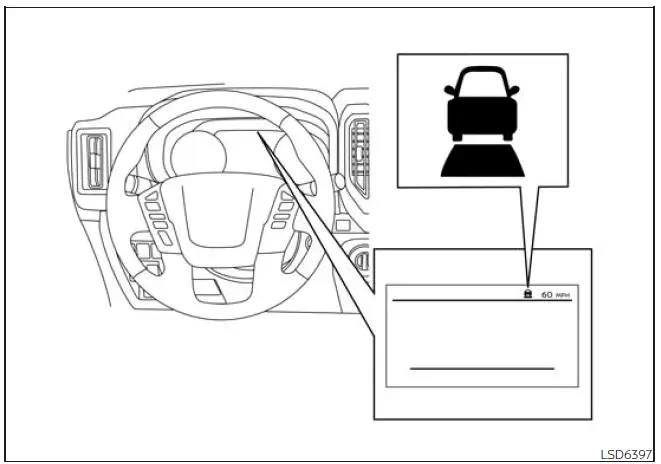
The following conditions may cause the Nissan Frontier ICC system to become temporarily unavailable. When this happens, the system may not be able to provide normal vehicle-to-vehicle distance control or may be unable to maintain the selected following distance from the vehicle ahead.
In these situations, the ICC system may not cancel in every case and may not control following distance as expected. The driver must remain alert, watch the traffic ahead, and be prepared to control speed and braking manually until normal ICC operation is restored.
Condition A
Under the following conditions, the ICC system is automatically canceled. A warning chime will sound, and the system will not be available for setting until the condition is corrected:
- When the VDC system is turned off
- When the VDC system is actively operating
- When a vehicle ahead is not detected and your Nissan Frontier is traveling below approximately 15 mph (25 km/h)
- When the system determines that the vehicle has come to a standstill
- When the shift lever is not in the D (Drive) position, Manual mode, or L (Low) range
- When the parking brake is applied
- When one or more wheels are slipping because of reduced traction
- When ROCK, MUD, or SAND mode is selected in the Terrain Mode Selector, if so equipped
- When the radar signal is temporarily interrupted
Action to take
When the conditions listed above are no longer present, turn the system off using the ICC switch. Then turn the Nissan Frontier ICC system back on and set the system again if road and traffic conditions are suitable.
Condition B
When poor weather conditions such as rain, fog, snow, heavy spray, or similar moisture interfere with the front radar sensor, the ICC system will automatically be canceled.
A chime will sound, and the "Forward Driving Aids Temporarily Disabled Front Sensor Blocked See Owner's Manual" warning message will appear in the vehicle information display. This indicates that the front sensor cannot monitor the area ahead reliably enough for ICC operation.
Action to take
When the weather or sensor-blocking condition is no longer present, the warning message will disappear from the vehicle information display, and the system should return to normal operation. If the "Forward Driving Aids Temporarily Disabled Front Sensor Blocked See Owner's Manual" warning message continues to be displayed, have the system checked. It is recommended that you visit a NISSAN dealer for this service.
Condition C
When the radar sensor area of the front bumper or emblem is covered with mud, dirt, snow, ice, road salt, insects, or other material, or when the sensor area is otherwise obstructed, the ICC system will automatically be canceled to prevent unreliable distance control.
A chime will sound, and the "Forward Driving Aids Temporarily Disabled Front Sensor Blocked See Owner's Manual" warning message will appear in the Nissan Frontier vehicle information display.
Action to take
If the warning message appears, stop the vehicle in a safe place, place the shift lever in the P (Park) position, and turn the engine off. When the radar signal has been temporarily interrupted because of obstruction, clean the sensor area of the front bumper or emblem carefully, then restart the engine.
If the "Forward Driving Aids Temporarily Disabled Front Sensor Blocked See Owner's Manual" warning message continues to be displayed after cleaning and restarting, have the system checked.
It is recommended that you visit a NISSAN dealer for this service, especially if the front bumper or emblem area has been damaged, repaired, repainted, or modified.
Condition D
When driving on roads with limited roadside structures or unusual surroundings, such as long bridges, deserts, snow fields, open areas, or roads running beside long walls, the system may illuminate the system warning light, display the "Forward Driving Aids Temporarily Disabled Front Sensor Blocked See Owner's Manual" message, and sound a chime.
Action to take
When the above driving conditions no longer exist, turn the system back on. If the Nissan Frontier ICC system resumes normal operation, no further action is usually required.
Condition E
When the ICC system is not operating properly, a chime sounds, the orange ICC system warning light comes on, and the "Forward Driving Aids Temporarily Disabled Front Sensor Blocked See Owner's Manual" warning message appears. This may indicate a system fault rather than a temporary environmental condition.
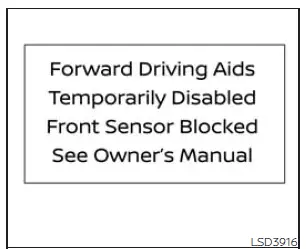
Action to take
If the warning light comes on, park the vehicle in a safe place. Turn the engine off, restart the engine, resume driving carefully, and try to set the ICC system again only when conditions are appropriate.
If it is not possible to set the system, or if the indicator stays on, it may indicate that the system is malfunctioning. Although the Nissan Frontier may still be drivable under normal conditions, have the vehicle checked. It is recommended that you visit a NISSAN dealer for this service.
NOTE:
If the ICC system is temporarily unavailable, the conventional cruise control mode may still be used. However, conventional cruise control does not maintain distance from a vehicle ahead, so the driver must control following distance and braking manually at all times.
System maintenance Nissan Frontier 2022
Basic Information
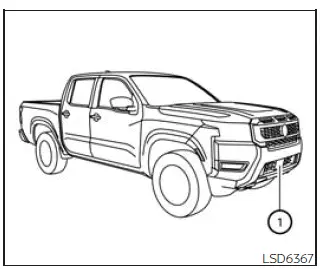
The sensor for the ICC system 1 is located at the front of the Nissan Frontier. This front radar sensor is an important part of the Intelligent Cruise Control system because it helps monitor the vehicle ahead and supports vehicle-to-vehicle distance control during suitable driving conditions.
To help keep the ICC system operating correctly and to reduce the chance of false warnings, temporary cancellation, or reduced detection performance, be sure to observe the following maintenance precautions:
- Always keep the sensor area of the front bumper and emblem clean. Remove dirt, mud, insects, snow, ice, road salt, or any other buildup that may block the radar signal.
- Do not strike, press, bend, or damage the area around the sensor. Even minor impact damage near the front bumper can affect sensor alignment and ICC performance on the Nissan Frontier.
- Do not attach a sticker, decal, protective film, transparent material, or any accessory near the sensor. These items may interfere with radar operation and could cause system failure or malfunction.
- Do not attach metallic objects near the sensor area, such as a brush guard, decorative trim, or other metal accessories. Metallic materials can disturb radar transmission and may cause the ICC system to operate incorrectly.
- Do not alter, remove, repaint, or modify the front bumper or emblem area. Before customizing, repairing, repainting, or restoring the front bumper of the Nissan Frontier, it is recommended that you visit a NISSAN dealer to help ensure the sensor area remains compatible with the ICC system.
Radio frequency statement
FCC Notice
USA
This device complies with Part 15 of the FCC Rules with Industry Canada licenceexempt RSS standard(s).
Operation is subject to the following two conditions:
1. This device may not cause harmful interference, and
2. This device must accept any interference received, including interference that may cause undesired operation.
Radio frequency radiation exposure Information:
This equipment complies with FCC and IC radiation exposure limits set forth for an uncontrolled environment.
This equipment should be installed and operated with minimum distance of 30 cm between the radiator and your body.
This transmitter must not be co-located or operating in conjunction with any other antenna or transmitter.
FCC Notice
Changes or modifications not expressly approved by the party responsible for compliance could void the user's authority to operate the equipment.
CANADA
This device complies with Part 15 of the FCC Rules and Industry Canada licenceexempt RSS standard(s).
Operation is subject to the following two conditions:
1. This device may not cause harmful interference, and
2. This device must accept any interference received, including interference that may cause undesired operation.
Radio frequency radiation exposure Information:
This equipment complies with FCC and IC radiation exposure limits set forth for an uncontrolled environment.
This equipment should be installed and operated with minimum distance of 30 cm between the radiator and your body.
This transmitter must not be co-located or operating in conjunction with any other antenna or transmitter.
FCC Notice
Changes or modifications not expressly approved by the party responsible for compliance could void the user's authority to operate the equipment.
Conventional (fixed speed) cruise control mode Nissan Frontier D41
Basic Information
The conventional, or fixed speed, cruise control mode in the Nissan Frontier is designed to help the driver maintain a selected road speed without keeping constant pressure on the accelerator pedal. When conditions are suitable, this function can support steady driving within a speed range of approximately 25 to 90 mph (40 to 144 km/h). It is important to understand that this mode holds speed only; it does not manage the distance to traffic ahead.
WARNING
- When the Nissan Frontier is operated in conventional (fixed speed) cruise control mode, the system does not provide a warning chime if your vehicle becomes too close to the vehicle in front. In this mode, the presence of a vehicle ahead and the vehicle-to-vehicle distance are not detected or controlled.
- Always watch the road carefully and maintain a safe following distance between your Nissan Frontier and the vehicle ahead. Failure to judge the distance properly can increase the risk of a collision.
- Before relying on the selected cruise function, always check and confirm the setting shown in the ICC system display.
- Do not use conventional (fixed speed) cruise control mode when driving in any of the following
conditions:
- When road or traffic conditions do not allow the vehicle to remain safely at a constant set speed
- In heavy traffic, stop-and-go traffic, or traffic where speeds change frequently
- On winding roads, steep grades, rolling hills, or roads that require frequent speed adjustment
- On slippery surfaces, including roads affected by rain, snow, ice, loose gravel, or similar conditions
- In areas with strong or gusty winds that may affect vehicle stability
- Using this mode in unsuitable conditions may reduce your ability to control the vehicle and could lead to an accident.
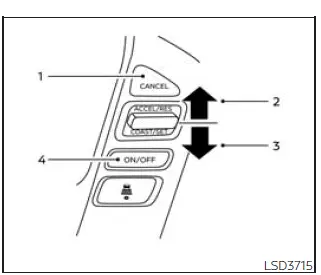
Conventional (fixed speed) cruise control switches
1. CANCEL switch: This switch deactivates the cruise control function and cancels the currently set speed.
2. ACCEL/RES switch: This switch resumes the previously set cruising speed or increases the selected speed step by step.
3. COAST/SET switch: This switch stores the desired cruise speed or lowers the set speed incrementally when adjustment is needed.
4. ICC switch: This is the master control switch used to activate the Intelligent Cruise Control system and select the appropriate cruise control mode in the Nissan Frontier.
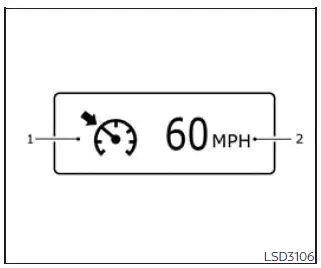
Conventional (fixed speed) cruise control mode display and indicators
The cruise control display is shown in the vehicle information display, where the driver can verify the selected mode and the current system status.
1. Cruise indicator: This indicator shows the operating condition of the ICC system by using different colors in the Nissan Frontier display.
- Cruise control ON indicator (gray): Shows that the ICC switch has been turned on and the system is ready for use.
- Cruise control SET indicator (green): Shows that a cruising speed has been selected and the vehicle is maintaining that set speed.
- Cruise control warning (yellow): Shows that a malfunction has been detected in the ICC system and the system requires attention.
2. Set vehicle speed indicator: This indicator displays the selected vehicle speed. On Canadian Nissan Frontier models, the set speed is shown in km/h.
Operating conventional (fixed speed) cruise control mode
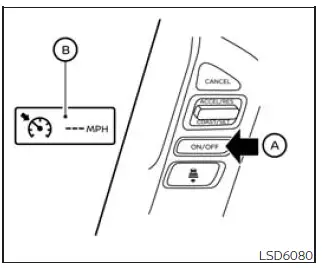
To activate conventional (fixed speed) cruise control mode, push and hold the ICC switch OA for more than approximately 1.5 seconds.
When the ICC switch is pressed and held, the ICC indicator appears briefly, turns off, and then the conventional (fixed speed) cruise control mode display and indicators OB appear in the vehicle information display. After this, the driver can set the desired cruising speed for the Nissan Frontier. Pressing the ICC switch again turns the system completely off. The system is also switched off automatically when the ignition switch is placed in the OFF position.
To use the ICC system again, quickly press and release the ICC switch for vehicle-to-vehicle distance control mode, or press and hold the ICC switch again to select conventional cruise control mode. Always choose the mode that matches the driving environment and confirm the display before continuing.
CAUTION
To help prevent accidental cruise control operation, turn the ICC switch off whenever the ICC system is not being used. This simple habit is especially important in the Nissan Frontier when moving between city traffic, open roads, and changing driving conditions.
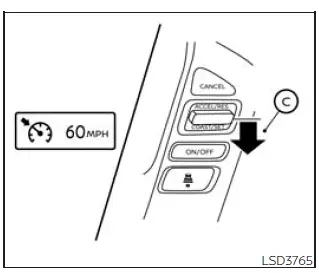
To establish a cruising speed in your Nissan Frontier, first accelerate the vehicle until the desired speed is reached. Press the COAST/SET C switch and then release it. Once activated, the cruise indicator changes color to green and the set speed indicator appears in the vehicle information display. After removing your foot from the accelerator pedal, the Nissan Frontier will automatically maintain the selected speed under suitable driving conditions.
- When overtaking another vehicle, simply press the accelerator pedal to gain additional speed. After the maneuver is completed and the pedal is released, the Nissan Frontier will automatically return to the previously stored cruising speed.
- The cruise control system may not be able to maintain the selected speed while traveling on steep uphill
or downhill grades.
If this occurs, manually control the vehicle speed until road conditions become suitable again for cruise control operation.
To cancel the currently stored cruising speed, use any of the following methods:
1. Press the CANCEL switch. The set vehicle speed indicator will turn off, confirming that the preset speed has been canceled.
2. Lightly press the brake pedal. This action immediately deactivates the stored speed setting and turns off the vehicle speed indicator.
3. Switch the ICC system off. Both the cruise indicator and the vehicle speed indicator will be extinguished, indicating that the system has been fully deactivated.
To establish a higher cruising speed, use one of the following methods:
1. Press the accelerator pedal and allow the Nissan Frontier to reach the desired speed. Once the target speed is achieved, press and release the COAST/SET switch to store the new speed.
2. Press and hold the ACCEL/RES switch.
Release the switch when the vehicle reaches the preferred cruising speed.
3. Press and quickly release the ACCEL/RES switch. Each brief press increases the stored speed by approximately 1 mph (1.6 km/h), allowing precise speed adjustments.
To establish a lower cruising speed, use one of the following methods:
1. Lightly tap the brake pedal to reduce speed. Once the Nissan Frontier reaches the desired speed, press and release the COAST/SET switch to save the new setting.
2. Press and hold the COAST/SET switch.
Release the switch when the vehicle slows to the preferred cruising speed.
3. Press and quickly release the COAST/SET switch. Each brief press lowers the stored speed by approximately 1 mph (1.6 km/h), making fine adjustments simple and convenient.
To return to a previously stored cruising speed, press and release the ACCEL/RES switch. The Nissan Frontier will automatically accelerate back to the last saved speed, provided the vehicle is traveling faster than 25 mph (40 km/h). This feature can be especially useful after temporarily slowing for traffic or road conditions.
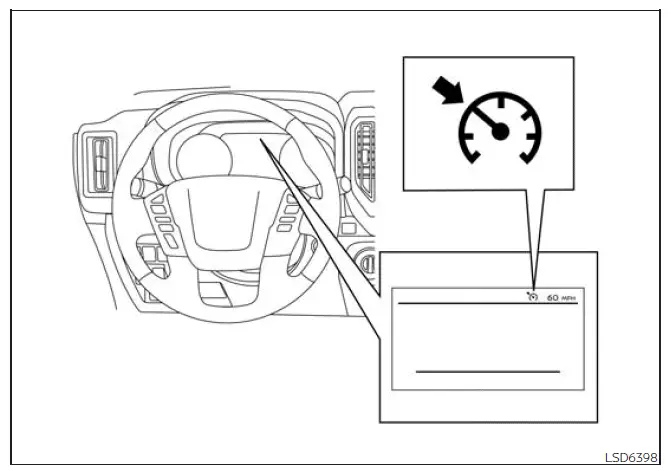
System temporarily disabled
Under certain operating conditions, an audible chime will sound and the cruise control system will automatically cancel operation to help maintain safe vehicle control.
- When the vehicle speed drops more than 8 mph (13 km/h) below the stored cruising speed
- When the shift lever is moved out of the D (Drive) position or manual shift mode
- When the parking brake is applied
- When the Vehicle Dynamic Control (VDC) system is activated, including traction control intervention
- When wheel slip is detected due to reduced traction or unstable road conditions
If the system detects an operational issue, an audible warning chime will sound and the cruise indicator color will change to orange. This color change alerts the driver that the Nissan Frontier cruise control system requires attention.
Action to take
If the cruise indicator changes to orange, safely move the vehicle to a secure location and place the shift lever in the P (Park) position.
Turn the engine off completely, wait a few moments, then restart the engine. Resume driving and attempt to set the cruise control system again following the normal operating procedure.
If the system cannot be set again or the indicator remains illuminated, a malfunction may be present within the cruise control or ICC system. Although the Nissan Frontier can generally continue to be driven under normal conditions, the system should be inspected as soon as possible. For accurate diagnosis and professional service, it is recommended that you have the vehicle checked by an authorized NISSAN dealer.





