



Nissan Frontier: Starting and driving - Intelligent Driver Alertness (I-DA)
Basic Information
WARNING
Failure to follow the warnings and instructions for proper use of the Intelligent Driver Alertness (I-DA) system could result in serious injury or death. The system is designed to support driver awareness, but it must never be treated as a substitute for safe driving habits.
- The I-DA system in the Nissan Frontier provides only a warning when it detects signs that the driver's attention may be decreasing or that drowsiness may be developing. It will not steer the vehicle, apply corrective control, keep the vehicle in its lane, or prevent loss of control.
- The I-DA system cannot detect every case of driver fatigue, distraction, reduced concentration, or lack of attention. In some situations, the system may not provide an alert even when the driver is tired or distracted.
- It is always the driver's responsibility to:
- stay alert and focused on the road,
- drive the Nissan Frontier safely and responsibly,
- keep the vehicle properly positioned in the traveling lane,
- remain in full control of the vehicle at all times,
- avoid driving when tired, sleepy, or physically unable to concentrate,
- avoid distractions such as texting, phone use, eating, or looking away from the road.
The I-DA system helps alert the driver if the Nissan Frontier detects signs of reduced attention or possible driving fatigue.
The system monitors steering behavior and driving style over a period of time, then compares current driving patterns with the driver's normal operation. If the system determines that driver attention may be decreasing over time, it uses audible and visual warnings to suggest that the driver take a break. This reminder is intended to encourage safer driving before fatigue becomes a more serious risk.
Intelligent Driver Alertness system operation
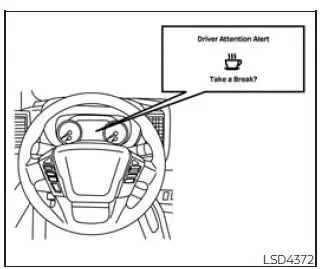
If the system detects signs of driver fatigue or reduced attention, the message "Take a break?" appears in the Nissan Frontier vehicle information display, and a chime sounds when the vehicle is being driven at speeds above 37 mph (60 km/h).
The system continuously monitors driver attention during the trip and can provide more than one warning if it continues to detect driving behavior that suggests tiredness or reduced concentration.
The system resets and begins reassessing driving style and steering behavior when the ignition switch is cycled from the ON position to the OFF position and then back to the ON position. After this reset, the Nissan Frontier starts building a new driving pattern for the current trip.
How to enable/disable the Intelligent Driver Alertness (I-DA) system
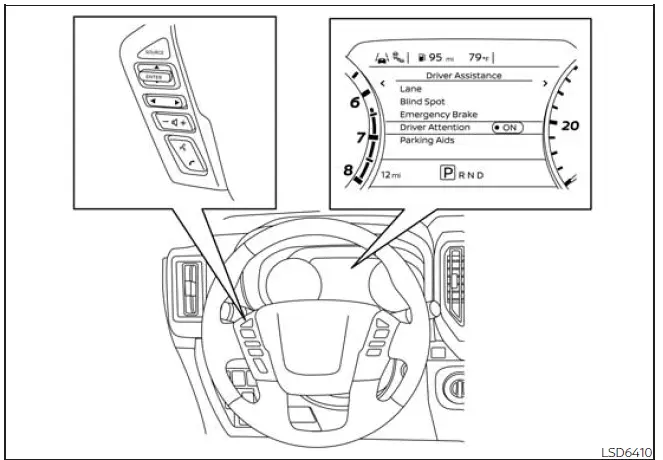
Use the following steps to enable or disable the I-DA system through the Nissan Frontier vehicle information display.
1. Press the
 button until
"Settings" appears
in the vehicle information display.
button until
"Settings" appears
in the vehicle information display.
Use the
 button to select "Driver
Assistance." Then press the ENTER
button to open the menu.
button to select "Driver
Assistance." Then press the ENTER
button to open the menu.
2. Select "Driver Attention" and press the ENTER button to turn the Intelligent Driver Alertness system on or off.
NOTE:
The selected setting is retained even after the engine is restarted, so the Nissan Frontier will keep the last chosen I-DA system setting until it is changed again.
Intelligent Driver Alertness (I-DA) system limitations
Basic Information
WARNING
The following points describe important limitations of the I-DA system. Failure to operate the Nissan Frontier in accordance with these limitations could result in serious injury or death.
- The I-DA system may not operate properly and may not provide an alert in the following
conditions:
- Poor road conditions, including uneven pavement, rough surfaces, potholes, road repairs, or similar conditions that affect steering behavior.
- Strong side winds that require frequent steering corrections.
- A sporty or aggressive driving style, including higher cornering speeds, rapid acceleration, or quick steering inputs.
- Frequent lane changes or repeated changes in vehicle speed that make the driving pattern harder for the system to evaluate.
- The I-DA system will not provide an alert in the following conditions:
- The Nissan Frontier is traveling at speeds lower than 37 mph (60 km/h).
- The driver experiences only a brief lapse of attention.
- There is an instantaneous distraction, such as dropping an object, briefly looking away, or making a quick adjustment inside the cabin.
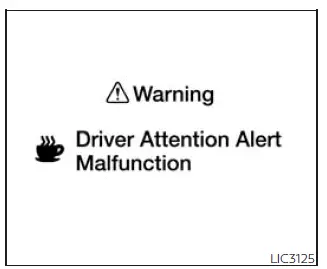
System malfunction
If the Intelligent Driver Alertness system malfunctions, a system warning message will appear in the Nissan Frontier vehicle information display, and the function will stop automatically to prevent incorrect operation.
Action to take
Stop the vehicle in a safe location, place the Nissan Frontier in the P (Park) position, turn the engine off, and then restart the engine. If the system warning message continues to appear after restarting, have the system inspected by a qualified technician. It is recommended that you visit a NISSAN dealer for this service, especially if the warning returns repeatedly or the driver attention function remains unavailable.





