



Nissan Frontier: Starting and driving - Intelligent Forward Collision Warning (I-FCW)
- Basic Information
- I-FCW system operation
- Turning the I-FCW system on/off
- I-FCW system limitations
- System temporarily unavailable
- System maintenance
Basic Information Nissan Frontier 2026
WARNING
Failure to follow the warnings and instructions for proper use of the Intelligent Forward Collision Warning (I-FCW) system could result in serious injury or death. The system is intended to support the driver, not to replace attentive driving.
- The I-FCW system in the Nissan Frontier can help warn the driver before a potential collision situation develops, but it cannot prevent a collision by itself. It is always the driver's responsibility to remain alert, monitor traffic conditions, keep a safe following distance, drive safely, and maintain full control of the vehicle at all times.
The I-FCW system can help alert the driver when it detects sudden braking by a second vehicle traveling ahead of the vehicle directly in front of the Nissan Frontier in the same lane. This added forward-looking warning can give the driver more time to recognize a developing traffic hazard and respond appropriately.
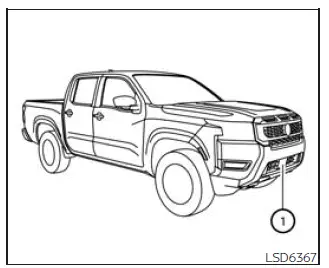
The I-FCW system uses a radar sensor 1 located on the front of the Nissan Frontier to measure the distance to the vehicle ahead in the same lane. By monitoring traffic farther forward, the system can assist the driver with earlier awareness of sudden braking situations beyond the immediately preceding vehicle.
I-FCW system operation Nissan Frontier
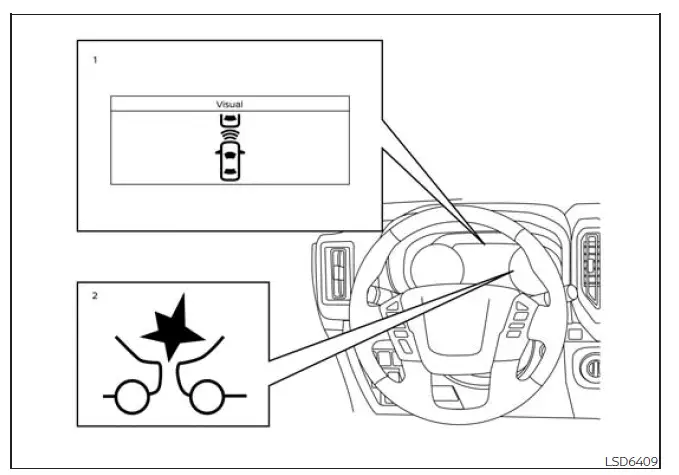
- Vehicle ahead detection indicator
- AEB with Pedestrian Detection system warning light
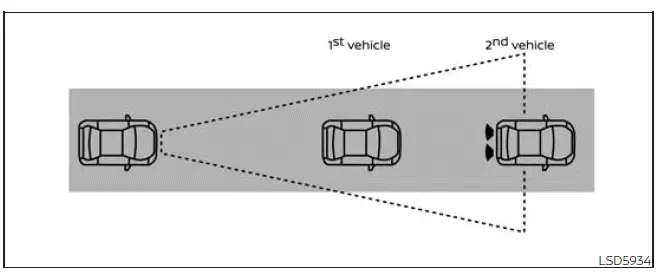
The I-FCW system in the Nissan Frontier is designed to operate when the vehicle is traveling at speeds above approximately 3 mph (5 km/h).
If the system identifies a possible risk of a forward collision, the I-FCW system alerts the driver by flashing the vehicle ahead detection indicator and by sounding an audible warning. This early alert is intended to help the driver react sooner, maintain awareness of traffic conditions ahead, and take appropriate action when necessary.
Turning the I-FCW system on/off Nissan Frontier D41
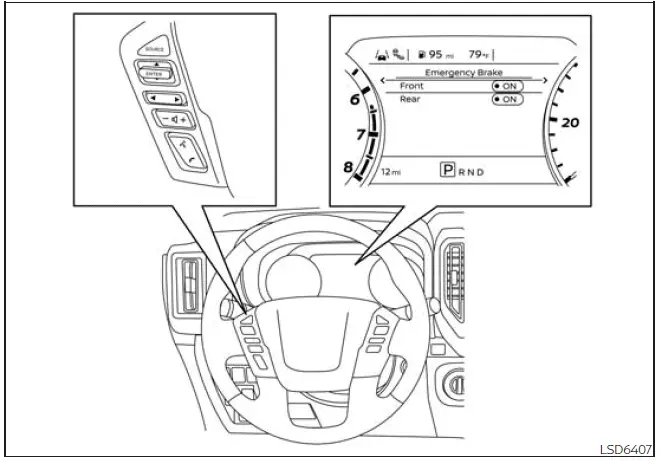
Use the following procedure to switch the I-FCW system ON or OFF in the Nissan Frontier.
1. Press the
 button until
"Settings" appears
in the vehicle information display.
button until
"Settings" appears
in the vehicle information display.
Use the
 button to highlight "Driver
Assistance." Then press the ENTER
button.
button to highlight "Driver
Assistance." Then press the ENTER
button.
2. Select "Emergency Brake" and press the ENTER button.
3. Select "Front" and press the ENTER button to turn the system on or off.
When the I-FCW system is switched off, the AEB with Pedestrian Detection system warning light illuminates. This visual warning helps remind the driver that the forward warning function is not currently active.
NOTE:
- The I-FCW system will automatically turn back on when the engine is restarted.
- The I-FCW system is integrated into the
AEB with Pedestrian Detection system.
There is no separate menu selection in the vehicle information display specifically for the I-FCW system. When the AEB with Pedestrian Detection system is switched off, the I-FCW system in the Nissan Frontier is also turned off.
I-FCW system limitations Nissan Frontier 2026
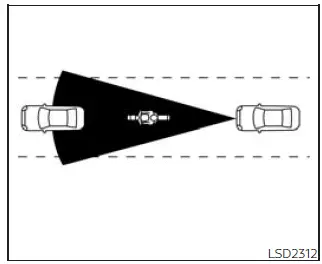
Illustration A
WARNING
The following points describe important limitations of the I-FCW system. Failure to operate the Nissan Frontier with these limitations in mind could result in serious injury or death.
- The I-FCW system cannot detect every vehicle or traffic situation under all driving conditions.
- The radar sensor does not detect the
following objects:
- Pedestrians, animals, or obstacles in the roadway
- Oncoming vehicles
- Vehicles crossing in front of the Nissan Frontier
- (Illustration A) The I-FCW system may not operate when the vehicle ahead is narrow, such as a motorcycle.
- The radar sensor may fail to detect a
vehicle ahead in the following
conditions:
- Snow or heavy rain
- When towing a trailer or similar equipment
- Dirt, ice, snow, or other material covering the radar sensor.
- Interference from other radar sources.
- Snow, mist, or road spray from other vehicles.
- Driving inside a tunnel
- (Illustration B) When the vehicle ahead is being towed.
- (Illustration C) When the distance to the vehicle ahead is too short and the radar sensor beam is blocked.
- (Illustration D) When driving on a steep downhill grade or on roads with sharp curves.
- The system is designed to automatically check sensor operation within certain limits. However, it may not recognize some types of blockage around the sensor area, including ice, snow, stickers, or other attached materials. In these situations, the system may not be able to warn the driver correctly. Regularly inspect, clean, and clear the radar sensor area on the Nissan Frontier.
- Excessive surrounding noise can interfere with the warning chime, and the driver may not hear the alert clearly.
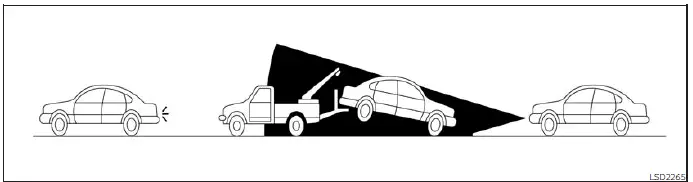
Illustration B
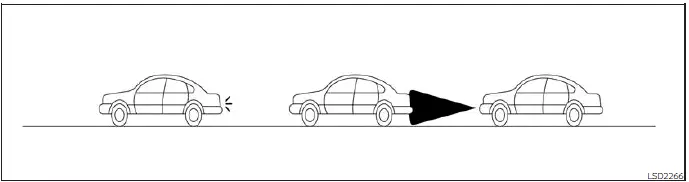
Illustration C
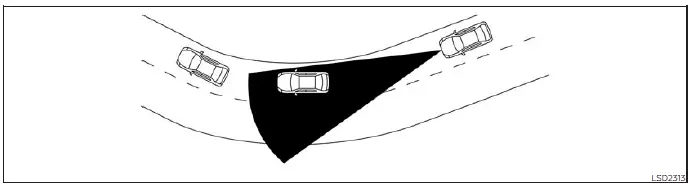
Illustration D
System temporarily unavailable Nissan Frontier SUV
Condition A
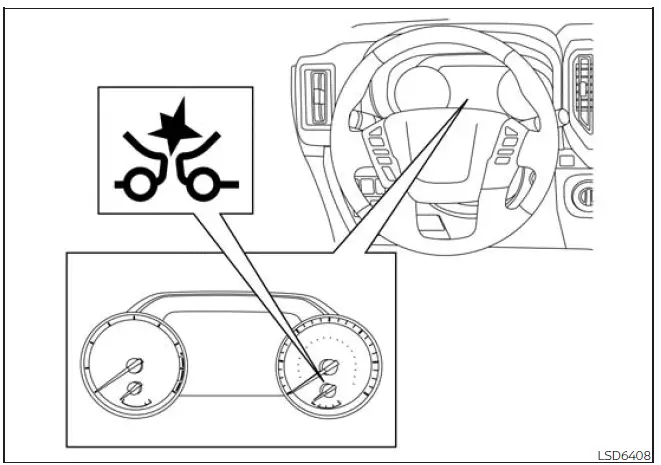
When the radar sensor detects interference from another radar source and the system can no longer reliably identify a vehicle ahead, the I-FCW system in the Nissan Frontier is automatically switched off.
The AEB with Pedestrian Detection system warning light (orange) will illuminate to inform the driver that the forward driving aid is not currently available.
Action to take
When the interference or surrounding conditions are no longer present, the I-FCW system will resume operation automatically.
Condition B
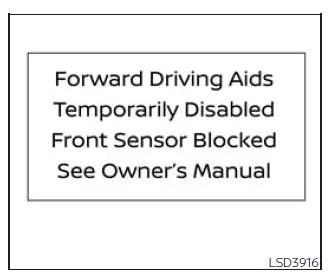
When severe or poor weather conditions, such as rain, fog, snow, or similar visibility-reducing conditions, block the front radar sensor, the I-FCW system will automatically be canceled. The AEB with Pedestrian Detection system warning light will illuminate, and the "Forward Driving Aids Temporarily Disabled Front Sensor Blocked See Owner's Manual" warning message will appear in the vehicle information display of the Nissan Frontier.
Action to take:
When the conditions described above are no longer present, the warning message should disappear from the vehicle information display. If the "Forward Driving Aids Temporarily Disabled Front Sensor Blocked See Owner's Manual" warning message continues to be shown, the system should be inspected. It is recommended that you visit a NISSAN dealer for this service.
Condition C
When the radar sensor located near the front bumper is covered with dirt, snow, ice, road debris, or is otherwise obstructed, the I-FCW system will automatically be canceled. The AEB with Pedestrian Detection system warning light will illuminate, and the "Forward Driving Aids Temporarily Disabled Front Sensor Blocked See Owner's Manual" warning message will appear in the vehicle information display.
Action to take:
If this warning message appears, stop the Nissan Frontier in a safe place, move the shift lever to the P (Park) position, and turn the engine off. If the radar signal is temporarily interrupted because the sensor area is dirty or blocked, clean the front bumper sensor area carefully and restart the engine. If the "Forward Driving Aids Temporarily Disabled Front Sensor Blocked See Owner's Manual" warning message remains displayed, have the system checked. It is recommended that you visit a NISSAN dealer for this service.
Condition D
When driving in areas with limited roadside structures or few surrounding objects, such as long bridges, deserts, open snowfields, or roads running alongside long walls, the system may turn on the system warning light and display the "Forward Driving Aids Temporarily Disabled Front Sensor Blocked See Owner's Manual" warning message. In these situations, the radar may not receive enough normal reference information from the driving environment.
Action to take:
When the driving conditions listed above no longer exist, turn the system back on and continue driving with normal caution.
NOTE:
If the AEB with Pedestrian Detection system stops working, the I-FCW system in the Nissan Frontier will also stop working because both functions are linked within the same forward driving assistance system.
System malfunction
If the I-FCW system malfunctions, it will be turned off automatically. A chime will sound, the AEB with Pedestrian Detection system warning light (orange) will illuminate, and the warning message [System fault See Owner's Manual] will appear in the vehicle information display. This indicates that the Nissan Frontier forward collision warning function may not be operating as intended.
Action to take
If the warning light (orange) comes on, stop the vehicle in a safe location, turn the engine off, and then restart the engine. If the warning light continues to illuminate after the restart, have the I-FCW system checked. It is recommended that you visit a NISSAN dealer for this service.
System maintenance Nissan Frontier
Basic Information
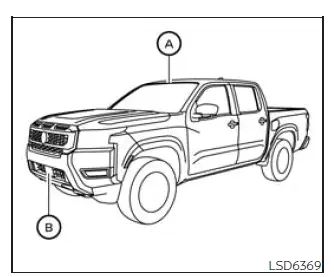
The radar sensor for the AEB with Pedestrian Detection system is positioned at the front of the Nissan Frontier B. The forward camera is installed on the upper area of the windshield A, where it can monitor the road ahead and support the system's detection functions.
To help keep the AEB with Pedestrian Detection system operating accurately and reliably in the Nissan Frontier, observe the following maintenance requirements:
- Always keep the sensor areas on the front bumper, front emblem area, and windshield clean and free from mud, snow, ice, road film, bugs, wax, stickers, or other materials that may interfere with detection.
- Do not strike, press, scratch, or damage the areas around the sensors, including the bumper and windshield. Even minor damage or misalignment can affect how the Nissan Frontier forward safety systems read the road ahead.
- Do not cover the sensors, attach stickers, apply transparent film, or install accessories near the sensor areas. Blocking the radar or camera view may interrupt sensor signals and can cause improper operation, system failure, or warning messages.
- Do not attach metallic objects near the radar sensor, such as a brush guard, decorative metal trim, or other front-mounted equipment. Metallic parts may interfere with radar operation and can cause the AEB with Pedestrian Detection system to malfunction.
- Do not place reflective materials, including white paper, mirrors, shiny accessories, or reflective decorations, on the instrument panel. Reflected sunlight can enter the camera field of view and reduce the camera unit's ability to identify vehicles, pedestrians, or road conditions correctly.
- Do not alter, remove, repaint, modify, or repair the front bumper in a way that may affect the sensor area. Before customizing, replacing, painting, or restoring the front bumper of the Nissan Frontier, it is recommended that you visit a NISSAN dealer to help ensure the sensors remain properly positioned and calibrated.
Radio frequency statement
FCC Notice
USA
This device complies with Part 15 of the FCC Rules with Industry Canada licenceexempt RSS standard(s).
Operation is subject to the following two conditions:
1. This device may not cause harmful interference, and
2. This device must accept any interference received, including interference that may cause undesired operation.
Radio frequency radiation exposure Information:
This equipment complies with FCC and IC radiation exposure limits set forth for an uncontrolled environment.
This equipment should be installed and operated with minimum distance of 30 cm between the radiator and your body.
This transmitter must not be co-located or operating in conjunction with any other antenna or transmitter.
FCC Notice
Changes or modifications not expressly approved by the party responsible for compliance could void the user's authority to operate the equipment.
CANADA
This device complies with Part 15 of the FCC Rules and Industry Canada licenceexempt RSS standard(s).
Operation is subject to the following two conditions:
1. This device may not cause harmful interference, and
2. This device must accept any interference received, including interference that may cause undesired operation.
Radio frequency radiation exposure
Information:
This equipment complies with FCC and IC radiation exposure limits set forth for an uncontrolled environment.
This equipment should be installed and operated with minimum distance of 30 cm between the radiator and your body.
This transmitter must not be co-located or operating in conjunction with any other antenna or transmitter.
FCC Notice
Changes or modifications not expressly approved by the party responsible for compliance could void the user's authority to operate the equipment.





