



Nissan Frontier: Instruments and Controls - Interior lights
Basic Information
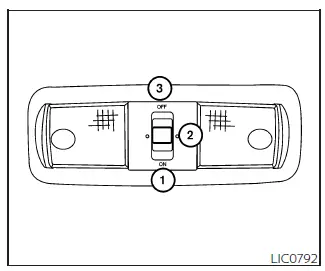
The interior lighting system in the Nissan Frontier is designed to improve visibility, convenience, and passenger comfort inside the cabin. The interior light features a three-position switch and can operate independently of the ignition switch position.
When the switch is moved to the ON position 1, the interior lights illuminate continuously regardless of whether the doors are open or closed. To help protect the battery, the lights will automatically turn off after a certain period unless the ignition switch is placed in the ON position.
When the switch is set to the DOOR or normal operating position 2, the interior lights remain illuminated for a short period of time under several conditions, and the cargo light may also activate when:
- The doors are unlocked using the key fob, mechanical key, or power door lock switch while all doors remain closed and the ignition switch is in the OFF position.
- The driver's door is opened and then closed while the ignition switch remains in the OFF position.
- The ignition switch is turned to the OFF position while all vehicle doors are closed.
This delayed lighting feature helps Nissan Frontier occupants enter and exit the vehicle safely in low-light conditions while also making it easier to locate personal belongings inside the cabin.
The interior lights will automatically switch off during the timer period when any of the following actions occur:
- The driver's door is locked using the key fob, mechanical key, or power door lock switch.
- The ignition switch is placed in the ON position.
When the switch is moved to the OFF position 3, the interior lights remain off regardless of door status. However, the cargo light may still illuminate when a front or rear passenger door is opened, depending on vehicle configuration.
To prevent unnecessary battery drain, the Nissan Frontier lighting system automatically turns off the interior lights after a specified amount of time, even if the doors remain open.
CAUTION
Do not leave the interior lights on for extended periods with the engine stopped. Excessive use may discharge the vehicle battery and affect starting performance.
Map lights
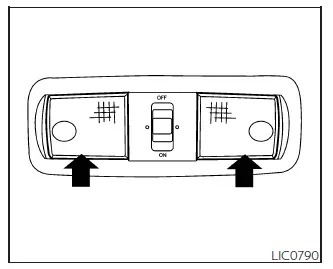
The Nissan Frontier map lights provide focused illumination for reading maps, locating items, or performing other tasks inside the cabin without significantly affecting visibility for other occupants.
To switch the map lights on, gently press the light lenses.
To turn the map lights off, press the lenses again. The lights will immediately switch off.
The convenient overhead location allows both the driver and front passenger to access additional lighting whenever needed.
CAUTION
Do not operate the map lights for long periods while the engine is not running. Prolonged use may result in battery discharge.
Cargo light
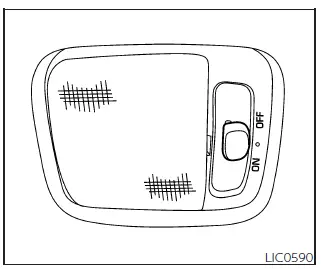
The cargo light located in the overhead trim area of the Nissan Frontier helps improve visibility when loading, unloading, or organizing cargo inside the vehicle. The light is controlled by a convenient three-position switch.
To operate the cargo light, move the switch to the desired position:
ON: The cargo light remains illuminated continuously.
DOOR: The cargo light automatically turns on when the rear doors are opened and switches off when the rear doors are closed.
OFF: The cargo light remains off regardless of door position, lock status, or vehicle operation.
The Nissan Frontier cargo lighting system is especially useful when accessing equipment, luggage, tools, or personal items during nighttime driving or in poorly lit environments.
CAUTION
Do not use the cargo light for extended periods when the engine is not running. Continuous operation may discharge the battery and reduce available starting power.
Proper use of the Nissan Frontier interior lighting system helps improve cabin visibility, convenience, and overall comfort while minimizing unnecessary battery consumption.





