



Nissan Frontier: Pre-driving checks and adjustments - Keys
NISSAN Intelligent Key
Basic information
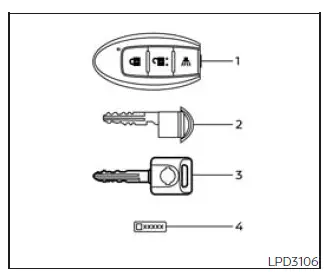
Type A (if so equipped)
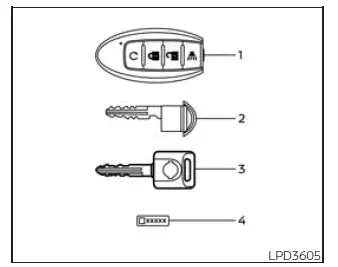
Type B (if so equipped)
- Two Intelligent Keys
- Mechanical key
- Master key
- Key number plate
The Nissan Frontier can only be operated using Intelligent Keys that have been properly registered to the vehicle's Intelligent Key system and NISSAN Vehicle Immobilizer System. These advanced security systems work together to help prevent unauthorized vehicle operation and provide convenient keyless access functionality.
Never leave these keys inside the Nissan Frontier.
Up to four Intelligent Keys can be registered and paired with a single Nissan Frontier. Before any additional keys can be used, they must be programmed by an authorized NISSAN dealer. During the registration process, the memory of the Intelligent Key system is reset and updated. For this reason, it is important to bring every Intelligent Key currently associated with the vehicle when having new keys programmed.
A key number plate is supplied with the vehicle keys. Record this number and store it in a secure location such as a wallet, safe, or important document file, but never inside the Nissan Frontier itself. If all keys are lost, this number can be used by a NISSAN dealer to create replacement keys.
NISSAN does not maintain a permanent record of individual key numbers. Therefore, keeping the key number plate in a safe location is extremely important.
The key number is generally required only if all keys have been lost and no original key remains available for duplication. If at least one working key is available, a duplicate key can usually be produced without referencing the key number.
CAUTION
Listed below are conditions and situations that may damage the Nissan Frontier Intelligent Key or negatively affect its operation:
- Do not allow the Intelligent Key, which contains sensitive electronic components, to come into contact with water, moisture, or saltwater. Exposure may interfere with proper system operation.
- Do not drop the Intelligent Key onto hard surfaces.
- Do not strike the Intelligent Key against other objects or subject it to strong impacts.
- Do not alter, modify, disassemble, or attempt to repair the Intelligent Key.
- Moisture can damage internal electronic components. If the Intelligent Key becomes wet, dry it thoroughly as soon as possible.
- Do not leave the Intelligent Key for extended periods in locations where temperatures exceed 140°F (60°C), such as a vehicle parked in direct sunlight.
- Do not attach the Intelligent Key to a key holder or accessory that contains a magnet.
- Do not place the Intelligent Key near devices that generate strong magnetic fields, including
televisions, speakers, audio equipment, computers, or similar electronics.
If an Intelligent Key for your Nissan Frontier is lost or stolen, NISSAN strongly recommends deleting the associated ID code from the vehicle memory. This precaution can help reduce the risk of unauthorized vehicle access or operation. For assistance with this procedure, it is recommended that you visit an authorized NISSAN dealer.
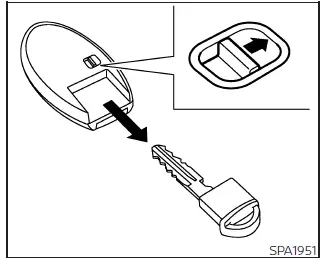
Mechanical key
The Nissan Frontier Intelligent Key includes an integrated mechanical key that can be used when battery power is unavailable or when manual access is required.
To remove the mechanical key, slide or release the lock knob located on the rear side of the Intelligent Key.
To reinstall the mechanical key, insert it completely into the Intelligent Key housing until the lock knob automatically returns to the locked position.
The mechanical key can be used to manually lock or unlock the driver's door, tailgate, and glove box (if equipped).
CAUTION
Always keep the mechanical key securely installed inside the Nissan Frontier Intelligent Key when it is not being used separately.
Valet hand-off (if so equipped)
When leaving your Nissan Frontier with valet parking personnel, it is recommended to provide only the Intelligent Key while retaining the mechanical key and master key. This helps protect personal belongings and restrict access to secured storage areas.
To prevent unauthorized access to the glove box during valet parking, follow the procedure below.
1. Remove the mechanical key from the Intelligent Key.
2. Lock the glove box (if so equipped) using the mechanical key or the master key.
3. Hand the Intelligent Key to the valet attendant and keep both the mechanical key and master key in your possession.
This convenient Nissan Frontier security feature provides additional peace of mind when temporarily entrusting the vehicle to others.
NISSAN Vehicle Immobilizer System keys
Additional or replacement keys:
If you still possess at least one functioning key, the key number is generally not required when obtaining additional Nissan Frontier Vehicle Immobilizer System keys. Existing keys can be duplicated without referencing the original key number.
Up to four Nissan Vehicle Immobilizer System keys may be registered to a single Nissan Frontier. When obtaining replacement or additional keys, all existing keys should be brought to the NISSAN dealer.
This requirement exists because the registration procedure erases all previously stored key codes from the immobilizer system memory. Once programming is complete, only keys registered during that session will be recognized by the vehicle.
Any virtual key accessories (if so equipped) must also be registered again during the same process.
Any key not presented during registration will no longer be capable of starting the Nissan Frontier after programming has been completed.
This advanced immobilizer technology provides an additional layer of theft protection and helps ensure that only authorized keys can operate the vehicle.
CAUTION
Do not allow the immobilizer system key, which contains an electronic transponder chip, to come into contact with water, salt water, excessive moisture, or corrosive substances. Such exposure may interfere with proper Nissan Frontier immobilizer system operation and affect vehicle starting capability.





