



Nissan Frontier: Starting and driving - Lane Departure Warning (LDW)
Basic Information Nissan Frontier SUV
WARNING
Failure to follow the warnings and instructions for proper use of the LDW system may result in serious injury or death.
- This system is designed only as a warning feature to help inform the driver of a possible unintended lane departure. It does not steer the Nissan Frontier, correct the vehicle path, or prevent loss of control. The driver is always responsible for staying alert, driving safely, keeping the vehicle within the proper travel lane, and remaining in control of the vehicle at all times.
The LDW system operates when the Nissan Frontier is driven at speeds of approximately 37 mph (60 km/h) and above, and only when the lane markings ahead are clearly visible on the road surface.
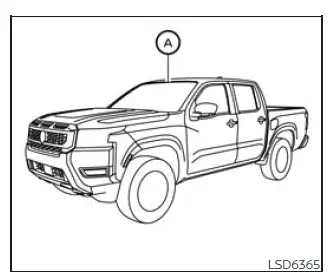
The LDW system monitors the lane markers in the traveling lane using the camera unit A, which is located above the inside rearview mirror.
When the system detects that the Nissan Frontier is beginning to move out of its driving lane, it warns the driver with a visual indicator and a steering wheel vibration. This warning gives the driver an opportunity to check the surroundings and correct the vehicle path safely.
LDW system operation Nissan Frontier
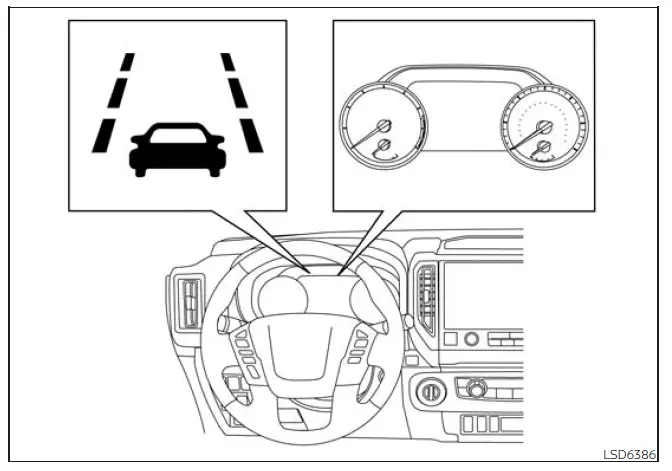
The LDW system provides a lane departure warning function when the vehicle is driven at speeds of approximately 37 mph (60 km/h) and above and the lane markings are clear enough for the camera to recognize. When the Nissan Frontier approaches the left or right side of the traveling lane without the system recognizing normal lane keeping, the steering wheel will vibrate and the LDW indicator on the instrument panel will blink to alert the driver.
The warning function stops when the vehicle returns inside the lane markers and the system no longer detects a possible unintended lane departure.
How to enable/disable the LDW system
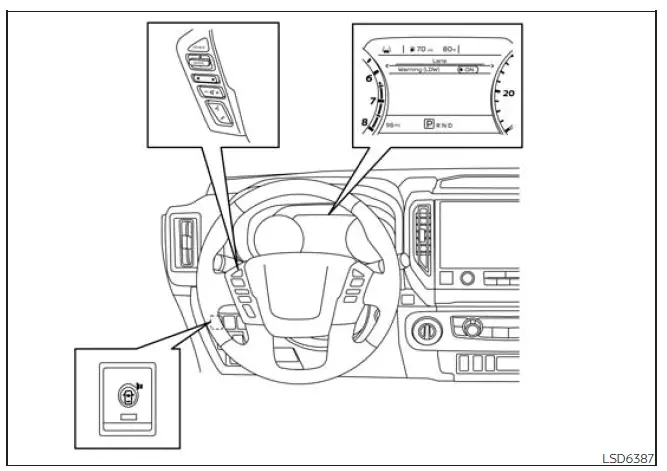
When the LDW system is enabled in the vehicle information display, it can be temporarily turned off by pressing the warning systems switch.
Use the following steps to enable or disable the LDW system in the Nissan Frontier.
1. Press the
 button until
"Settings" appears
in the vehicle information display.
button until
"Settings" appears
in the vehicle information display.
Use the
 button to select "Driver
Assistance." Then press the ENTER
button.
button to select "Driver
Assistance." Then press the ENTER
button.
2. Select "Lane" and press the ENTER button.
3. Select "Warning (LDW)" and press the ENTER button.
4. Press the Warning systems switch to turn the system on or off.
NOTE:
- When the system is enabled or disabled, the current setting will be retained even after the engine is restarted.
- When the LDW system is turned on, the LDW indicator (white) in the vehicle information display illuminates.
For dependable Nissan Frontier LDW performance, keep the windshield area around the front camera clean, avoid covering the camera, and remember that faded lane markings, bad weather, glare, or road construction can limit system accuracy.
LDW system limitations Nissan Frontier 2022
WARNING
The limitations of the LDW system are described below. Failure to understand these limits or to follow the instructions for proper use of the Lane Departure Warning system in the Nissan Frontier could result in serious injury or death.
- The system will not operate at speeds below approximately 37 mph (60 km/h), and it will not provide a warning if the camera cannot clearly detect lane markers.
- Do not rely on the LDW system under the
following conditions, because it may not
function accurately or may be unable to recognize the lane:
- During poor weather, including rain, fog, snow, sleet, or similar conditions that reduce visibility.
- When driving the Nissan Frontier on slippery roads, such as roads covered with ice, packed snow, or wet surfaces with reduced traction.
- When driving on winding, rough, uneven, or irregular roads where lane position may change quickly.
- When a lane is closed because of road repairs, construction work, or temporary traffic control.
- When driving in a temporary, makeshift, or redirected lane that does not have normal markings.
- When driving on roads where the lane is too narrow for reliable camera detection.
- When the tires are not in normal operating condition, such as excessive tire wear, low tire pressure, use of a spare tire, tire chains, or installation of nonstandard wheels.
- When the vehicle is equipped with non-original brake components or suspension parts that may affect vehicle behavior or ride height.
- When the Nissan Frontier is towing a trailer or another vehicle, since the vehicle's movement and lane position may be affected.
- The system may also fail to function properly
under the following road or visibility conditions:
- On roads with multiple parallel lane markings, faded lane lines, poorly painted markings, yellow lane markers, non-standard lane markings, or lane markers covered by water, dirt, mud, snow, or road debris.
- On roads where old or discontinued lane markers are still visible and may be mistaken for active lane markings.
- On roads with sharp curves, where the camera may have difficulty following the lane shape.
- On roads where high-contrast objects, such as shadows, snow patches, standing water, wheel ruts, pavement seams, or leftover lines from road repairs, appear near the lane. The LDW system may incorrectly interpret these objects as lane markers.
- On roads where the traveling lane merges, splits, widens, or narrows suddenly.
- When the Nissan Frontier is not traveling in the same direction as the lane marker, such as during angled driving or lane transition.
- When following another vehicle too closely, because the vehicle ahead may block the lane camera unit's detection range.
- When rain, snow, dirt, frost, fogging, stickers, or another object is on the windshield in front of the lane camera unit.
- When the headlights are dim or ineffective because of dirt on the lens, poor condition, or incorrect headlight aiming.
- When strong light enters the lane camera unit, such as direct sunlight shining toward the front of the Nissan Frontier at sunrise or sunset.
- When brightness changes suddenly, for example when the vehicle enters or exits a tunnel, passes under a bridge, or moves between bright sunlight and deep shade.
The LDW system should be treated as an additional warning aid, not as a substitute for careful steering and road awareness. For the best Nissan Frontier LDW performance, keep the windshield clean, maintain proper tires and suspension components, and continue checking lane markings with your own eyes.
System temporarily disabled
If the Nissan Frontier is parked in direct sunlight during high-temperature conditions, over approximately 104ºF [40ºC], and then started, the LDW system may temporarily deactivate automatically. In this condition, the LDW indicator will blink in white and the following message will appear in the vehicle information display: "Not Available High Camera Temp." After the cabin temperature drops and the camera area cools, the LDW system will resume operation automatically.
The LDW system is not designed to provide a warning under the following conditions:
- When you use the lane change signal and move the Nissan Frontier into another lane in the direction of the signal. The LDW system will become available again approximately 2 seconds after the lane change signal is turned off.
- When vehicle speed drops below approximately 37 mph (60 km/h).
After these conditions are no longer present and all required operating conditions are satisfied, the LDW functions will resume without requiring special driver action.
System malfunction
If the LDW system malfunctions, it will cancel automatically. The LDW indicator will blink in yellow and "Malfunction" will appear in the vehicle information display. If "Malfunction" appears in the vehicle information display, move the Nissan Frontier off the road to a safe location and stop the vehicle. Place the shift lever in the P (Park) position, turn the ignition switch to the OFF position, and restart the engine. If "Malfunction" continues to appear in the vehicle information display, have the system inspected. It is recommended that you visit a NISSAN dealer for this service.
System maintenance
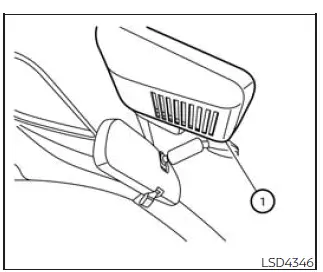
The lane camera unit 1 for the LDW system is positioned above the inside rearview mirror. To help maintain proper LDW system operation in the Nissan Frontier and reduce the risk of a system malfunction, follow these precautions:
- Always keep the windshield clean, especially the area in front of the camera.
- Do not attach stickers, transparent films, toll tags, or other accessories near the camera unit.
- Do not place reflective materials, such as white paper, shiny objects, or a mirror, on the instrument panel. Reflected sunlight can interfere with the camera unit's ability to detect lane markers accurately.
- Do not strike, press, or damage the areas around the camera unit. Do not touch the camera lens or remove the screw located on the camera unit. If the camera unit is damaged in an accident or during windshield service, it is recommended that you visit a NISSAN dealer.
Clean glass, an unobstructed camera view, and correct repairs are important for dependable Nissan Frontier LDW performance, especially in bright sunlight, rain, or changing road conditions.





