



Nissan Frontier: Instruments and Controls - Meters and Gauges
- Basic Information
- Speedometer and Odometer
- Engine Coolant Temperature Gauge
- Auxiliary Gauges
- Off-road and 4-Wheel Drive (4WD) Monitor
Basic Information Nissan Frontier third generation
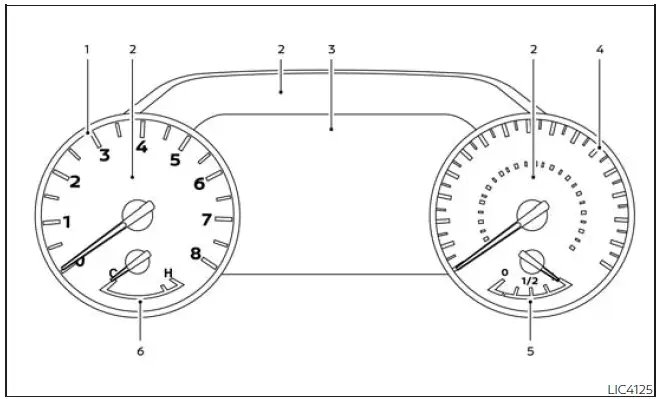
- Tachometer
- Warning and indicator lights
- Vehicle information display
Odometer
Outside temperature display - Speedometer
- Fuel gauge
- Engine coolant temperature gauge
The Nissan Frontier gauge cluster combines traditional analog instrumentation with modern digital information displays. This arrangement allows drivers to monitor vehicle performance, operating conditions, fuel status, and system warnings quickly and efficiently.
Speedometer and Odometer Nissan Frontier D41
Basic Information
The Nissan Frontier is equipped with both a speedometer and an odometer. The speedometer is positioned on the right side of the instrument cluster for easy visibility while driving.
The odometer is displayed within the vehicle information display located to the left of the speedometer and can be viewed whenever the ignition switch is placed in the ON position.
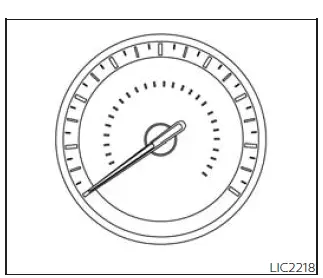
Speedometer
The speedometer continuously displays the current vehicle speed, allowing Nissan Frontier drivers to monitor travel speed accurately under varying road and driving conditions.
Odometer/Twin Trip Odometer
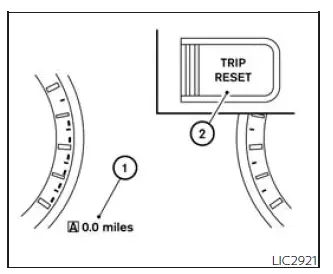
The odometer and twin trip odometer 1 are displayed within the Nissan Frontier vehicle information display whenever the ignition switch is in the ON position.
The odometer records the total accumulated distance traveled by the vehicle throughout its lifetime.
The twin trip odometer allows drivers to track individual journey distances, making it useful for fuel economy calculations, maintenance intervals, business mileage tracking, and trip planning.
Changing the display:
Press the TRIP RESET switch 2 located on the left side of the Nissan Frontier instrument panel to cycle through the available display modes as follows:
ODO → Trip
 → Trip
 → ODO
→ ODO
Resetting the trip odometer:
Press and hold the TRIP RESET switch 2 for approximately two seconds to reset the currently displayed trip odometer reading back to zero.
Tachometer
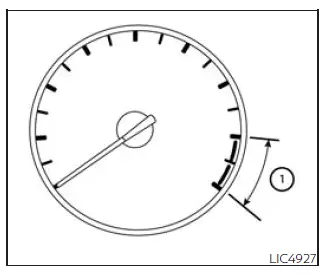
The tachometer displays engine speed in revolutions per minute (RPM), allowing the driver to monitor engine operation and select appropriate shift points for optimal performance and efficiency.
To help protect the Nissan Frontier engine, avoid operating the engine within the red-zone area 1 shown on the gauge.
CAUTION
If engine speed approaches the red zone, immediately reduce engine RPM. Continuous operation within the red zone may result in severe engine damage and costly repairs.
Engine Coolant Temperature Gauge Nissan Frontier
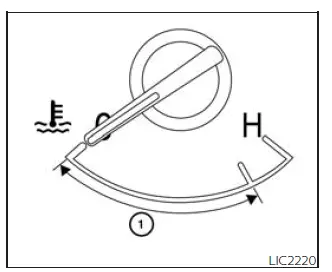
The engine coolant temperature gauge displays the current operating temperature of the Nissan Frontier engine cooling system.
Normal operating temperature 1 is indicated when the gauge needle remains within the designated range shown in the illustration.
The coolant temperature reading may vary depending on outside temperatures, driving conditions, towing loads, terrain, traffic congestion, and engine workload.
CAUTION
If the coolant temperature gauge approaches the hot (H) end of the scale, reduce vehicle speed and engine load to help lower engine temperature. If the gauge exceeds the normal operating range, stop the Nissan Frontier as soon as it is safe to do so. Continuing to operate an overheated engine may result in severe engine damage. Refer to the "If Your Vehicle Overheats" section for emergency procedures.
Fuel Gauge
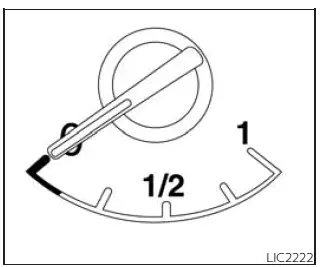
The fuel gauge indicates the approximate amount of fuel remaining in the Nissan Frontier fuel tank.
The gauge reading may fluctuate slightly during acceleration, braking, cornering, climbing hills, or descending steep grades. Such movement is normal and does not indicate a malfunction.
When the ignition switch is turned OFF, the fuel gauge needle gradually returns to the 0 (Empty) position.
The low fuel warning light illuminates when the remaining fuel level becomes low and refueling should be performed soon.
Refill the Nissan Frontier fuel tank before the gauge reaches 0 (Empty).
The
 symbol indicates that the fuel-filler door is located on the driver's side of the vehicle.
CAUTION
- If the Nissan Frontier runs completely out of fuel, the
 Malfunction Indicator Light (MIL) may illuminate.
Refuel the vehicle as soon as possible. After several normal driving cycles, the
 warning light should turn off automatically. If the light remains illuminated, have the vehicle
inspected. It is recommended that you visit an authorized NISSAN dealer for service.
warning light should turn off automatically. If the light remains illuminated, have the vehicle
inspected. It is recommended that you visit an authorized NISSAN dealer for service.
Distance To Empty (DTE)
The Distance To Empty (DTE) feature estimates how far the Nissan Frontier can travel before refueling becomes necessary.
The displayed value is calculated using recent fuel economy data, current fuel level, driving history, and actual fuel consumption patterns.
Because driving conditions constantly change, the displayed DTE value should be considered an estimate rather than an exact measurement. Variations in traffic, terrain, weather, towing loads, and driving style can affect the accuracy of the calculation.
When fuel level becomes critically low, the DTE display automatically changes to "---" before the fuel gauge reaches 0 (Empty).
NOTE:
- The DTE value after refueling is calculated using recent fuel economy data together with the amount of fuel added to the tank.
- If only a small amount of fuel is added or if the ignition remains ON during refueling, the display may not update immediately.
- Any condition affecting fuel economy will also affect the Nissan Frontier DTE estimate, including city driving, highway driving, extended idling, remote engine start usage, off-road terrain, seasonal temperatures, additional cargo weight, roof racks, cargo carriers, towing equipment, and aerodynamic accessories.
Auxiliary Gauges Nissan Frontier SUV
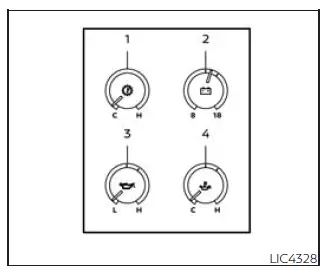
Basic Information
- Automatic Transmission Fluid Temperature Gauge
- Voltmeter
- Engine Oil Pressure Gauge
- Engine Oil Temperature Gauge
The Nissan Frontier auxiliary gauge cluster provides additional real-time vehicle operating information beyond the standard instrument panel. These gauges help drivers monitor critical drivetrain and engine systems, especially during towing, hauling, off-road driving, and other demanding operating conditions.
Automatic Transmission Fluid Temperature Gauge
This gauge displays the current temperature of the automatic transmission fluid in your Nissan Frontier. Monitoring transmission temperature can be particularly useful when towing trailers, carrying heavy loads, or operating the vehicle in challenging terrain.
CAUTION
- This gauge is not intended to indicate automatic transmission fluid level. Transmission fluid level must be checked separately using the appropriate dipstick and maintenance procedures.
- If the automatic transmission fluid temperature gauge indicates a temperature above the normal operating range, stop the Nissan Frontier as soon as it is safe to do so. Continued driving with excessively high transmission temperatures may result in severe transmission damage. It is recommended that the vehicle be inspected by an authorized NISSAN dealer.
Voltmeter
When the ignition switch is placed in the ON position, the voltmeter displays battery voltage. Once the Nissan Frontier engine is running, the gauge reflects charging system output and generator voltage.
During engine cranking, voltage will temporarily drop below the normal range. This is a normal operating characteristic and does not indicate a malfunction.
If the voltmeter reading remains outside the normal operating range of approximately 11 to 15 volts while the engine is running, it may indicate a charging system issue involving the battery, alternator, voltage regulator, or related electrical components.
Should abnormal voltage readings persist, have the charging system inspected as soon as possible. It is recommended that you visit an authorized NISSAN dealer for diagnosis and service.
Engine Oil Pressure Gauge
The engine oil pressure gauge monitors lubrication system pressure while the Nissan Frontier engine is operating.
Under normal conditions, the gauge bar should remain near the center portion of the display while the engine is running.
Proper oil pressure is essential for lubricating internal engine components, minimizing friction, and ensuring long-term engine durability.
CAUTION
- This gauge is not designed to indicate engine oil level. Engine oil level must be checked manually using the engine oil dipstick.
- If the gauge fails to respond properly despite the engine containing the correct amount of oil, the
Nissan Frontier should be inspected immediately.
Continued operation under these conditions may result in serious engine damage due to insufficient lubrication.
Engine Oil Temperature Gauge
This gauge measures engine oil temperature and provides valuable information regarding engine operating conditions.
Engine oil temperature may increase during towing, prolonged highway driving, steep climbs, off-road operation, or operation in extremely hot weather conditions.
Monitoring engine oil temperature can help Nissan Frontier drivers identify demanding operating situations and reduce excessive engine stress when necessary.
Off-road and 4-Wheel Drive (4WD) Monitor Nissan Frontier third generation
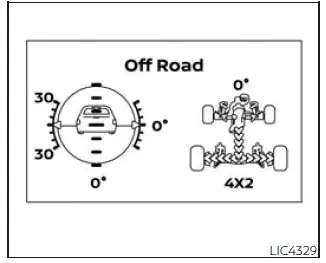
The Nissan Frontier Off-Road and 4WD Monitor provides real-time vehicle information designed to assist drivers during off-road adventures and challenging terrain conditions.
The system displays multiple vehicle operating parameters and allows drivers to better understand vehicle positioning and drivetrain status.
The Pitch and Roll Gauge located on the left side of the display shows the current vehicle angle when tilted left, right, uphill, or downhill.
As vehicle attitude changes, the Nissan Frontier graphic automatically rotates to visually represent the vehicle's position and orientation.
The Tire Angle & 4WD Gauge displayed on the right side shows steering wheel position, wheel angle, and four-wheel-drive operating status.
The graphic representation reflects actual tire orientation while the angle value above provides an additional numerical reference.
The current 4WD mode and drivetrain status are displayed beneath the tire-angle information for quick reference during off-road driving.
This feature can be especially useful when navigating steep inclines, uneven terrain, rocky trails, and technical off-road obstacles.
Eco Drive Report
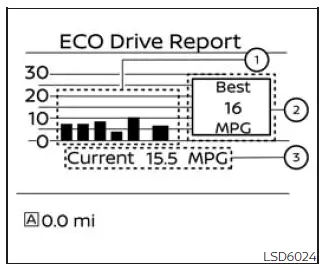
When the Nissan Frontier ignition switch is moved to the OFF position, the ECO Management Display becomes available.
- Previous 5 Driving Records (History)
- Current Fuel Economy
- Best Fuel Economy Record
The ECO evaluation results appear approximately 30 seconds after the ignition switch is placed in the ON position and the Nissan Frontier has been driven for at least 1/3 mile (500 meters).
- The average fuel economy for the previous five driving sessions is displayed.
- The average fuel economy accumulated since the last reset is shown.
- The best fuel economy achieved within the stored history is displayed.
The Eco Drive Report feature can be enabled or disabled through vehicle settings according to driver preference.
This system helps Nissan Frontier owners evaluate driving habits and identify opportunities to improve fuel efficiency and reduce fuel consumption.





