



Nissan Frontier: Monitor, climate, audio, phone and voice recognition systems - Moving Object Detection (MOD)
Basic Information Nissan Frontier 3rd Gen
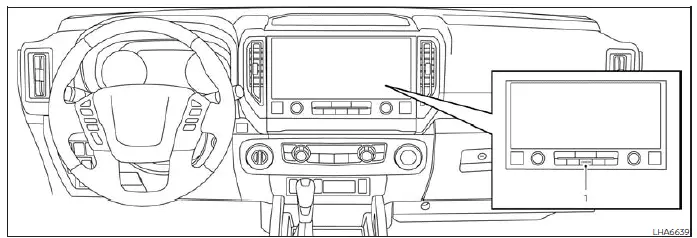
- CAMERA button
WARNING
- Failure to follow all warnings and operating instructions for the Nissan Frontier Moving Object Detection (MOD) system may result in an accident causing serious injury, property damage, or death.
- The Nissan Frontier MOD system is intended as a supplemental driver-assistance feature and should never
replace safe driving practices.
When maneuvering the vehicle, always check the surrounding area directly, use the exterior mirrors, rearview mirror, and visually confirm that the path is clear before moving.
- The MOD system automatically deactivates when vehicle speed exceeds approximately 6 mph (10 km/h) and becomes active again when the Nissan Frontier returns to lower speeds.
- The Nissan Frontier Moving Object Detection system is designed to identify moving objects only and is not intended to detect stationary obstacles surrounding the vehicle.
The Nissan Frontier Moving Object Detection (MOD) system can assist drivers by identifying moving objects near the vehicle during low-speed maneuvers.
This feature can be especially useful when backing out of garages, reversing from parking spaces, maneuvering through parking lots, or navigating crowded areas where pedestrians or moving vehicles may be present.
The MOD system utilizes advanced image-processing technology to analyze camera images displayed on the monitor and identify movement around the Nissan Frontier.
By continuously monitoring camera feeds, the system helps increase driver awareness of moving activity in the vicinity of the vehicle.
MOD system operation Nissan Frontier 3rd Gen
The Nissan Frontier MOD system operates when the shift lever is in the D (Drive), N (Neutral), R (Reverse), or P (Park) position and the vehicle is traveling at speeds of approximately 6 mph (10 km/h) or less.
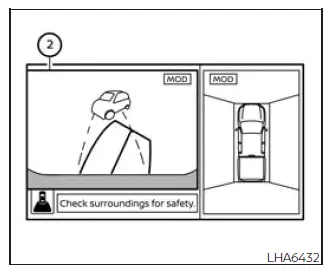
Front and bird's-eye views
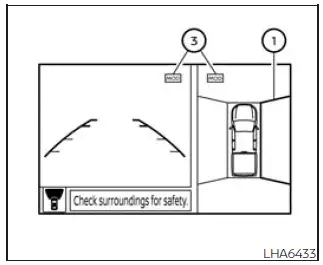
Rear and bird's-eye views
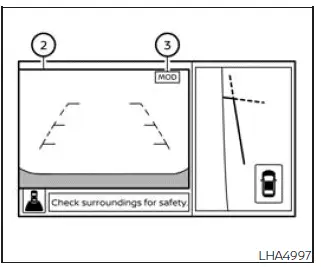
Front and front-side views
Rear and front-side views
Rear-wide view
The Nissan Frontier MOD system functions under the following conditions whenever a camera image is displayed on the monitor:
- When the shift lever is in the P (Park) or N (Neutral) position and the vehicle is stationary, the MOD system monitors for moving objects within the bird's-eye view. The system will not operate if either front door is open. In addition, if the exterior mirrors are folding, unfolding, or are in the stowed position, MOD performance may be reduced.
- When the shift lever is in the D (Drive) position and vehicle speed remains below approximately 6 mph (10 km/h), the Nissan Frontier MOD system monitors for moving objects in the front camera view.
- When the shift lever is in the R (Reverse) position and vehicle speed remains below approximately 6 mph (10 km/h), the system monitors for moving objects in the rear camera view. The MOD system will not operate if the Nissan Frontier tailgate is open.
The Nissan Frontier MOD system does not monitor moving objects within the front-side camera view. Therefore, the MOD indicator icon is not displayed when this view is active.
Whenever the MOD system detects a moving object near the Nissan Frontier, an audible chime sounds and a yellow warning frame appears around the area where movement has been detected.
As long as the system continues to identify movement, the yellow frame remains visible on the display.
This visual and audible alert helps drivers recognize potential hazards before continuing a maneuver.
NOTE:
While the Nissan Frontier Rear Cross Traffic Alert (RCTA) warning chime is sounding, the MOD system chime will be temporarily suppressed.
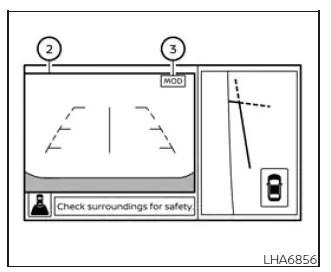
In bird's-eye view mode, the yellow frame 1 appears on the individual camera image where motion is detected, including the front, rear, left, or right camera views.
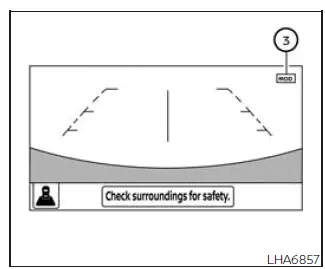
The yellow frame 2 is displayed within the front-view and rear-view modes whenever moving objects are detected by the Nissan Frontier MOD system.
A blue MOD icon 3 indicates that the Moving Object Detection system is currently active and monitoring the displayed view.
A gray MOD icon indicates that the Nissan Frontier MOD system is unavailable or inactive for the current view.
If the MOD feature has been manually disabled, icon 3 will not be displayed on the screen.
Turning MOD on and off
Depending on vehicle equipment, some Nissan Frontier models allow drivers to enable or disable the Moving Object Detection system through the vehicle settings menu.
To turn the Nissan Frontier MOD system ON or OFF:
1. Press the
 or
or
 button on the steering wheel to access the
"Settings" menu.
button on the steering wheel to access the
"Settings" menu.
2. Using the
 buttons, select "Driver Assistance" and
press the ENTER button.
buttons, select "Driver Assistance" and
press the ENTER button.
3. Select "Parking Aids" and press ENTER.
4. Highlight "Moving Object" and use the ENTER button to switch the Nissan Frontier MOD system ON or OFF.
On equipped vehicles, the MOD feature can also be activated or deactivated using the Parking Aids system switch.
Keeping the Nissan Frontier Moving Object Detection system enabled can provide additional awareness during low-speed driving, parking, and reversing maneuvers, helping drivers better identify moving hazards around the vehicle.
MOD system limitations Nissan Frontier SUV
WARNING
The following limitations apply to the Nissan Frontier Moving Object Detection (MOD) system. Failure to operate the vehicle while considering these limitations may increase the risk of an accident, resulting in serious injury, property damage, or death.
- Do not rely on the Nissan Frontier MOD system while towing a trailer. Trailer operation can affect camera views and system performance, which may prevent the MOD system from functioning correctly.
- High levels of ambient noise, such as loud audio system volume, open windows, strong wind noise, or surrounding traffic sounds, may interfere with the MOD warning chime and make it difficult to hear.
- The effectiveness of the Nissan Frontier MOD system may be reduced under certain environmental conditions
and surrounding circumstances, including:
- Situations where there is very little contrast between the moving object and its background.
- Areas containing flashing, blinking, or rapidly changing light sources.
- Strong illumination from direct sunlight, vehicle headlights, reflections, or other intense light sources.
- When a camera is not positioned normally, such as when an exterior mirror is folded or partially folded.
- When dirt, rain droplets, ice, mud, condensation, or snow cover a camera lens.
- When moving objects remain in approximately the same location on the display screen without significant movement relative to the Nissan Frontier.
- The Nissan Frontier MOD system may occasionally identify moving water droplets, exhaust vapor, steam, drifting smoke, moving shadows, or similar visual effects as moving objects.
- Detection capability may vary depending on the speed, direction, distance, size, shape, and movement pattern of surrounding objects.
- If the Nissan Frontier sustains damage in areas where cameras are mounted, causing misalignment, deformation, or improper positioning, the MOD detection zone may change and object detection accuracy may be reduced.
- When ambient temperatures are extremely high or extremely low, image quality may be reduced and displayed objects may appear less clear. This condition does not indicate a malfunction.
The Nissan Frontier MOD system is intended to assist the driver but should never replace direct visual observation, proper mirror usage, and safe driving practices.
NOTE:
The blue Nissan Frontier MOD indicator icon may change to orange under the following conditions:
- When the MOD system detects a malfunction.
- When a system component reaches an elevated operating temperature. In this case, the icon may flash.
- When the rearview camera detects an obstruction or blockage. In this situation, the icon may also flash.
If the orange indicator remains illuminated, have the Nissan Frontier MOD system inspected as soon as possible. It is recommended that you visit an authorized NISSAN dealer for diagnosis and service.
System maintenance
CAUTION
- Do not use alcohol, benzine, thinner, abrasive cleaners, or harsh chemicals when cleaning Nissan Frontier camera lenses. These substances may damage the lens surface or cause discoloration.
- Avoid scratching, striking, or damaging any camera component, as this may adversely affect monitor image quality and MOD system performance.
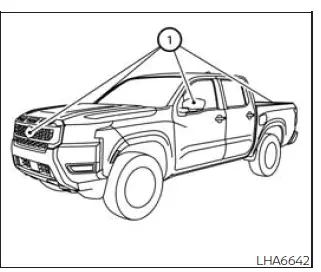
If dirt, rain, mud, road grime, snow, ice, or other contaminants accumulate on any of the Nissan Frontier cameras 1, the Moving Object Detection system may not function correctly.
To clean the cameras, gently wipe each lens using a soft cloth dampened with a diluted mild cleaning solution. Afterward, wipe the lens with a clean dry cloth to remove any remaining moisture.
Regular inspection and cleaning of the Nissan Frontier camera lenses will help maintain optimal image quality and reliable MOD system operation.
Vents
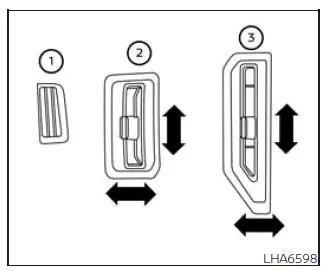
Adjust airflow direction for the Nissan Frontier driver-side vent, front passenger-side vent 2, and center vents 3 by moving the vent sliders and vent assemblies to the desired position.
The defrost vents 1, located above the driver and front passenger vents, are fixed in position and cannot be adjusted or closed.
Proper vent adjustment helps improve cabin comfort and ensures more efficient distribution of heated or cooled air throughout the Nissan Frontier interior.





