



Nissan Frontier: Starting and driving - Push-button ignition switch
Basic Information Nissan Frontier SUV
WARNING
Do not operate the push-button ignition switch while driving the Nissan Frontier except in a genuine emergency. The engine will stop if the ignition switch is pushed three consecutive times in quick succession or if the ignition switch is pushed and held for more than 2 seconds. If the engine stops while the vehicle is being driven, steering and braking effort may change, which could lead to a crash and serious injury.
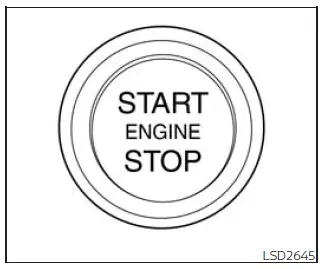
When the ignition switch is pushed without depressing the brake pedal, the illuminated ignition switch position changes in sequence as follows. Push the center of the switch:
- Once to change to ACC.
- Two times to change to ON.
- Three times to return to OFF.
In the Nissan Frontier, the ignition switch will automatically return to the LOCK position when any door is opened or closed while the switch is in the OFF position.
If the ignition switch cannot be placed in the OFF position, use the following procedure:
1. Move the shift lever to the P (Park) position.
2. Push the ignition switch. The ignition switch position will change to the ON position.
3. Push the ignition switch again to move it to the OFF position.
The shift lever can be moved from the P (Park) position only when the ignition switch is in the ON position and the brake pedal is depressed.
If the battery of the Nissan Frontier is discharged, the ignition switch cannot be moved from the LOCK position.
Some operating indicators, system messages, and warnings are shown in the meter to help the driver confirm the current ignition status and related vehicle conditions.
Operating range
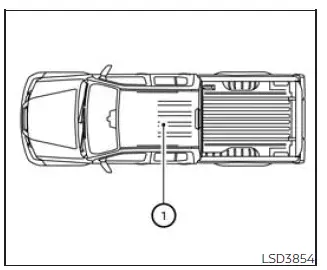
The Intelligent Key functions on the Nissan Frontier can only be used when the Intelligent Key is within the specified operating range.
When the Intelligent Key battery is nearly discharged, or when strong radio waves are present near the operating location, the Intelligent Key system's operating range may become smaller and the system may not function properly.
If the Intelligent Key is within the operating range, it may be possible for someone, even a person who is not carrying the Intelligent Key, to push the ignition switch and start the engine.
The operating range for the engine start function is inside the vehicle area marked as 1.
- The luggage area is not included in the operating range, although the Intelligent Key may still function in some situations.
- If the Intelligent Key is placed on the instrument panel or inside the glove box, storage bin, or door pocket, the Intelligent Key may not function reliably.
- If the Intelligent Key is placed near the door or window outside the Nissan Frontier, the Intelligent Key may function.
For reliable starting operation, keep the Intelligent Key with the driver inside the cabin, avoid placing it near electronic devices, and replace the key battery when the operating range becomes noticeably reduced.
Push-button ignition switch positions Nissan Frontier D41
LOCK (Normal parking position)
The ignition switch on the Nissan Frontier can be locked only in this position.
The ignition switch is unlocked when it is pushed to the ON position while the driver is carrying the Intelligent Key inside the proper operating range.
The ignition switch will return to the locked condition when any door is opened or closed after the ignition has been switched off.
ACC (Accessories)
This position supplies power to selected electrical accessories, such as the radio, when the engine is not running.
In the ACC position, the Nissan Frontier includes a battery saver feature that will move the ignition switch to the OFF position after a certain period of time when the following conditions are met:
- All doors are closed.
- The shift lever is in P (Park).
- The hazard lamps are off.
- The turn signals are off.
The battery saver feature will be canceled if any of the following actions or conditions occur:
- Any door is opened.
- The shift lever is moved out of the P (Park) position.
- The ignition switch changes position.
- The hazard lamps are turned on.
ON (Normal operating position)
This position turns on the ignition system and powers the electrical accessories needed for normal vehicle operation.
The ON position also has a battery saver feature. If the Nissan Frontier is not running, the system will place the ignition switch in the OFF position after a period of time when the following conditions are present:
- All doors are closed.
- The shift lever is in P (Park).
- The hazard lamps are off.
- The turn signals are off.
The battery saver feature will be canceled if any of the following occur:
- Any door is opened.
- The shift lever is moved out of the P (Park) position.
- The ignition switch changes position.
- The hazard lamps are turned on.
- The turn signals are turned on.
CAUTION
Do not leave the Nissan Frontier with the ignition switch in the ACC or ON position when the engine is not running for an extended period. Doing so can discharge the battery and may prevent the vehicle from starting.
OFF
The ignition switch is in the OFF position when the engine has been turned off using the ignition switch.
Emergency engine shut off
To shut off the engine in an emergency situation while driving the Nissan Frontier, perform the following procedure:
- Rapidly push the ignition switch three consecutive times in less than 1.5 seconds, or
- Push and hold the ignition switch for more than 2 seconds.
Automatic engine shut-off
This system automatically shuts off the engine after an extended period of time if it has been left running while the shift lever is in the P (Park) position for Automatic Transmission models, or in the N (Neutral) position with the parking brake applied for Manual Transmission models. This feature helps avoid unnecessary idling, reduce fuel waste, and limit unintentional engine operation.
The final 30 seconds of engine run time will be shown in the vehicle information display, giving the driver time to respond before shutdown.
At this time, you can use the button on the steering wheel to select one of the following options:
- "OK" to clear the display and allow the system to shut off the engine. The engine will also shut off if no option is selected.
- "Disable" to prevent the system from shutting off the engine for the remainder of the current trip. The system cannot be canceled permanently and will be available again after restart.
NOTE:
- The timer that monitors idling will restart if the brake pedal or accelerator pedal is pressed, which delays the automatic engine shut-off activation.
- The system will automatically turn back on after the engine is restarted.
For reliable Nissan Frontier operation, always confirm the ignition position before leaving the vehicle, avoid unnecessary accessory use with the engine off, and respond promptly to any messages shown in the vehicle information display.
NISSAN Intelligent Key battery discharge Nissan Frontier
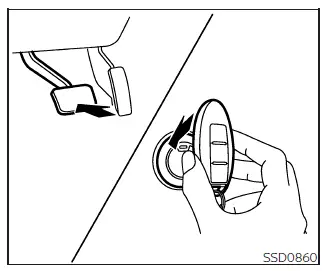
If the battery inside the NISSAN Intelligent Key becomes discharged, or if surrounding environmental conditions interfere with normal Intelligent Key communication, the Nissan Frontier can still be started by using the following procedure:
1. Move the shift lever to the P (Park) position.
2. Firmly press and hold the brake pedal.
3. Touch the ignition switch with the Intelligent Key as shown in the illustration. A confirmation chime will sound when the system recognizes the key.
After completing step 3, pressing the ignition switch without depressing the brake pedal will change the ignition switch position to ON.
4. Within 10 seconds after the chime sounds, push the ignition switch while continuing to depress the brake pedal. The engine of the Nissan Frontier will start normally.
NOTE:
- When the ignition switch is moved to
the ON position or the engine is started
using the above procedure, the Intelligent
Key battery discharge indicator may appear
in the vehicle information display,
even if the Intelligent Key remains
inside the Nissan Frontier. This condition is normal
and does not indicate a malfunction.
To switch off the Intelligent Key battery discharge indicator, touch the ignition switch with the Intelligent Key once again.
- If the Intelligent Key battery discharge indicator appears, replace the battery at the earliest opportunity to ensure reliable operation.
NISSAN Vehicle Immobilizer System
The NISSAN Vehicle Immobilizer System is designed to help protect the Nissan Frontier from unauthorized use. The engine cannot be started without a properly registered key recognized by the system.
If the engine does not start when using a registered key, interference may be present. For example, another registered key, an electronic toll collection device, or an automatic payment transponder attached to the same key ring may interfere with communication. If this occurs, restart the engine using the following procedure:
1. Leave the ignition switch in the ON position for approximately 5 seconds.
2. Move the ignition switch to the OFF or LOCK position and wait approximately 10 seconds.
3. Repeat steps 1 and 2.
4. Restart the engine while keeping the device that may be causing the interference separate from the registered key.
If the engine still fails to start under the same conditions, NISSAN recommends carrying the registered key on a separate key ring. This helps minimize interference from other electronic devices and ensures dependable Nissan Frontier operation.
Before starting the engine
- Make sure the area around the vehicle is clear of people, animals, obstacles, and other hazards.
- Inspect fluid levels such as engine oil, coolant, brake fluid, and windshield washer fluid regularly, especially before long trips or whenever refueling.
- Check that all windows, mirrors, cameras, and exterior lights are clean and provide clear visibility.
- Visually inspect the tires for signs of wear, damage, cuts, punctures, or unusual appearance. Also verify that all tires are inflated to the proper pressure.
- Confirm that all doors, including the tailgate, are securely closed.
- Adjust the driver's seat and position the head restraints/ headrests correctly for maximum comfort and protection.
- Adjust both the inside and outside mirrors for the best possible field of view.
- Fasten your seat belt and ensure that all passengers are properly restrained before the Nissan Frontier begins moving.
- Verify the operation of warning and indicator lights when the ignition switch is placed in the ON position. Any warning light that remains illuminated should be investigated before driving.
Taking a few moments to complete these checks before starting your Nissan Frontier can help improve safety, reduce the likelihood of unexpected issues, and contribute to a more confident driving experience in everyday conditions.





