



Nissan Frontier: Starting and driving - Rear Automatic Braking (RAB)
Basic Information Nissan Frontier 3rd Gen
WARNING
Failure to follow the warnings and operating instructions for the Rear Automatic Braking (RAB) system can result in serious injury or death. The system must be understood as a driver-assistance feature, not as a substitute for safe backing procedures.
- The RAB system in the Nissan Frontier is designed only as a supplemental aid for the driver. It does
not replace careful driving habits, proper mirror use, or direct visual checks before reversing.
Always check the side mirrors and rearview mirror, turn your head, and look in the direction the Nissan Frontier will move before and while backing up. Never depend only on the RAB system to detect an object or prevent contact.
The driver remains fully responsible for staying alert, controlling the vehicle, judging the surroundings, and operating the Nissan Frontier safely at all times.
- The RAB system has operating limits and may not detect every object, surface, or situation behind the vehicle. It is not effective in all driving or parking conditions.
- Poor weather conditions or strong ultrasonic interference, such as noise from an automatic car wash, compressed-air brakes on a truck, construction equipment, or a pneumatic drill, can affect system performance. This may result in reduced detection ability or an unwanted system activation.
The Rear Automatic Braking system can help the driver when the Nissan Frontier is backing up and approaching certain objects directly behind the vehicle. If the system detects a possible collision risk within its operating range, it may provide visual and audible warnings and, when necessary, assist by applying the brakes.
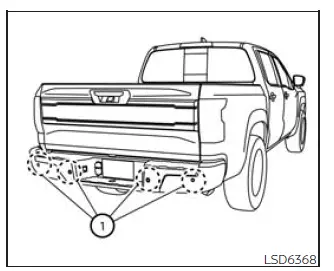
NOTE:
The sonar function can be temporarily canceled in the vehicle settings or by using the parking aid controls, but the RAB system may continue to operate. Because of this, always confirm the current system status in the Nissan Frontier display before reversing.
RAB system operation Nissan Frontier SUV
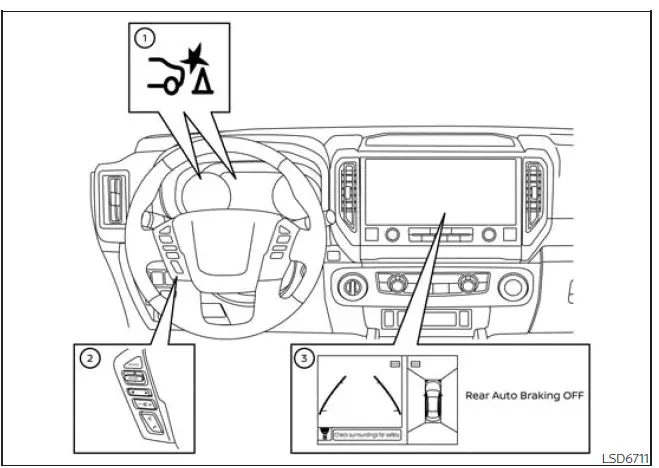
Basic Information
- RAB system warning light and RAB system indicator
- Steering-wheel-mounted controls on the left side
- Center display
The RAB system operates when the shift lever is placed in the R (Reverse) position and the Nissan Frontier is moving at less than approximately 9 mph (15 km/h).
If the system detects a risk of collision with an obstacle while the vehicle is backing up, the RAB system warning indicator flashes in the vehicle information display. On Nissan Frontier models equipped with the Intelligent Around View Monitor system, a red frame also appears on the center display. At the same time, the system sounds a three-time chime to alert the driver. If the risk continues, the system can automatically apply the brakes. After automatic braking occurs, the driver must press the brake pedal to maintain braking force and keep the vehicle stopped.
NOTE:
- The brake lights turn on when braking is applied by the RAB system, helping alert traffic behind the Nissan Frontier.
- A sound may be heard when the brakes operate automatically. This is part of normal system operation and does not indicate a malfunction.
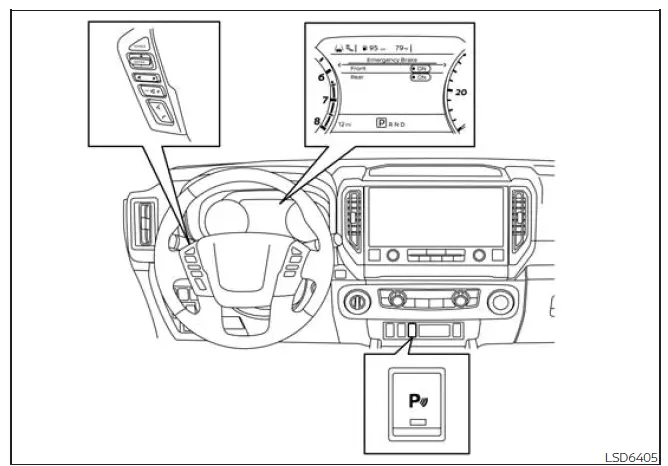
Turning the RAB system on/off
Use the following procedure to turn the RAB system on or off through the Nissan Frontier vehicle information display and parking aid controls.
1. Press the
 button until
"Settings" appears
in the vehicle information display,
then press the ENTER button. Use
the
button until
"Settings" appears
in the vehicle information display,
then press the ENTER button. Use
the
 button to select "Driver
Assistance."
Then press the ENTER button.
button to select "Driver
Assistance."
Then press the ENTER button.
2. Select "Emergency Brake" and press the ENTER button to open the braking assistance settings.
3. Select "Rear" and press the ENTER button to switch the Rear Automatic Braking function on or off.
4. Press the Parking Aids system switch to turn the parking aid function on or off as required.
When the RAB system is turned off, the RAB system warning light illuminates to remind the driver that rear automatic braking assistance is not active.
NOTE:
The RAB system is automatically turned back on when the engine is restarted. For this reason, check the system setting again after restarting the Nissan Frontier if you intentionally turned the feature off.
RAB system limitations Nissan Frontier 2026
WARNING
The following information explains important operating limits of the Rear Automatic Braking (RAB) system. Failure to understand and follow these warnings and instructions for proper use of the RAB system in the Nissan Frontier could lead to serious injury or death.
- When the Nissan Frontier approaches an obstacle while the accelerator pedal or brake pedal is already being pressed, the system may not activate, or its operation may begin later than expected. Depending on vehicle condition, driving environment, traffic situation, weather, road surface, sensor condition, and other factors, the RAB system may not operate at all or may not provide enough braking assistance. Do not wait for the system to react. Press the brake pedal yourself as soon as braking is needed.
- If it becomes necessary to override RAB operation, firmly press the accelerator pedal. The driver must remain in full control of the Nissan Frontier at all times.
- Always check all surroundings and turn your head to look behind the vehicle before and during backing
maneuvers. The RAB system is designed to detect certain stationary objects behind the vehicle. The
RAB system does not detect the following objects reliably:
- Moving objects, including pedestrians, bicycles, animals, or vehicles passing behind the Nissan Frontier
- Low objects that are below the sensor detection range
- Narrow objects that may not reflect enough ultrasonic signal
- Wedge-shaped objects or objects with angled surfaces
- Objects very close to the bumper, less than approximately 1 ft (30 cm)
- Objects that suddenly appear behind the vehicle
- Thin objects such as rope, wire, chain, poles, or similar items
- The RAB system may not operate correctly for the following types of obstacles:
- Obstacles positioned high above the ground and outside the main sensing area
- Obstacles located off-center or offset from the direct path of the Nissan Frontier
- Obstacles with soft outer surfaces, such as spongy materials, loose snow, or similar surfaces that can absorb ultrasonic sound waves instead of reflecting them back to the sensors
- The RAB system may not operate in the following conditions:
- Rain, snow, ice, mud, dirt, road salt, or other material is attached to the sonar sensors.
- A loud sound or ultrasonic disturbance is present around the vehicle.
- The surface of the obstacle is positioned diagonally in relation to the rear of the Nissan Frontier.
- The RAB system may activate unintentionally in the following conditions:
- There is tall or overgrown grass around the vehicle.
- A structure such as a wall, toll gate device, narrow tunnel, garage entrance, parking lot gate, or similar object is close to the side of the vehicle.
- There are bumps, raised areas, protrusions, drainage covers, or manhole covers on the road surface.
- The Nissan Frontier passes through or backs near a hanging flag, curtain, sheet, or similar flexible object.
- Snow or ice has accumulated behind the vehicle.
- An ultrasonic wave source, such as another vehicle's sonar system, is operating near the Nissan Frontier.
- After automatic brake control has operated once, it may not operate again if the vehicle continues to approach the same obstacle. The driver must take over braking immediately.
- Automatic brake control operates only for a short period of time.
For this reason, the driver must press and hold the brake pedal to keep the Nissan Frontier stopped and prevent further movement.
- In the following situations, the RAB system may not operate properly or may not provide sufficient
braking assistance:
- The vehicle is driven in poor weather, including rain, fog, snow, or similar low-visibility conditions.
- The vehicle is driven on a steep hill or sharp grade.
- The vehicle's posture changes suddenly, such as when driving over a bump, dip, curb, or uneven surface.
- The vehicle is driven on a slippery road surface.
- The vehicle is turned sharply with the steering wheel fully rotated.
- Snow chains are installed.
- Wheels or tires other than those recommended by NISSAN are used.
- The brakes are cold because of low outside temperatures or because the Nissan Frontier has just started moving.
- Braking force is reduced because the brakes are wet after driving through standing water, a puddle, heavy rain, or after washing the vehicle.
- Turn the RAB system off in the following situations to help prevent sudden or unexpected system
operation that could cause an accident:
- The vehicle is being towed.
- The vehicle is being loaded onto or transported on a flatbed truck.
- The vehicle is positioned on a chassis dynamometer.
- The Nissan Frontier is driven on an uneven road surface where the sensors may misread the surroundings.
- The vehicle is towing an object, if so equipped.
- Suspension components other than designated Genuine NISSAN parts are installed. If vehicle height or body inclination changes, the system may not detect obstacles correctly.
- An accessory such as a bike rack, cargo carrier, trailer equipment, or similar attachment blocks or interferes with the rear sensors.
- Excessive interior or exterior noise, including a high audio system volume, open windows, strong wind noise, or surrounding traffic noise, can interfere with the warning chime. The driver may not hear the alert clearly, so visual checking and careful control of the Nissan Frontier remain essential.
System malfunction
If a malfunction occurs in the Rear Automatic Braking (RAB) system, the system will automatically switch itself off to prevent improper operation. When this happens in the Nissan Frontier, the RAB system warning light will illuminate, and the warning message "System fault See Owner's Manual" will appear in the vehicle information display.
Action to take
If the warning light comes on, stop and park the Nissan Frontier in a safe location away from traffic. Turn the engine off completely, then restart the engine and check whether the warning light remains illuminated. If the light continues to stay on, the RAB system should be inspected by a qualified technician. It is recommended that you visit a NISSAN dealer for this service so the rear braking assistance system can be checked correctly.
NOTE:
If the RAB system is temporarily unavailable rather than permanently malfunctioning, the RAB system warning light may blink. In this case, check the surrounding conditions, sensor cleanliness, and the Nissan Frontier vehicle information display before continuing to rely on the system.
System maintenance
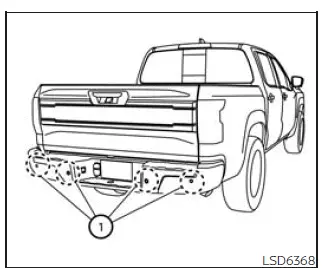
To help ensure proper operation of the RAB system in the Nissan Frontier, observe the following maintenance points and keep the rear sensing area in good condition:
- Always keep the parking sensors 1 clean and free from dirt, mud, snow, ice, road salt, wax, or any other material that could block detection.
- If the parking sensors become dirty, wipe them gently with a soft cloth. Clean the sensors carefully to avoid scratching, pressing, or damaging the sensor surface.
- Do not apply strong impact to the area around the parking sensors 1. Also, do not remove, modify, or disassemble the parking sensors. If the sensors or the surrounding bumper area are damaged, deformed, or affected by an accident, have the system inspected. It is recommended that you visit a NISSAN dealer for this service.
- Do not attach stickers, transparent film, paint, covers, accessories, or decorative parts to the parking sensors 1 or the surrounding areas. Any obstruction near the sensors may cause the RAB system to malfunction, activate incorrectly, or fail to detect obstacles properly.





