



Nissan Frontier: Starting and driving - Rear Sonar System (RSS)
Basic Information Nissan Frontier SUV
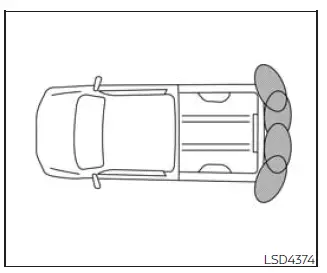
The Rear Sonar System (RSS) in the Nissan Frontier provides an audible warning tone to help inform the driver when obstacles are detected near the rear bumper area.
When the "DISPLAY" key is turned on, the sonar view automatically appears on the touch-screen display. For added awareness, a separate sonar status view is also shown in the vehicle information display, allowing the driver to reference obstacle distance information while maneuvering the Nissan Frontier in reverse.
WARNING
- The RSS is a convenience feature only. It is designed to assist the driver, but it must never be considered a replacement for careful, proper parking procedures.
- The driver is always responsible for safe operation during parking, reversing, and other low-speed
maneuvers.
Before moving the Nissan Frontier, always look around the vehicle, check mirrors, verify the surrounding area directly, and make sure it is safe to proceed.
- Read and understand the limitations of the Rear Sonar System as described in this section before
relying on its alerts.
The colors of the corner sonar indicator and the distance guide lines shown in the rear view display represent different distances between the Nissan Frontier and the detected object.
- Poor weather conditions or nearby ultrasonic sources, such as an automatic car wash, compressed-air brakes from a truck, construction equipment, or a pneumatic drill, may interfere with system performance. These conditions may cause reduced detection accuracy, delayed warnings, or false activation.
- This function is intended to assist the driver by detecting large, stationary objects behind the Nissan Frontier, helping reduce the chance of bumper or body damage during parking maneuvers.
- The system is not designed to prevent contact with small, low, narrow, or moving objects. Always reverse slowly and carefully. The RSS may not detect objects positioned below the bumper, very close to the bumper, or flat against the ground.
- The system may not reliably detect certain materials or shapes, including soft or fluffy objects such as snow, cloth, cotton, glass fiber, or wool; thin objects such as rope, wire, chain, or small poles; and wedge-shaped objects that may reflect ultrasonic waves away from the sensors.
If the Nissan Frontier sustains damage to the bumper fascia, or if the bumper becomes bent, loose, or misaligned, the sonar sensing zone may change. This can lead to inaccurate obstacle distance measurement, missed detection, or false warning sounds during reverse operation.
CAUTION
- Excessive cabin or exterior noise, including high audio system volume, open windows, strong wind noise, or nearby traffic noise, can make the warning tone difficult to hear.
- Keep the sonar sensors, which are located on the bumper fascia, free from snow, ice, mud, road salt,
wax, and heavy dirt buildup.
Do not clean the sensors with sharp tools or abrasive objects. If the sensors are blocked, scratched, or covered, the accuracy and reliability of the Nissan Frontier sonar function may be reduced.
System operation Nissan Frontier
The Rear Sonar System provides both visual and audible alerts when rear obstacles are detected while the shift lever is placed in the R (Reverse) position. This helps the driver better understand the area behind the Nissan Frontier during parking and backing maneuvers.
The system automatically deactivates when vehicle speed exceeds approximately 6 mph (10 km/h). It becomes available again when the Nissan Frontier slows below that speed and the required operating conditions are met.
If only a corner sensor detects an obstacle and the distance to that object does not change, the intermittent warning tone will stop after approximately 3 seconds. The tone will also stop when the detected object moves away from the vehicle or when the Nissan Frontier moves away from the object.
When an object is first detected, a green indicator appears, begins blinking, and the warning tone sounds intermittently. As the Nissan Frontier moves closer to the object, the indicator changes to yellow and the blinking rate increases. When the vehicle becomes very close to the object, the indicator turns red, stops blinking, and the warning tone sounds continuously to alert the driver of close proximity.
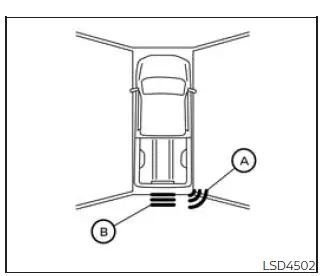
When a rear corner of the Nissan Frontier approaches an object, the corner sonar indicator A appears. When the center rear area of the vehicle moves close to an object, the center sonar indicator B is displayed, helping the driver distinguish where the obstacle is located.
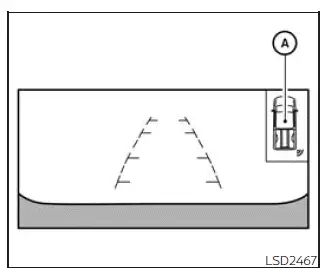
The system indicators A appear when the Nissan Frontier moves closer to a detected object. These visual alerts should always be used together with direct observation, mirrors, and careful low-speed control for safer parking.
How to enable/disable the RSS Nissan Frontier 2026
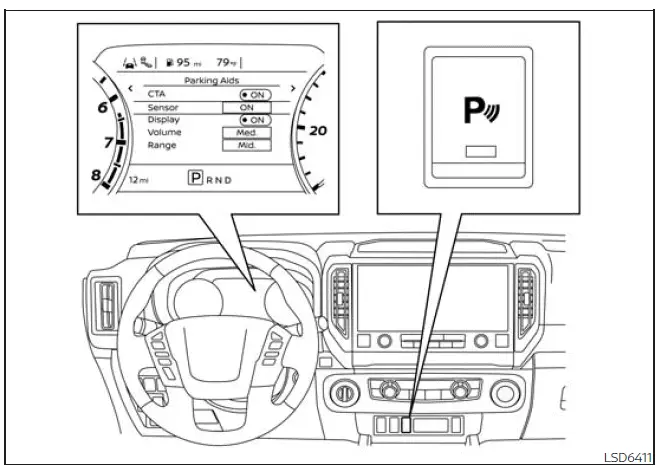
The Rear Sonar System (RSS) in the Nissan Frontier is automatically activated whenever the ignition is switched to the ON position and the shift lever is moved into the R (Reverse) position. This allows the system to immediately assist the driver during parking and low-speed reversing maneuvers.
Follow the steps below to customize, enable, or disable the Nissan Frontier sonar system according to your driving preferences:
1. Press the
 button until
"Settings" appears
in the vehicle information display.
button until
"Settings" appears
in the vehicle information display.
Use the
 button to highlight "Driver
Assistance." Then press ENTER to continue.
button to highlight "Driver
Assistance." Then press ENTER to continue.
2. Select "Parking Aids" and press ENTER.
3. Choose "Sensor" and press ENTER to activate or deactivate the Nissan Frontier sonar system.
- Select "Display" if you wish to turn the sonar visualization screen on or off.
- Select "Range" to adjust the sonar detection distance setting between "Near," "Mid," or "Far" depending on your preference and parking environment.
- Select "Volume" to customize the warning sound level and choose between "High," "Medium," or "Low".
4. Press the Parking Aids system switch to manually switch the system on or off whenever needed.
These customizable settings allow Nissan Frontier drivers to tailor the RSS operation for different parking situations, improving convenience and overall driving confidence.
Sonar limitations
WARNING
The following limitations apply to the Nissan Frontier sonar system. Failure to understand and follow these limitations may result in property damage, serious injury, or even death.
- The sonar system automatically deactivates at vehicle speeds above 6 mph (10 km/h). Once speed decreases below this threshold, the system becomes active again.
- Adverse weather conditions and external ultrasonic sources, including automatic vehicle wash equipment, truck air-brake systems, industrial machinery, or pneumatic tools, may interfere with system performance. Such interference may cause inaccurate readings, reduced effectiveness, delayed warnings, or false alerts.
- The system is intended only as a parking aid and is not capable of preventing contact with every obstacle. Always reverse slowly and maintain awareness of your surroundings. Small objects below the bumper or lying on the ground may not be detected.
- The Nissan Frontier RSS may have difficulty detecting certain object types, including soft or fluffy materials such as snow, cloth, cotton, insulation material, or glass wool. Thin objects such as ropes, chains, cables, wires, or narrow poles may also be difficult for the system to recognize. Wedge-shaped objects may likewise reduce detection performance.
- The system may not detect objects reliably when the Nissan Frontier is moving faster than 3 mph (5 km/h), and detection may be reduced for certain moving, angled, curved, or irregularly shaped obstacles.
- Do not place stickers, transparent films, decorative coverings, aftermarket accessories, or any other materials over the sonar sensors. Such modifications may significantly reduce system accuracy and performance.
System temporarily unavailable
When the Nissan Frontier detects that one or more sonar sensors are blocked, the Rear Sonar System will automatically deactivate itself to prevent inaccurate operation.
During this condition, the system remains unavailable until the obstruction or environmental condition is removed.
Temporary sensor blockage may occur due to environmental factors such as splashing water, heavy rain, mist, fog, road spray, or condensation. Sensor obstruction may also be caused by snow, ice, frost, mud, dirt, or other foreign materials covering the sonar sensors.
Action to take:
Once the obstruction is removed or environmental conditions improve, the Nissan Frontier sonar system will normally resume operation automatically without requiring additional driver intervention.
System maintenance
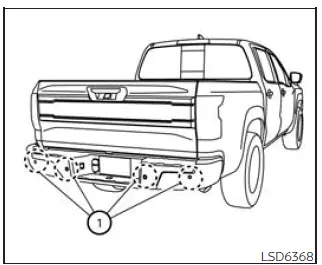
The sonar sensors 1 are installed in the rear bumper of the Nissan Frontier. To maintain reliable obstacle detection, always keep the sensor area clean and free of contamination.
Temporary environmental conditions such as water spray, heavy moisture, fog, mist, slush, or road grime may partially block the sonar sensors and affect system performance.
Sensor blockage may also occur when ice, frost, mud, dirt, snow, or other debris accumulates on the rear bumper around the sensor locations.
Inspect the sensor area regularly and remove any material that could obstruct sensor operation. Keeping the sensors clean helps ensure the Nissan Frontier RSS provides accurate distance measurements and warning alerts.
Do not attach stickers, transparent protective films, decorative trim pieces, aftermarket accessories, or additional paint coatings near the sonar sensors, as these may interfere with ultrasonic signal transmission and reception.
Avoid striking, scratching, or otherwise damaging the area surrounding the sonar sensors. If the rear bumper or sensor area of your Nissan Frontier is damaged in a collision, it is recommended that the vehicle be inspected by an authorized NISSAN dealer to verify proper system operation and sensor alignment.
Regular maintenance and inspection of the sonar sensors will help preserve the effectiveness of the Nissan Frontier Rear Sonar System and contribute to safer parking performance in a wide variety of driving conditions.





