



Nissan Frontier: Starting and driving - Terrain Mode Selector
Basic Information
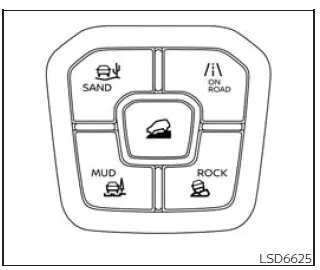
The Nissan Frontier allows several driving modes to be selected through the Terrain Mode Selector, helping the vehicle adapt more effectively to different road and trail surfaces.
To change the mode, press the Terrain Mode Selector switch and choose the appropriate setting for the current driving conditions.
NOTE:
- After the Terrain Mode Selector is used to choose a mode, the mode may not change immediately. This delay is normal and is not a malfunction.
- The Terrain Mode will reset to ON ROAD each time the ignition switch is placed in the ON position.
- Terrain Modes are available only when 4WD is being used.
- Terrain Modes cannot be used while TOW mode is active.
The selected mode is shown in the vehicle information display. A mode list will appear in the vehicle information display, allowing the driver to review and select the desired mode.
NOTE:
The mode list will disappear a few seconds after a mode is selected. You can also clear the message by pressing the scroll dial on the steering wheel.
If the driving mode cannot be changed using the Terrain Mode Selector while the ignition switch is in the ON position, have the system inspected. It is recommended that you visit a NISSAN dealer for this service.
WARNING
Do not stare at the Terrain Mode Selector or the display while driving. Keep your attention on the road, traffic, and vehicle operation at all times.
ON ROAD MODE
The symbol of this mode is
 .
.
ON ROAD mode is the standard setting and is best suited for normal pavement driving, everyday commuting, and general use on stable road surfaces.
ROCK MODE
WARNING
When ROCK mode is selected, VDC operation is reduced. The VDC system may not respond in the same way as it does in ON ROAD mode. To help prevent accidents, drive carefully, avoid reckless or unsafe driving techniques, and be especially cautious when steering or cornering on slippery, uneven, or loose surfaces.
CAUTION
Never drive on dry, hard-surface roads in ROCK mode. Doing so can overload the powertrain and may cause a serious malfunction. It can also cause premature tire wear and reduce fuel economy.
The symbol of this mode is
 .
.
This mode helps the Nissan Frontier start and move more easily over moguls, uneven rock sections, and rocky roads where slow, controlled progress is required.
When ROCK mode is selected, tight-corner braking sensation or vibration while cornering may occur. This is normal for the mode and is not a malfunction.
MUD MODE
WARNING
When MUD mode is selected, VDC operation is reduced. The VDC system may not operate in the same way as it does in ON ROAD mode. To help prevent accidents, drive with caution, avoid careless or aggressive maneuvers, and use extra care when driving or cornering on slippery surfaces.
CAUTION
Never drive on dry, hard-surface roads in MUD mode, because this can overload the powertrain and may cause a serious malfunction. It can also lead to premature tire wear and lower fuel economy.
The symbol of this mode is
 .
.
This mode helps the Nissan Frontier start and drive through muddy roads, soft ruts, wet tracks, and riverbed-type surfaces where traction changes quickly.
When MUD mode is selected, tight-corner braking sensation or vibration while cornering may occur. This is expected in this mode and is not a malfunction.
SAND MODE
WARNING
When SAND mode is selected, VDC operation is reduced. The VDC system may not behave the same way as it does in ON ROAD mode. To help prevent accidents, drive carefully, avoid careless or dangerous driving techniques, and be especially attentive when driving and cornering on slippery, loose, or shifting surfaces.
CAUTION
Never drive on dry, hard-surface roads in SAND mode, because this can overload the powertrain and may cause a serious malfunction. This use can also cause premature tire wear and reduce fuel economy.
The symbol of this mode is
 .
.
This mode is intended to make the Nissan Frontier easier to drive on deep gravel, sandy roads, loose beach-like surfaces, or dunes where maintaining momentum is important.
When SAND mode is selected, tight-corner braking sensation or vibration during cornering may occur. This behavior is part of the system operation and is not a malfunction.
Choose a terrain mode only for the surface you are actually driving on, return to ON ROAD mode for normal pavement, and use steady throttle and steering inputs to keep the Nissan Frontier controlled in changing terrain.





