



Nissan Frontier: Starting and driving - Traffic Sign Recognition (TSR)
Basic Information
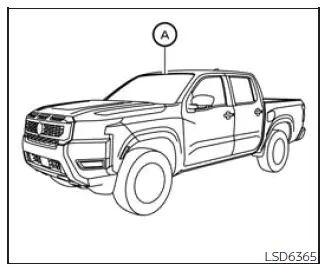
The Traffic Sign Recognition (TSR) system in the Nissan Frontier is designed to help the driver stay informed about the most recently detected speed limit. The system reads road sign information through the multi-sensing front camera unit A, which is mounted on the windshield in front of the inside rearview mirror, and then shows recognized signs in the vehicle information display. On Nissan Frontier models equipped with a navigation system, the displayed speed limit may be based on both map data and live camera recognition, giving the driver a more complete reference when road signs are detected clearly. TSR information is always shown at the top of the vehicle information display and, when selected, can also appear in the main central area of the display screen.
WARNING
The TSR system is a driver assistance feature only. It is intended to provide helpful information, but it does not replace the driver's own observation of traffic, road signs, speed limits, or changing road conditions. The system cannot prevent accidents caused by inattention or unsafe driving. The driver of the Nissan Frontier remains fully responsible for staying alert, obeying posted regulations, and driving safely at all times.
System operation
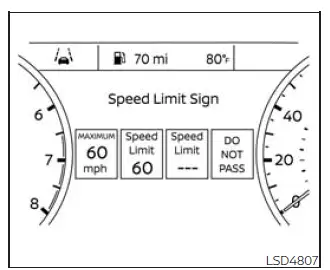
The Traffic Sign Recognition (TSR) system can display several types of road sign information when the camera or available navigation data identifies them:
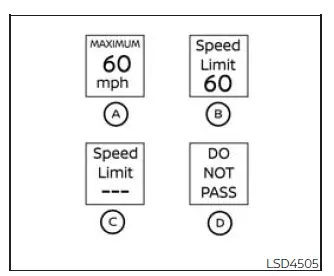
- Speed sign detected (in Canada)
- Speed sign detected (in USA)
- Speed sign detected (no speed limit detected)
- "Do not pass" sign detected
CAUTION
- The TSR system is intended to support careful driving, not to make decisions for the driver. It remains the driver's responsibility to stay attentive, drive safely, follow all current road regulations, and personally watch for road signs along the route.
- The TSR system may not operate correctly or may fail to recognize signs under the following
conditions:
- When a road sign is difficult to see because it is damaged, dirty, faded, blocked, poorly positioned, or affected by weather conditions.
- When rain, snow, ice, fogging, or dirt is present on the windshield area in front of the multi-sensing camera unit.
- When the headlights are not bright enough, for example because the lenses are dirty or the headlight aim is not adjusted properly.
- When strong light enters the camera unit, such as direct sunlight shining toward the front of the Nissan Frontier at sunrise or sunset.
- When brightness changes suddenly, such as when the vehicle enters or exits a tunnel, underpass, shaded area, or bridge.
- When navigation information does not match the current road, for example because of new construction, temporary detours, changed lane layouts, or updated road routing.
- When passing buses, trucks, trailers, or other vehicles that display speed stickers or sign-like markings that could be misread by the camera.
Turning the Traffic Sign Recognition (TSR) system on and off
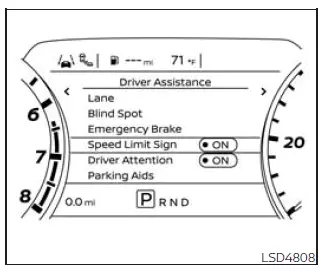
Use the following steps to turn the TSR system on or off in the Nissan Frontier.
1. Press the
 button until
"Settings" appears
in the vehicle information display.
button until
"Settings" appears
in the vehicle information display.
Use the
 button to select "Driver
Assistance." Then press the ENTER
button.
button to select "Driver
Assistance." Then press the ENTER
button.
2. Select "Speed Limit Sign" and press the ENTER button to switch the system on or off.
System temporarily unavailable
If the Nissan Frontier is parked in direct sunlight during very hot conditions, above approximately 104ºF [40ºC], and then started, the TSR system may be temporarily deactivated to protect camera operation. In this situation, the "Not Available High Camera Temp" warning message will appear in the vehicle information display.
Action to take:
When the cabin temperature drops and the camera area cools, the TSR system will resume operating automatically without requiring driver reset.
System malfunction
The TSR system uses the same multi-sensing front camera unit used by the Lane Departure Warning (LDW) system. This camera is located in front of the interior rearview mirror, so keeping the windshield clean in that area is important for proper Nissan Frontier driver assistance operation.





