



Nissan Frontier: Pre-driving checks and adjustments - Truck box
Tailgate
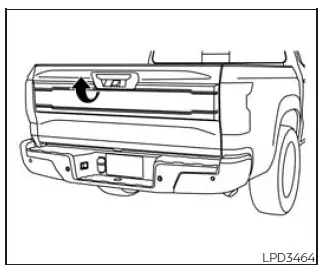
Opening the tailgate
To open the Nissan Frontier tailgate, pull the tailgate handle upward and carefully lower the tailgate into the open position. The support cables are designed to hold the tailgate securely while it is open.
When closing the tailgate, raise it smoothly and make sure both latches are fully engaged and securely locked before driving or loading cargo.
Do not drive the Nissan Frontier with the tailgate lowered unless the vehicle is equipped with a NISSAN Bed Extender accessory, or an equivalent approved extender, installed and used in the extended position.
The truck box is designed for transporting cargo, tools, equipment, and recreational gear, but it must always be used safely and within the vehicle's load-carrying limits.
WARNING
- Never allow anyone to ride in the cargo area of the Nissan Frontier or on the rear seat when it is folded. These areas do not provide proper occupant restraints, and using them for passengers could result in serious injury or death during a collision or sudden stop.
- Riding in a cargo area is extremely dangerous. In a crash, occupants located in these areas are much more likely to be seriously injured or killed.
- Do not permit passengers to ride in any area of the Nissan Frontier that is not equipped with approved seats and seat belts.
- Make sure every occupant is seated properly and wearing a seat belt correctly before the vehicle is driven.
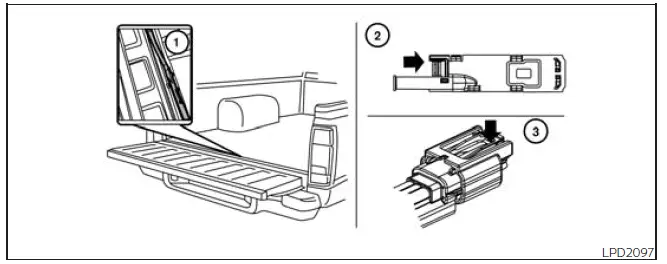
Disconnecting the rear camera
Before removing the Nissan Frontier tailgate, the rear camera wiring must be disconnected carefully to prevent damage to the camera system and electrical connectors.
Perform the following procedure before tailgate removal:
1. Open the tailgate to access the rear camera connector bracket 1 located on the rear sill.
2. Remove connector bracket 2 from the sill by pressing the locking tab inward in the direction shown while gently pulling the bracket apart.
3. Disconnect the chassis wiring harness 3 by pressing inward on the locking tab in the direction shown while separating the connectors. Hold the connector firmly so the chassis harness connector does not fall into the sill opening.
4. Remove the chassis plug and bracket from the glove box and attach them to the chassis wiring harness. This helps protect the terminals from dirt, moisture, and contamination that could cause rear camera malfunction.
5. Reinsert the bracket securely into the sill.
6. Remove the tailgate plug from the glove box and connect it to the tailgate wiring harness. This protects the tailgate-side connector from contamination that may interfere with proper rear camera operation after reinstallation.
7. Remove the tailgate. For the next step, refer to the "Removing the tailgate" procedure.
Taking time to protect the electrical connectors helps maintain reliable Nissan Frontier rear camera performance when the tailgate is reinstalled.
Removing the tailgate
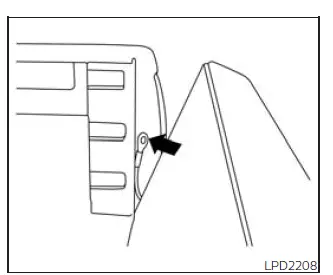
1. Release the tailgate support cables from both sides of the Nissan Frontier tailgate.
CAUTION
- The tailgate is heavy. Two people should remove or install it to reduce the risk of injury or damage. Handle it carefully and do not allow it to fall during removal.
- After releasing the support cables, do not allow the tailgate to rest on the bumper, as this may damage the tailgate, bumper, hinges, or painted surfaces.
When the tailgate is removed, store it on a clean, stable, padded surface to help prevent scratches, dents, or damage to the rear camera wiring. Reinstall all connectors and support cables correctly before returning the Nissan Frontier to normal use.
2. Hold the Nissan Frontier tailgate at approximately a 15 degree angle to align it correctly with the hinge slots.
3. Pull the tailgate outward from the left side hinge at an angle, keeping a firm grip to maintain control during removal.
4. Once the left side is released, the tailgate will slide out of the right side hinge.
Installing the tailgate
1. Insert the Nissan Frontier tailgate into the right side hinge first, making sure it is seated correctly.
2. Align and insert the tailgate into the left side hinge.
3. Continue holding the tailgate at approximately a 15 degree angle while attaching the tailgate support cables securely to both sides.
4. Close the tailgate carefully and confirm that it latches securely.
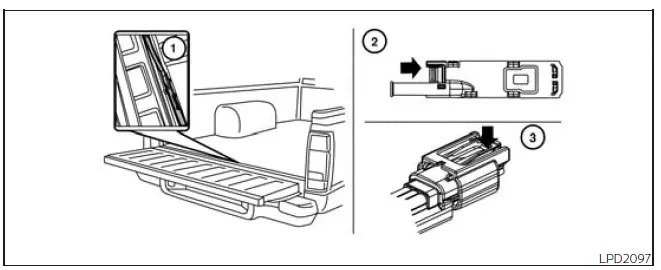
Connecting the rear camera
Before closing the Nissan Frontier tailgate after installation, reconnect the rear camera wiring carefully to help ensure proper camera operation and prevent connector damage.
1. After attaching the rear tailgate to the truck, keep the tailgate open and inspect the tailgate harness. Make sure the wiring harness is not hanging below the tailgate or positioned where it could be pinched, stretched, or damaged.
2. Remove connector bracket 2 from the sill by pressing the locking tab inward in the direction shown while gently pulling the bracket apart.
3. Disconnect the chassis plug and bracket from the chassis wiring harness 3. Store the connector and bracket in a safe, clean location, such as the glove box, for future use.
4. Disconnect the tailgate plug from the tailgate wiring harness. Keep the tailgate plug in a secure place, such as the glove box, so it is available whenever the tailgate is removed again.
5. Connect the Nissan Frontier tailgate wiring harness to the chassis wiring harness, making sure the connectors are fully seated and properly locked together.
6. Securely attach the rear camera connector bracket 1 to the rear sill so the wiring remains protected and correctly positioned.
7. Close the tailgate securely and verify that the rear camera system operates normally before driving.
Correctly reconnecting the rear camera harness is important for maintaining clear rear visibility and proper operation of the Nissan Frontier Back-up Camera system.
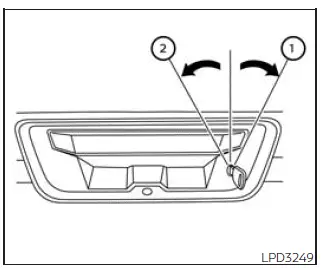
Locking the tailgate
To lock the Nissan Frontier tailgate, insert the key and turn it toward the passenger side of the vehicle 1. To unlock the tailgate, turn the key toward the driver side 2.
Always check that the tailgate is securely locked when carrying cargo, parking the vehicle, or leaving the Nissan Frontier unattended.
Tie down hooks
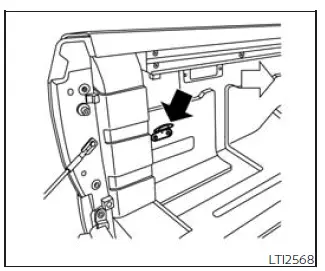
For added convenience and cargo security, tie down hooks are positioned at each corner of the Nissan Frontier truck box.
These hooks are designed to help secure cargo loaded into the truck box when used with suitable ropes, straps, or tie-down equipment.
- The weight of the cargo load should be distributed evenly across the truck box and balanced over both the front and rear axles to help maintain stable handling.
- All cargo should be firmly secured with ropes, straps, or other approved restraints to prevent movement, sliding, or shifting while the Nissan Frontier is being driven.
Proper cargo placement and secure fastening are especially important when driving over rough roads, making sudden stops, or transporting heavy equipment.
WARNING
Always secure cargo properly with ropes, straps, or suitable tie-down equipment to help prevent it from sliding or shifting. During sudden braking, sharp maneuvers, or a collision, unsecured cargo in the Nissan Frontier truck box could move unexpectedly and cause personal injury or vehicle damage.





