



Nissan Frontier: Starting and driving - Using 4-Wheel Drive (4WD)
Basic Information
WARNING
- On Nissan Frontier models equipped with a 4WD system, never attempt to raise only two wheels off the ground and then shift the transmission into a drive or reverse position while the engine is running. Such actions can place excessive stress on drivetrain components and may cause unexpected vehicle movement. This could result in serious damage to the Nissan Frontier driveline system, property damage, or severe personal injury.
- Do not attempt to evaluate or test a Nissan Frontier equipped with 4WD on a two-wheel dynamometer
(including certain emissions-testing dynamometers) or any similar testing equipment, even if the
remaining wheels are lifted from the ground. Always notify testing personnel that the vehicle is
equipped with a four-wheel-drive system before any inspection or testing begins.
Using improper testing equipment may lead to drivetrain malfunction, transfer case damage, or sudden and unexpected vehicle movement, potentially causing significant vehicle damage or serious personal injury.
CAUTION
- Avoid operating your Nissan Frontier in the 4H or 4LO mode on dry, paved, or hard-surface roads.
Continuous use of four-wheel drive on high-traction surfaces may increase tire wear, create
unnecessary drivetrain noise, and negatively affect fuel economy.
If a 4WD warning message appears in the Nissan Frontier vehicle information display while driving on dry pavement:
- If the transfer case is in the 4H position, switch the 4WD selector back to 2WD as soon as conditions permit.
- If the transfer case is in the 4LO position, bring the vehicle to a complete stop, press and hold the brake pedal, move the shift lever to the N (Neutral) position, and then shift the 4WD selector switch to 2WD.
- If the warning message remains displayed after performing the recommended procedure, have the Nissan Frontier inspected without delay. Professional diagnosis and service by an authorized Nissan dealer is strongly recommended to ensure proper operation of the four-wheel-drive system.
Transfer case shifting procedures
Basic Information
The Nissan Frontier part-time 4WD system offers three selectable drive modes: 2WD, 4H, and 4LO. These modes allow the driver to choose the most appropriate drivetrain configuration based on terrain, weather conditions, and traction requirements. Selecting the correct mode can improve vehicle control, off-road capability, and overall driving confidence.
2WD or 4WD shift procedure:
2WD (REAR WHEELS DRIVEN)

Use conditions: Recommended for everyday driving on dry, paved roads where maximum fuel efficiency and reduced drivetrain wear are desired. This mode delivers power exclusively to the rear wheels and is ideal for normal highway and city driving.
4WD shift procedure:
- Operate the Nissan Frontier 4WD selector switch.
- Shift between 2WD and 4H as required. The 4WD indicator light will confirm when the transfer case has successfully engaged the selected mode.
- IT IS NOT NECESSARY TO MOVE THE SHIFT LEVER TO THE N (NEUTRAL) POSITION FOR THIS OPERATION.
- FOR THE SMOOTHEST ENGAGEMENT, PERFORM THIS PROCEDURE WHILE DRIVING STRAIGHT AHEAD.
4H (FOUR WHEELS DRIVEN)

Use conditions: Designed for driving on loose or slippery surfaces such as gravel roads, rocky trails, sand, mud, wet grass, or snow-covered terrain where additional traction is required. The Nissan Frontier 4H mode distributes power to all four wheels to improve stability and control.
4WD shift procedure:
- Move the 4WD selector switch to the desired position.
- The system allows shifting between 2WD and 4H. The 4WD indicator confirms successful transfer case engagement.
- IT IS NOT NECESSARY TO MOVE THE SHIFT LEVER TO THE N (NEUTRAL) POSITION DURING THIS PROCEDURE.
- PERFORM THIS OPERATION WHILE THE NISSAN FRONTIER IS TRAVELING IN A STRAIGHT LINE FOR OPTIMUM RESULTS.
4H (N (NEUTRAL) POSITION)

The transfer case 4LO indicator may flash while the shifting process is underway.
Before moving the transmission shift lever out of the N (Neutral) position, wait until the 4LO indicator remains illuminated steadily. A solid indicator confirms that the Nissan Frontier transfer case has fully completed the shift procedure and that the low-range gear set is properly engaged. If the transmission is shifted into gear before the indicator becomes steady, gear grinding may occur, the transfer case may fail to engage correctly, or the system may remain in the Neutral position. Allowing the process to complete fully helps protect drivetrain components and ensures reliable four-wheel-drive operation. For the best off-road performance and durability, always verify indicator status before proceeding.
Use conditions:
- On the Nissan Frontier, the N (Neutral) transfer shift position disengages the automatic transmission (A/T) mechanical parking lock. Because of this, the vehicle may roll if it is not properly secured with the brake.
- Do not leave the transfer shift position in N (Neutral), because this position is intended only for specific shifting procedures and not for normal parking or driving.
- When shifting into or out of 4LO, the ignition switch must be in the ON position and the Nissan Frontier engine must be running. This is required for the shift to occur and for the 4WD shift indicator and 4LO position indicator to operate correctly. If these conditions are not met, the transfer case shift will not be completed, and the indicator lights may not illuminate or flash.
4WD shift procedure:
1. Bring the Nissan Frontier to a complete stop.
2. Keep the brake pedal firmly depressed, then move the shift lever to the N (Neutral) position.
3. While continuing to depress the brake pedal, push in and turn the 4WD shift switch to the desired 4LO or 4H position.
- THE TRANSFER CASE WILL NOT ENGAGE BETWEEN 4H AND 4LO, OR FROM 4LO BACK TO 4H, UNLESS THE VEHICLE HAS FIRST BEEN FULLY STOPPED, THE BRAKE PEDAL IS DEPRESSED, AND THE SHIFT LEVER HAS BEEN MOVED TO N (NEUTRAL).
- Confirm that the transfer 4LO position indicator illuminates when the 4WD shift switch is moved to 4LO.
The
 indicator light will also illuminate when 4LO is selected.
4LO (N (NEUTRAL) POSITION)

The transfer 4LO position indicator may blink while the shift is being completed.
Before moving the shift lever out of N (Neutral), wait until the 4LO indicator remains steadily illuminated. This steady light confirms that the Nissan Frontier 4WD shift procedure has finished and that the transfer gear is correctly engaged in the 4LO position. If the vehicle is shifted into gear before the indicator becomes steady, the transfer gear may grind, fail to engage properly, or remain in the N (Neutral) position. Waiting for the indicator to stabilize helps protect the transfer case and supports reliable off-road operation.
Use conditions:
- The N (Neutral) transfer position disengages the automatic transmission (A/T) mechanical parking lock, which means the Nissan Frontier can roll if the vehicle is not held securely by the brake.
- Never leave the transfer shift position in N (Neutral), as this setting is not intended for regular driving, parking, or unattended vehicle operation.
- During any shift into or out of 4LO, the ignition switch must be ON and the engine must be running. These conditions allow the transfer case to shift and allow the 4WD shift and 4LO position indicators to function. If the engine is not running or the ignition is not in the proper position, the shift will not occur and the indicators may remain off.
4WD shift procedure:
1. Stop the vehicle completely before attempting the shift.
2. With the brake pedal depressed, place the shift lever in the N (Neutral) position.
3. Continue holding the brake pedal, then press and turn the Nissan Frontier 4WD shift switch to 4LO or 4H as required.
- THE TRANSFER CASE CANNOT SHIFT BETWEEN 4H AND 4LO, OR FROM 4LO TO 4H, UNTIL THE VEHICLE IS STOPPED, THE BRAKE PEDAL IS PRESSED, AND THE SHIFT LEVER IS PLACED IN N (NEUTRAL).
- Make sure the transfer 4LO position indicator comes on when the 4WD shift switch is turned to 4LO. The
 indicator light will also come on when 4LO is selected.
4LO (FOUR WHEELS DRIVEN)

The transfer 4LO position indicator remains illuminated when the low-range four-wheel-drive mode is fully engaged.
Use conditions: Use 4LO when maximum pulling power, low-speed control, and traction are required, such as when driving the Nissan Frontier on steep grades, rocky trails, deep sand, mud, or other difficult off-road surfaces. This mode is intended for demanding terrain where controlled torque delivery is more important than speed.
4WD shift procedure:
1. Bring the Nissan Frontier to a full stop.
2. With the brake pedal depressed, move the shift lever into the N (Neutral) position.
3. Keep the brake pedal depressed, then press and rotate the 4WD shift switch to either 4LO or 4H.
- THE TRANSFER CASE WILL NOT ENGAGE BETWEEN 4H AND 4LO, OR FROM 4LO TO 4H, UNLESS THE VEHICLE HAS FIRST BEEN STOPPED, THE BRAKE PEDAL HAS BEEN DEPRESSED, AND THE SHIFT LEVER HAS BEEN MOVED TO N (NEUTRAL).
- Verify that the transfer 4LO position indicator illuminates after selecting 4LO with the 4WD shift
switch. The
 indicator light will also illuminate when 4LO is selected.
If the Nissan Frontier 4WD warning message appears in the vehicle information display, follow the procedure below to help return the transfer case to its proper operating condition.
1. Turn the engine off by placing the ignition switch in the OFF position.
2. Restart the engine.
- Confirm that the 4WD warning message in the Nissan Frontier vehicle information display turns off. If the warning message remains visible after restarting the engine, the 4WD system should be inspected. It is recommended that you visit a NISSAN dealer or qualified service facility for diagnosis and repair.
3. Apply the parking brake, keep the brake pedal depressed, and move the shift lever to the N (Neutral) position.
4. While continuing to depress the brake pedal, move the 4WD shift switch to the required drive mode.
- Always wait until the transfer gear change is fully completed before moving the shift lever out of the N (Neutral) position. This helps prevent incomplete engagement, gear noise, or unexpected transfer case behavior.
When the 4LO position is selected on the Nissan Frontier, the VDC system is disabled, and the VDC OFF indicator light comes on to show that low-range four-wheel-drive operation is active.
The transfer case 4WD shift switch is used to select either 2WD or 4WD according to road surface, terrain, and traction needs. The Nissan Frontier provides three available drive modes: 2WD, 4H, and 4LO.
The 4WD shift switch electronically controls transfer case operation. Rotate the switch to move between the available modes: 2WD, 4H, and 4LO. Each mode should be selected only when the driving conditions require it.
To shift into or out of 4LO, the Nissan Frontier MUST be completely stationary, the shift lever must be moved to N (Neutral), and the brake pedal must be depressed. The 4WD switch must be pushed in and turned to select 4LO.
WARNING
- When parking the Nissan Frontier, apply the parking brake before stopping the engine. Make sure the 4WD shift indicator is illuminated and that the Automatic Transmission Park (ATP) warning light turns off. If these conditions are not confirmed, the vehicle could move unexpectedly even when the automatic transmission is placed in the P (Park) position.
- The 4LO indicator must stop blinking and either remain steadily illuminated or turn off before the transmission is shifted into gear. If the shift lever is moved from N (Neutral) into any other gear while the 4LO indicator is still blinking, the Nissan Frontier may move unexpectedly.
CAUTION
- Never shift the 4WD shift switch between 4LO and 4H while the Nissan Frontier is moving.
- The 4H position provides increased traction for slippery or loose surfaces.
Avoid driving at excessive speed in 4H, because high speed can increase fuel consumption, raise oil temperatures, and place additional stress on drivetrain components.
Driving faster than 62 mph (100 km/h) while in 4H is not recommended.
- The 4LO position provides maximum power, torque multiplication, and traction for demanding low-speed driving. Avoid increasing vehicle speed excessively in this mode, because the maximum recommended speed is approximately 31 mph (50 km/h).
WARNING
- When parking, always apply the parking brake before shutting off the engine. Also confirm that the 4WD shift indicator is on and that the Automatic Transmission Park (ATP) warning light has gone out. Otherwise, the Nissan Frontier could roll or move unexpectedly even if the A/T selector is in the P (Park) position.
- The 4LO indicator must stop flashing and become steadily illuminated, or turn off, before the transmission is placed into gear. Moving the shift lever out of N (Neutral) while the 4LO indicator is blinking may cause unexpected vehicle movement.
CAUTION
- Do not shift the 4WD shift switch between 4LO and 4H while driving. The vehicle must be stopped and the proper shifting procedure must be followed.
- Use 4H when additional traction is needed, such as on snow, gravel, sand, or other low-traction
surfaces.
Do not drive too fast in 4H. Excessive speed may increase fuel use, elevate drivetrain oil temperature, and contribute to premature wear or damage of transfer case and drivetrain components.
Speeds above 62 mph (100 km/h) in 4H are not recommended for the Nissan Frontier.
- The 4LO mode is intended for maximum low-speed pulling power and traction. Keep vehicle speed low in this mode, because the maximum speed is approximately 31 mph (50 km/h).
- When driving straight ahead, shift the 4WD shift switch to the 2WD or 4H position only when the road and traction conditions make that selection appropriate.
Do not operate the 4WD shift switch while the Nissan Frontier is turning or reversing. Changing drive modes during these maneuvers can place unwanted strain on the drivetrain and may affect smooth vehicle control.
When driving on rough roads:
- Select 4H or 4LO with the 4WD shift switch according to the severity of the terrain and the traction available.
- Drive the Nissan Frontier carefully and adjust your speed, steering, and throttle input to match the road surface conditions.
When the vehicle is stuck:
- Move the 4WD shift switch to 4H or 4LO, depending on how much traction and low-speed pulling power is required.
- Place stones, wooden blocks, traction boards, or other suitable firm material under the tires to help the Nissan Frontier regain grip.
- Use the Electronic locking rear differential (E-Lock) system, if the vehicle is so equipped, to improve traction at the rear wheels.
- If the vehicle remains difficult to free, gently rock it back and forth by shifting between reverse and drive gears, using controlled throttle input and avoiding excessive wheelspin.
- If the Nissan Frontier is stuck deeply in mud, place stones or wooden blocks under the tires first.
Then carefully repeat the recovery procedures described above, allowing the tires to build traction gradually.
Tire chains may also be effective in certain muddy, snowy, or slippery conditions when they are properly installed and permitted for use.
CAUTION
- Do not spin the tires excessively. Rapid wheelspin can cause the tires to dig deeper into mud, sand, or loose soil, making the Nissan Frontier more difficult to recover.
- Avoid shifting gears while the engine is running at high speeds, because harsh engagement may cause drivetrain malfunction or component damage.
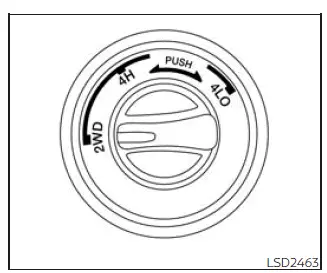
4WD shift switch operations
- Move the 4WD shift switch to 2WD, 4H, or 4LO depending on the driving surface, weather conditions, and required traction.
- If the 4WD shift switch is operated while turning, accelerating, decelerating, or if the ignition switch is placed in the OFF position while the Nissan Frontier is in 4H or 4LO, you may feel a slight jolt. This sensation is not considered abnormal.
- You may hear mechanical or electronic operating sounds as the transfer case shifts or engages. These noises can occur during normal 4WD system operation and do not necessarily indicate a malfunction.
CAUTION
- When driving straight ahead, shift the 4WD shift switch to the 2WD or 4H position only when
conditions allow safe engagement.
Do not move the 4WD shift switch while making a turn or reversing the Nissan Frontier, because this may cause harsh engagement or drivetrain stress.
- Do not shift the 4WD shift switch while traveling down steep downhill grades. Use engine braking and low automatic transmission gears, such as M1 or M2, to help control vehicle speed safely.
- Do not operate the 4WD shift switch while the rear wheels are spinning. Wait until the wheels stop spinning before selecting a different drive mode.
- Before shifting the 4WD shift switch from 2WD to 4H, make sure the Nissan Frontier is traveling below 62 mph (100 km/h). Failing to observe this speed limit can damage the 4WD system.
- Never shift the 4WD shift switch between 4LO and 4H while driving. The vehicle must be stopped and the correct low-range shifting procedure must be followed.
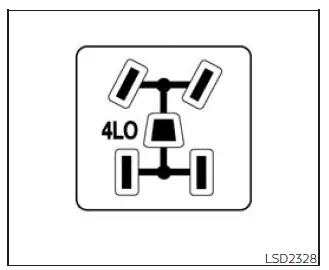
4WD shift indicator
The 4WD shift indicator is shown in the Nissan Frontier vehicle information display, allowing the driver to confirm the currently selected transfer case mode. Always verify the indicator after changing drive modes, especially before continuing on rough roads, slippery surfaces, or off-road terrain.
The indicator should switch off within approximately one second after the ignition switch is placed in the ON position.
While the Nissan Frontier engine is running, the 4WD shift indicator displays the drive mode currently selected with the 4WD shift switch, helping the driver confirm whether 2WD, 4H, or another transfer case position is active.
- The 4WD shift indicator may illuminate while the system is changing from one drive mode to another. After the shift has been completed, the indicator will remain on to confirm the selected position.
- If the 4WD warning message appears in the Nissan Frontier vehicle information display, the 4WD shift indicator will turn off, indicating that the system requires attention.
CAUTION
If the 4WD shift indicator changes to 2WD when the 4WD shift switch has been moved to the 4H position in low ambient temperatures, the 2WD mode may be engaging because of a drive system malfunction. If the indicator does not return to normal operation and the 4WD warning message appears in the Nissan Frontier vehicle information display, have the system inspected promptly. It is recommended that you visit a NISSAN dealer for this service.
Warning message
Warning message comes on or blinks when there is a malfunction in the 4-Wheel Drive system
- Warning message in Vehicle information display
 4WD Error: See
Owner's Manual
4WD Error: See
Owner's Manual
The 4WD warning message is shown in the meter display. This warning message appears when the ignition switch is placed in the ON position and normally turns off shortly after the engine is started. If a malfunction occurs in the Nissan Frontier 4WD system while the ignition switch is ON, the warning message may stay illuminated or begin blinking. When the 4WD warning message appears, the 4WD shift indicator turns off. A significant difference between the front and rear wheel diameters can cause the warning message to blink slowly, approximately once every two seconds.
If this occurs, shift the 4WD shift switch to 2WD and avoid driving at high speed until the condition is corrected.
CAUTION
- If the warning message appears while driving, or if it comes on again soon after the Nissan Frontier
has been stopped for a short time, have the vehicle inspected as soon as possible.
It is recommended that you visit a NISSAN dealer for this service to prevent further drivetrain damage.
- Shifting between 4H and 4LO is not recommended while the 4WD warning message is displayed.
- When the warning message appears, 2WD mode may be engaged even if the 4WD shift switch is set to 4H.
Drive with extra caution. If the related components are malfunctioning, the Nissan Frontier 4WD mode may not engage even when the 4WD shift switch is moved to a four-wheel-drive position.
- Do not drive the Nissan Frontier in 4H or 4LO on dry, hard-surface roads. Operating in these modes on
dry pavement can create unnecessary drivetrain noise, increase tire wear, and reduce fuel economy.
If the 4WD warning message turns on while you are driving on dry, hard-surface roads:
- In the 4H position, move the 4WD shift switch back to 2WD.
- In the 4LO position, stop the vehicle completely, move the automatic transmission shift lever to N (Neutral) while keeping the brake pedal depressed, and then move the 4WD shift switch to 2WD.
- If the warning message remains displayed after completing the above procedure, have the Nissan
Frontier inspected as soon as possible.
It is recommended that you visit a NISSAN dealer for proper diagnosis and service.
- The transfer case may be damaged if the vehicle continues to be driven while the 4WD warning message remains on. Stop using the affected drive mode and arrange service promptly.





