



Nissan Frontier: Instruments and Controls - Warning Lights, Indicator Lights and Audible Reminders
- Warning & Indicator Lights
- Warning/Indicator Lights (Red)
- Warning/Indicator Lights (Yellow)
- Warning/Indicator Lights (Other)
Warning & Indicator Lights Nissan Frontier
Warning & Indicator Lights (Red)
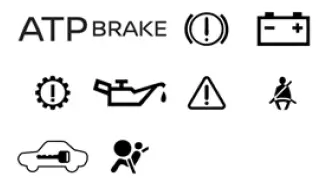
Warning & Indicator Lights (Yellow)
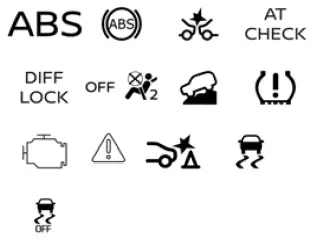
Warning & Indicator Lights (Other)
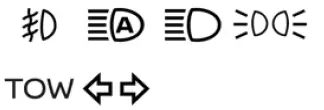
Checking Lights
With all doors closed, the parking brake applied, and all seat belts fastened, place the Nissan Frontier ignition switch in the ON position without starting the engine.
The following indicator lights (if equipped) should illuminate:
 ,
,
 or
or
 ,
,
 ,
,
 ,
,

The following lights (if equipped) should illuminate briefly and then turn off after the Nissan Frontier completes its self-check procedure:
 ,
,
 ,
,
 ,
,
 ,
,
 ,
,
 ,
,
 ,
,
 ,
,
 ,
,
 or
or

If any warning light, indicator light, or status symbol fails to illuminate or operates differently than described, it may indicate a burned-out bulb, electrical issue, sensor malfunction, or vehicle system fault.
In such situations, the Nissan Frontier should be inspected as soon as possible. It is recommended that you visit an authorized NISSAN dealer to diagnose and repair the affected system.
Many warning messages, reminders, and status notifications are also displayed in the Nissan Frontier vehicle information display located between the speedometer and tachometer, providing additional details about vehicle operating conditions and system status.
Warning/Indicator Lights (Red) Nissan Frontier 2022
Automatic Transmission Park Warning Light (4x4 Models)

WARNING
- If the ATP warning light illuminates, it indicates that the automatic transmission P (Park) function is not fully engaged because the transfer case remains in the N (Neutral) position.
- Whenever parking your Nissan Frontier, always verify that the appropriate 4WD indicator light is
illuminated and that the parking brake has been firmly applied.
Failure to place the transfer case in 2WD, 4H, or 4LO may allow the vehicle to move unexpectedly, potentially causing serious personal injury, property damage, or a collision.
- If the ATP warning light remains illuminated while the shift lever is in the P (Park) position, move the
4WD selector switch back into 2WD, 4H, or 4LO to properly engage the transfer case and turn off the
warning light.
Before selecting 4LO, place the transmission in N (Neutral), select the desired transfer case position, then return the shift lever to P (Park) and confirm that the ATP warning light has turned off.
If the Nissan Frontier 4WD mode indicator is off or the ATP warning light remains illuminated, the transmission parking mechanism may not hold the vehicle securely. Under these conditions, the vehicle could roll unexpectedly, resulting in severe injury or property damage.
Always engage the parking brake before leaving the vehicle.
This warning light serves as an indication that the automatic transmission parking lock function has not been properly engaged.
If the transfer control system is not fully secured in a valid drive position while the shift lever remains in P (Park), the transmission may disengage and the drive wheels may not lock as intended.
Brake Warning Light
 OR
OR

This warning light is used to monitor both the parking brake system and the hydraulic brake system of the Nissan Frontier.
Parking Brake Indicator
When the ignition switch is placed in the ON position, this indicator illuminates whenever the parking brake is applied.
Low Brake Fluid Warning Light
With the ignition switch in the ON position, this warning light may indicate that the brake fluid level has fallen below the recommended operating range.
If the light illuminates while the Nissan Frontier engine is running and the parking brake is fully released, perform the following checks immediately:
1. Inspect the brake fluid reservoir and add the specified brake fluid if necessary.
2. If the brake fluid level is within specification, have the brake warning system inspected. It is recommended that you visit an authorized NISSAN dealer for diagnosis.
WARNING
- If the brake warning light remains illuminated, the braking system may not be functioning properly.
Driving under these conditions may be dangerous. If it appears safe, carefully drive the Nissan Frontier to the nearest service facility. Otherwise, arrange for the vehicle to be transported by tow truck.
- Applying the brake pedal with the engine stopped and/or with low brake fluid may significantly increase stopping distance and require greater pedal effort and pedal travel.
- If the brake fluid level falls below the MINIMUM or MIN mark on the reservoir, do not continue driving the Nissan Frontier until the brake system has been inspected and repaired.
Charge Warning Light

If this warning light comes on while the engine is running, it may indicate a malfunction within the Nissan Frontier charging system.
Stop the engine and inspect the generator drive belt. If the belt is loose, damaged, broken, or missing, or if the warning light remains illuminated after inspection, the charging system should be serviced immediately.
It is recommended that you visit an authorized NISSAN dealer for professional diagnosis and repair.
CAUTION
- Do not connect electrical accessories directly to the battery terminals. Doing so may bypass the Nissan Frontier variable voltage control system and prevent the battery from charging correctly.
- Do not continue operating the vehicle if the generator belt is loose, damaged, broken, or missing.
Electric Shift Control System Warning Light

This warning light illuminates whenever a malfunction is detected within the Nissan Frontier electric shift control system.
When the master warning light also illuminates, an audible chime sounds and the message "When parked apply parking brake" appears within the vehicle information display.
When the ignition is switched OFF, the warning chime may continue sounding until the parking brake has been properly applied.
Ensure the parking brake is engaged and have the system inspected as soon as possible. It is recommended that you visit an authorized NISSAN dealer for service.
Engine Oil Pressure Warning Light

This warning light alerts the driver to low engine oil pressure conditions.
If the warning light flickers or remains illuminated while driving your Nissan Frontier, safely move off the roadway, stop the engine immediately, and contact an authorized repair facility or NISSAN dealer.
The engine oil pressure warning light is designed to monitor oil pressure only and does not indicate actual engine oil level.
Always use the engine oil dipstick to verify oil level.
CAUTION
Operating the Nissan Frontier with the engine oil pressure warning light illuminated can cause severe engine damage within a very short period of time. Such damage may not be covered by the NISSAN New Vehicle Limited Warranty. Turn the engine off immediately when it is safe to do so.
Master Warning Light

The master warning light illuminates whenever important warning messages are displayed in the Nissan Frontier vehicle information display.
Examples include:
- Parking brake release warning
- Transmission system warning
Seat Belt Warning Light and Chime

- The warning light and audible chime remind occupants to properly fasten their seat belts.
- The seat belt warning light illuminates when the ignition switch is placed in the ON position if the driver's seat belt is unfastened or if the occupied front passenger seat belt is not secured.
- The warning light may also illuminate when a rear passenger changes from a buckled to an unbuckled condition.
- If the driver's seat belt is not fastened when the Nissan Frontier is started, the warning chime will sound for a short period.
- If vehicle speed exceeds approximately 9 mph (15 km/h) while a monitored seat belt remains unfastened, the warning light will begin flashing and the audible warning chime may continue for more than one minute or until the seat belt is secured.
NOTE:
- The warning light and/or chime may activate if an object is placed on the unoccupied front passenger seat. Remove the object to restore normal system operation.
- The warning light and/or chime may also activate if a seat belt is unfastened before the Nissan Frontier comes to a complete stop. Occupants should remain buckled until the vehicle has fully stopped.
Security Indicator Light

This indicator flashes whenever the ignition switch is in the OFF, LOCK, or ACC position.
Its operation confirms that the Nissan Frontier security and anti-theft systems are active and functioning as designed.
Supplemental Air Bag Warning Light

When the ignition switch is placed in the ON position, the supplemental air bag warning light illuminates for approximately seven seconds before turning off.
This brief illumination confirms that the Nissan Frontier Supplemental Restraint System (SRS) has completed its self-diagnostic check successfully.
If any of the following conditions occur, the front air bag, side air bag, curtain air bag, supplemental knee air bag, and pretensioner systems require inspection:
- The supplemental air bag warning light remains illuminated longer than approximately 7 seconds.
- The supplemental air bag warning light flashes intermittently.
- The supplemental air bag warning light fails to illuminate during startup.
It is recommended that you visit an authorized NISSAN dealer for diagnosis and repair of these systems.
Unless the Nissan Frontier Supplemental Restraint System is properly inspected and repaired, the air bag systems and/or seat belt pretensioners may not operate correctly during a collision.
WARNING
If the supplemental air bag warning light remains illuminated or operates abnormally, the front air bag system, side air bag system, curtain air bag system, supplemental knee air bag system, and/or seat belt pretensioner system may fail to operate during an accident. To help reduce the risk of serious injury, have the Nissan Frontier inspected as soon as possible.
It is recommended that you visit an authorized NISSAN dealer for professional service and repair.
Warning/Indicator Lights (Yellow) Nissan Frontier SUV
Anti-lock Braking System (ABS) Warning Light
 OR
OR

When the ignition switch of the Nissan Frontier is placed in the ON position, the ABS warning light illuminates briefly and then turns off. This startup sequence confirms that the Anti-lock Braking System is functioning correctly and has successfully completed its self-diagnostic check.
If the ABS warning light illuminates while the engine is running or while driving, it may indicate a malfunction within the Nissan Frontier Anti-lock Braking System. In this situation, the system should be inspected as soon as possible. It is recommended that you visit an authorized NISSAN dealer for diagnosis and service.
If an ABS malfunction occurs, the anti-lock braking function is automatically disabled. However, the conventional hydraulic braking system remains operational, allowing the Nissan Frontier to continue braking normally, although without anti-lock assistance during emergency stops or low-traction conditions.
The ABS system plays an important role in helping drivers maintain steering control during hard braking situations, particularly on wet, slippery, or uneven road surfaces.
Automatic Emergency Braking (AEB) with Pedestrian Detection System Warning Light

This warning light illuminates when the Nissan Frontier ignition switch is placed in the ON position and normally turns off shortly after the engine starts.
The indicator remains illuminated whenever the Automatic Emergency Braking (AEB) with Pedestrian Detection system has been manually switched OFF through the vehicle information display settings.
If the warning light begins flashing or remains illuminated while the AEB with Pedestrian Detection system is activated, it may indicate that the system is temporarily unavailable or that a malfunction has been detected.
Various conditions such as dirt, snow, ice, heavy rain, sensor obstruction, or certain environmental conditions may affect system performance.
The Nissan Frontier AEB system is designed to help reduce the risk of frontal collisions by monitoring traffic conditions ahead and applying braking assistance when necessary.
For complete operating information, refer to the section titled "Automatic Emergency Braking (AEB) with Pedestrian Detection."
Automatic Transmission Check Warning Light

When the ignition switch is turned to the ON position, this warning light illuminates for approximately two seconds as part of the normal Nissan Frontier startup self-test procedure.
If the light illuminates at any other time while driving or operating the vehicle, it may indicate that the automatic transmission system is not functioning properly.
Prompt inspection is recommended to prevent potential transmission damage and maintain optimal vehicle performance. It is recommended that you visit an authorized NISSAN dealer for professional diagnosis and repair.
Electronic Locking Rear Differential (E-Lock) System ON Indicator Light (if so equipped)

This indicator light illuminates when the Nissan Frontier Electronic Locking Rear Differential (E-Lock) system has fully engaged the differential locking mechanism.
When the system is initially activated, the indicator light flashes while engagement is taking place.
Once the rear differential lock is completely engaged, the indicator remains steadily illuminated.
If the E-Lock switch is activated but the indicator continues flashing, the locking mechanism has not fully engaged and the system may not yet be ready for use.
The E-Lock system is particularly beneficial when driving the Nissan Frontier on loose surfaces such as mud, sand, snow, gravel, or challenging off-road terrain where additional traction may be required.
Front Passenger Air Bag Status Light

The front passenger air bag status light indicates whether the front passenger air bag system is enabled or disabled based on occupant classification and seat usage.
Depending on how the front passenger seat is occupied, the Nissan Frontier Occupant Classification System may automatically activate or deactivate the passenger air bag system.
This indicator helps drivers confirm that the front passenger air bag is operating according to current seating conditions and safety requirements.
Hill Descent Control System ON Indicator Light (if so equipped)

When the ignition switch is placed in the ON position, this indicator illuminates briefly before turning off as part of the normal system self-check.
The light illuminates whenever the Nissan Frontier Hill Descent Control system is activated and ready to assist the driver.
Hill Descent Control is designed to help maintain a controlled vehicle speed while traveling down steep slopes, reducing the need for constant brake pedal application and improving driver confidence in challenging off-road environments.
If the Hill Descent Control switch is activated and the indicator light flashes continuously, the system has not successfully engaged.
If the indicator light fails to illuminate when the Hill Descent Control system is switched on, the system may not be functioning properly.
Under these circumstances, the Nissan Frontier should be inspected by qualified service personnel. It is recommended that you visit an authorized NISSAN dealer for diagnosis and repair.
Understanding the various yellow warning and indicator lights in the Nissan Frontier can help drivers recognize system status, identify potential issues early, and maintain the vehicle's safety, performance, and reliability under a wide variety of driving conditions.
Low Tire Pressure Warning Light
Basic Information

Your Nissan Frontier is equipped with an advanced Tire Pressure Monitoring System (TPMS) designed to continuously monitor the air pressure of all road tires. The spare tire is not monitored by this system.
The low tire pressure warning light serves two important functions. It alerts the driver when one or more tires are operating below the recommended inflation pressure and also provides notification if a malfunction is detected within the TPMS itself.
When the ignition switch is placed in the ON position, the Nissan Frontier low tire pressure warning light will briefly illuminate for approximately one second before turning off. This indicates normal system operation and confirms that the TPMS is performing its startup self-check.
Low Tire Pressure Warning
If the Nissan Frontier is driven with one or more underinflated tires, the low tire pressure warning light will illuminate to alert the driver.
A "Tire Pressure Low - Add Air" message will also appear within the vehicle information display.
When the low tire pressure warning light comes on, safely stop the vehicle as soon as conditions permit and inspect all four tires. Adjust the tire pressures to the recommended COLD tire pressure values listed on the Tire and Loading Information label located inside the driver's door opening.
The Nissan Frontier low tire pressure warning light does not automatically switch off immediately after tire inflation. Once all tires have been adjusted to the recommended pressure, the vehicle must be driven at speeds above 16 mph (25 km/h) in order for the TPMS to update its readings and extinguish the warning light.
For the most accurate results, always verify tire pressures using a high-quality tire pressure gauge.
The "Tire Pressure Low - Add Air" message will continue to appear every time the ignition switch is turned ON for as long as the low tire pressure warning light remains illuminated.
Maintaining correct tire pressure on your Nissan Frontier helps improve handling, braking performance, fuel economy, tire longevity, and overall driving safety.
TPMS Malfunction
If the Tire Pressure Monitoring System is not functioning correctly, the low tire pressure warning light will flash for approximately one minute after the ignition switch is placed in the ON position.
After the initial flashing period, the warning light will remain continuously illuminated.
If this condition occurs, the Nissan Frontier TPMS should be inspected as soon as possible. It is recommended that you visit an authorized NISSAN dealer for diagnosis and repair.
When the warning light is indicating a TPMS malfunction, the "Tire Pressure Low - Add Air" message will generally not be displayed.
This behavior helps distinguish between an actual low tire pressure condition and a system-related fault.
WARNING
- Radio frequency signals generated by the TPMS may affect certain types of electronic medical equipment. Individuals using pacemakers or other implanted medical devices should consult the manufacturer of their medical equipment regarding possible effects before operating or riding in the Nissan Frontier.
- If the low tire pressure warning light fails to illuminate during the normal startup self-check when the ignition switch is placed in the ON position, the vehicle should be inspected promptly. It is recommended that you visit an authorized NISSAN dealer for service.
- If the warning light illuminates while driving, avoid sudden steering inputs, abrupt braking, or
aggressive maneuvers. Gradually reduce speed, move to a safe location, and stop the Nissan Frontier as
soon as possible.
Driving with underinflated tires may permanently damage the tires, reduce vehicle stability, increase stopping distances, and significantly raise the risk of tire failure.
Severe tire damage may result in loss of vehicle control, property damage, serious injury, or death.
Inspect all four tires and adjust them to the recommended COLD tire pressures listed on the Tire and Loading Information label located in the driver's door opening.
If the warning light continues to illuminate after tire pressures have been corrected, one of the tires may have a puncture or the TPMS may be malfunctioning.
If a tire is flat, replace it with the spare tire as soon as practical. If all tires appear properly inflated and no puncture is found, have the Nissan Frontier inspected by an authorized NISSAN dealer.
- When operating the Nissan Frontier with a wheel that is not equipped with a TPMS sensor, such as the
spare tire, the Tire Pressure Monitoring System will not function normally.
Under these circumstances, the low tire pressure warning light will flash for approximately one minute and then remain illuminated.
Replace the temporary wheel with a TPMS-equipped wheel and have the TPMS reset as soon as possible. It is recommended that you visit an authorized NISSAN dealer for these procedures.
- Installing tires that do not match Nissan Frontier specifications may interfere with proper Tire Pressure Monitoring System operation and could affect vehicle handling and safety.
- To help prevent serious injury or death, always check the pressure of every tire whenever performing
routine maintenance or responding to a TPMS warning.
Driving on underinflated tires can cause excessive heat buildup, premature tire wear, poor fuel economy, reduced handling performance, and possible tire failure.
Improper tire pressure may also negatively affect the operation of other Nissan Frontier safety and driver-assistance systems.
Regular tire pressure inspections and proper TPMS maintenance help ensure that your Nissan Frontier delivers optimal safety, handling, comfort, and fuel efficiency. Keeping all tires inflated to the specified pressure is one of the simplest yet most important maintenance procedures for preserving overall vehicle performance.
CAUTION
- The Tire Pressure Monitoring System (TPMS) installed in the Nissan Frontier is intended as a supplemental safety feature and should never replace routine tire inspections. Tire pressure should be checked regularly using an accurate tire pressure gauge, even when no warning messages are displayed.
- If the Nissan Frontier is driven at speeds below approximately 16 mph (25 km/h), the TPMS may not collect sufficient data to operate accurately or update tire pressure information correctly.
- Always install the specified Nissan Frontier tire size on all four wheels and ensure that tires are mounted correctly. Using incorrect tire sizes or mismatched tire combinations may affect TPMS operation, handling characteristics, and overall vehicle safety.
Malfunction Indicator Light (MIL)
Basic Information

If this indicator light illuminates continuously or begins flashing while the Nissan Frontier engine is running, it may indicate a potential malfunction within the emission control system.
The Malfunction Indicator Light (MIL), commonly referred to as the "Check Engine" light, is designed to monitor engine management, fuel delivery, ignition performance, emission-related components, and various electronic control systems.
If the indicator remains illuminated for approximately 20 seconds and then flashes for about 10 seconds while the engine is not running, it indicates that the Nissan Frontier is not yet ready for an emissions inspection or maintenance test.
This condition does not necessarily indicate a malfunction but rather that the vehicle's onboard diagnostic system has not completed all required monitoring procedures.
Operation
The Nissan Frontier Malfunction Indicator Light (MIL) may operate in one of two different ways depending on the type of issue detected:
- MIL illuminated continuously — An emission control system malfunction has been detected.
Before seeking service, inspect the fuel-filler cap if a Loose Fuel Cap warning message appears within the Nissan Frontier vehicle information display.
If the fuel-filler cap is loose, improperly installed, or missing, tighten or reinstall the cap securely and continue driving normally.
The
 indicator should turn off automatically after several normal driving cycles.
If the
 warning light remains illuminated after several trips, the Nissan Frontier should be inspected. It is
recommended that you visit an authorized NISSAN dealer for diagnosis and repair.
warning light remains illuminated after several trips, the Nissan Frontier should be inspected. It is
recommended that you visit an authorized NISSAN dealer for diagnosis and repair.
Under most circumstances, the vehicle does not need to be towed and may be driven carefully to a service facility.
- MIL flashing — An engine misfire has been detected that may cause damage to the Nissan Frontier emission
control system, catalytic converter, or related components.
- Avoid driving at speeds above 45 mph (72 km/h).
- Avoid rapid acceleration and hard braking whenever possible.
- Do not subject the vehicle to heavy engine loads.
- Avoid steep uphill grades that may increase engine stress.
- If practical, reduce the amount of cargo being carried or the weight being towed.
- Drive the Nissan Frontier conservatively until the vehicle can be inspected by qualified service personnel.
In some situations, the flashing MIL may stop flashing and remain steadily illuminated. Even if this occurs, the Nissan Frontier should still be inspected promptly because a fault has been detected within the engine or emissions system.
It is recommended that you visit an authorized NISSAN dealer for professional diagnosis and repair.
Unless the vehicle exhibits severe drivability concerns, towing is generally not required.
CAUTION
Continuing to operate the Nissan Frontier without correcting emission-control-related problems may result in poor engine performance, reduced fuel economy, increased emissions, rough running conditions, catalytic converter damage, and expensive repairs. Prompt diagnosis and repair are strongly recommended whenever the Malfunction Indicator Light remains illuminated.
Master Warning Light

The Nissan Frontier Master Warning Light illuminates whenever important warning messages or vehicle status notifications appear in the vehicle information display.
This indicator serves as a general attention alert and directs the driver to review additional information shown on the instrument cluster display.
The Master Warning Light may be triggered by various Nissan Frontier systems, including but not limited to the following:
- No Key Warning
- Low Fuel Warning
- Low Windshield Washer Fluid Warning
- Loose Fuel Cap Warning
- Low Tire Pressure Warning
- 4WD System Error (if equipped)
- Driver Assistance System Notifications
- Certain Vehicle System Status Messages
Whenever the Master Warning Light illuminates, review the vehicle information display for a detailed description of the warning condition. Addressing warning messages promptly can help maintain the safety, reliability, and long-term performance of your Nissan Frontier.
The Master Warning Light is designed to work together with the Nissan Frontier information display system, providing drivers with quick access to important vehicle alerts before minor issues develop into more significant problems.
Rear Automatic Braking (RAB) System Warning Light

When the ignition switch of the Nissan Frontier is placed in the ON position, this indicator light illuminates briefly as part of the vehicle's normal self-diagnostic procedure. After the engine starts, the light should turn off if the system is operating correctly.
This warning light illuminates whenever the Rear Automatic Braking (RAB) system has been manually disabled through the Nissan Frontier vehicle information display settings.
When the RAB system is switched off and the transmission is shifted into R (Reverse), a warning message such as "Rear Auto Braking Off" may appear in the center display to remind the driver that automatic rear collision braking assistance is unavailable.
The Nissan Frontier Rear Automatic Braking system is designed to help detect obstacles behind the vehicle and may automatically apply the brakes to help reduce the severity of certain reversing collisions.
If the warning light begins flashing or remains illuminated while the RAB system is enabled, it may indicate that the system is temporarily unavailable or that a malfunction has been detected.
Environmental conditions such as dirt, mud, snow, ice accumulation, heavy rain, sensor obstruction, or damage to rear bumper-mounted sensors may affect system performance and trigger the warning light.
If the Nissan Frontier RAB warning light continues to illuminate, the system should be inspected by qualified service personnel. It is recommended that you visit an authorized NISSAN dealer for diagnosis and repair.
Slip Indicator Light

The slip indicator light flashes whenever the Nissan Frontier Vehicle Dynamic Control (VDC) system is actively intervening to help maintain vehicle stability and traction.
When this light flashes, it serves as a reminder that road conditions may be slippery and that the vehicle is approaching the limits of available tire traction.
The VDC system automatically adjusts engine output and may apply braking force to individual wheels in order to help the Nissan Frontier maintain directional stability during acceleration, cornering, or low-traction driving situations.
While the system is operating, drivers may notice slight vibrations, hear mechanical or hydraulic sounds, or feel subtle changes in vehicle behavior. These responses are normal and indicate that the Nissan Frontier stability control system is actively working.
The slip indicator light may continue flashing for several seconds after the VDC system has finished reducing wheel spin or correcting vehicle motion.
The
 indicator light also illuminates briefly whenever the ignition switch is placed in the ON position.
Under normal operating conditions, the light turns off after approximately two seconds once the Nissan Frontier completes its startup self-test.
If the indicator fails to illuminate during startup, the Vehicle Dynamic Control system may not be functioning correctly.
In this situation, the Nissan Frontier should be inspected as soon as possible. It is recommended that you visit an authorized NISSAN dealer for service.
Vehicle Dynamic Control (VDC) OFF Indicator Light

This indicator illuminates whenever the Nissan Frontier Vehicle Dynamic Control system has been manually switched OFF using the VDC OFF switch.
When the light is illuminated, it indicates that traction control and certain stability control functions are not actively assisting the driver.
Disabling VDC may be useful under specific conditions such as freeing the vehicle from deep snow, mud, sand, or other situations where controlled wheel spin is desirable.
To restore normal operation, press the VDC OFF switch again or restart the Nissan Frontier engine. The Vehicle Dynamic Control system will then return to its normal operating mode.
The VDC OFF indicator light also illuminates briefly whenever the ignition switch is placed in the ON position.
If the Nissan Frontier Vehicle Dynamic Control system is functioning correctly, the indicator will turn off after approximately two seconds.
If the light remains illuminated, fails to turn off, or illuminates together with the
 indicator while driving, a malfunction may exist within the stability control system.
Under these circumstances, the Nissan Frontier should be inspected by qualified service personnel. It is recommended that you visit an authorized NISSAN dealer for diagnosis and repair.
During normal operation of the Vehicle Dynamic Control system, drivers may occasionally feel slight brake pulsations, hear mechanical noises, or experience subtle vehicle corrections while accelerating or driving on low-traction surfaces. These characteristics are considered normal and indicate that the Nissan Frontier stability control system is actively helping maintain vehicle control.
Understanding the operation of the Nissan Frontier Rear Automatic Braking system, Slip Indicator Light, and Vehicle Dynamic Control indicators can help drivers respond appropriately to changing road conditions and maintain the highest possible level of vehicle safety, stability, and driver confidence.
Warning/Indicator Lights (Other) Nissan Frontier third generation
Front Fog Light Indicator Light (Green) (if so equipped)

The front fog light indicator illuminates whenever the front fog lights of the Nissan Frontier are switched on. This indicator provides a quick visual confirmation that the auxiliary fog lighting system is active and helping improve visibility during adverse weather conditions.
Front fog lights are particularly useful when driving the Nissan Frontier through fog, mist, heavy rain, snow, or other situations where reduced visibility may occur. They are designed to illuminate the roadway directly ahead while minimizing glare and reflection.
High Beam Assist Indicator Light (Green)

This indicator light illuminates when the Nissan Frontier headlight switch is set to the AUTO position and the High Beam Assist system is actively controlling headlight operation.
When the indicator is illuminated, it confirms that the High Beam Assist feature is available and functioning as intended.
The Nissan Frontier High Beam Assist system automatically switches between high-beam and low-beam headlights based on surrounding traffic conditions and ambient lighting. This helps improve nighttime visibility while reducing glare for other road users.
High Beam Indicator Light (Blue)

This blue indicator light illuminates whenever the Nissan Frontier high-beam headlights are activated.
The indicator switches off automatically when the headlights return to low-beam operation.
The high beam indicator also illuminates when the passing signal feature is used, allowing the driver to momentarily flash the high beams to alert other motorists.
Using high beams appropriately can significantly improve nighttime visibility, especially when driving the Nissan Frontier on rural roads or in poorly illuminated areas.
Side Light and Headlight Indicator Light (Green)

The side light and headlight indicator illuminates whenever the parking lights, side lights, or headlight system is switched on.
This indicator allows Nissan Frontier drivers to quickly verify that exterior lighting systems are operating and helps prevent inadvertently leaving lights on after parking the vehicle.
TOW Mode ON Indicator Light (Green) (if so equipped)

This indicator illuminates whenever the Nissan Frontier Tow Mode function is activated.
Tow Mode is designed to optimize transmission operation and vehicle performance while towing trailers or transporting heavy loads.
When enabled, the system may modify transmission shift patterns to improve towing capability, vehicle control, and overall drivability.
Turn Signal/Hazard Indicator Lights (Green)

The corresponding indicator flashes whenever a turn signal is activated.
When the Nissan Frontier hazard warning switch is turned on, both turn signal indicators flash simultaneously to alert surrounding traffic that the vehicle is stopped, disabled, or presenting a potential hazard.
Proper use of turn signals and hazard flashers contributes significantly to safe vehicle operation and improved communication with other drivers.
Audible Reminders
Brake Pad Wear Warning
The Nissan Frontier braking system incorporates audible brake pad wear indicators.
When brake pads approach the end of their service life, a high-pitched scraping or squealing sound may be heard while the vehicle is moving, regardless of whether the brake pedal is being pressed.
This warning sound is intended to notify the driver that brake pad replacement is required.
If this sound is detected, have the Nissan Frontier braking system inspected as soon as possible to maintain optimal braking performance and safety.
Light Reminder Chime
When the ignition switch is placed in the OFF position and the driver's door is opened while the headlights or parking lights remain illuminated, an audible reminder chime sounds.
This feature helps prevent accidental battery discharge by reminding the driver to switch off the exterior lighting before leaving the Nissan Frontier.
Always turn the headlight control switch to the OFF position when exiting the vehicle.
NISSAN Intelligent Key Door Buzzer
The Nissan Frontier Intelligent Key system includes an audible warning buzzer that alerts the driver when certain improper key operations are detected.
The buzzer may sound under the following conditions:
- The Intelligent Key remains inside the Nissan Frontier when attempting to lock the doors.
- The Intelligent Key is removed from the vehicle while vehicle operation requires its presence.
Whenever the buzzer sounds, carefully inspect both the vehicle and the Intelligent Key location to ensure proper operation of the Nissan Frontier keyless access system.





