



Nissan Frontier: Instruments and Controls - Windows
Power windows
Basic Information
WARNING
- Ensure that all passengers keep their hands, arms, and other body parts inside the Nissan Frontier while the vehicle is moving and before closing any window. Use the window lock switch whenever necessary to prevent unintended operation.
- To help prevent injury or death resulting from unintended vehicle operation, window entrapment, or accidental door lock activation, never leave children, pets, or individuals requiring assistance unattended inside the vehicle. Temperatures inside a closed Nissan Frontier can rise rapidly and become life-threatening.
The power windows operate when the ignition switch is in the ON position and for a limited period after the ignition switch is moved to the ACC or OFF position. If either the driver's door or front passenger's door is opened during this retained-power period, power window operation is canceled.
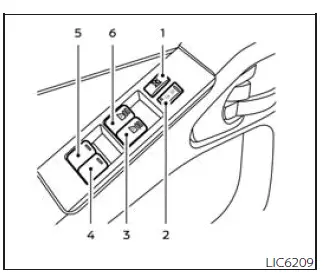
Driver's side power window switch
- Window lock button
- Power door lock switch
- Front passenger side automatic window switch
- Right rear passenger window switch (Crew Cab models only)
- Left rear passenger window switch (Crew Cab models only)
- Front driver's side automatic window switch
The Nissan Frontier driver's control panel provides centralized control of all available power windows. Using these switches, the driver can conveniently operate both front and rear windows from a single location.
To open a window, press and hold the appropriate switch downward. To close a window, pull the switch upward and hold it. Releasing the switch immediately stops window movement.
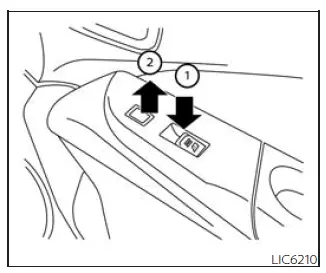
Front passenger's power window switch
The passenger-side switch controls only the corresponding front passenger window.
To lower the window, press and hold the switch downward 1. To raise the window, pull the switch upward 2.
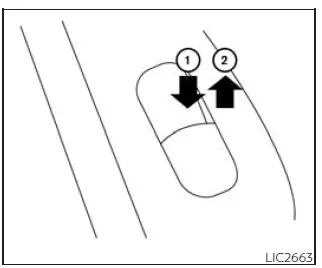
Rear power window switch (Crew Cab models only)
The rear passenger window switches control only their respective windows. Press and hold the switch downward 1 to open the window. Pull the switch upward 2 to close the window.
Locking passengers' windows
When the window lock switch is activated, only the driver's window remains operational. This feature helps prevent accidental window operation by rear passengers and children. Press the switch again to restore normal operation.
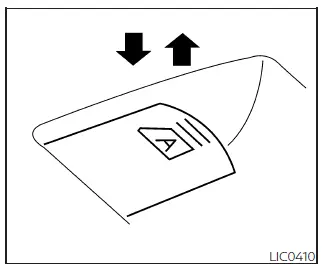
Automatic operation
To fully lower a window equipped with automatic operation, press the window switch past the second detent and release it. The window will automatically travel to the fully open position without requiring the switch to be held.
To stop the window before it reaches the fully open position, pull the switch upward while the window is moving.
Rear sliding window
WARNING
- Before operating the rear sliding window, make certain that all passengers, pets, and objects are clear
of the window opening and moving components.
Failure to observe this precaution may result in personal injury or damage to the rear window mechanism.
- The rear sliding window is not designed to support or transport long objects through the opening.
- Do not place cargo, equipment, lumber, pipes, or other items through the open rear window. Do not use the
rear sliding window as a cargo pass-through.
Improper use may damage the Nissan Frontier rear window system or result in injury.
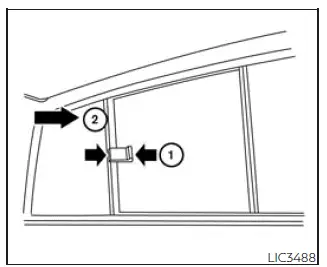
To open the rear sliding window, squeeze the handles of lever 1 and slide the glass panel in the direction indicated by arrow 2.
The rear sliding window helps improve cabin ventilation and airflow while enhancing comfort for Nissan Frontier occupants during warm-weather driving conditions.





