



Nissan Frontier: Pre-driving checks and adjustments - Doors
Basic information Nissan Frontier D41
The doors of the Nissan Frontier are equipped with multiple locking and security features designed to improve occupant protection, vehicle security, and everyday convenience. When the doors are locked using any of the available locking methods, they cannot be opened from either the inside or outside door handles until they are properly unlocked.
Always ensure that the doors are unlocked before attempting to enter or exit the Nissan Frontier.
WARNING
- Always keep the doors locked while driving. When combined with proper seat belt use, locked doors provide additional protection in the event of a collision by helping reduce the possibility of occupants being ejected from the vehicle. Locked doors also help prevent children from accidentally opening a door and provide an added layer of protection against unauthorized entry.
- Before opening any door of the Nissan Frontier, always check for approaching vehicles, cyclists, pedestrians, or other potential hazards.
- To help reduce the risk of injury or death resulting from unintended vehicle operation, accidental window operation, or inadvertent door locking, never leave children, individuals requiring assistance, or pets unattended inside the vehicle. Interior temperatures can rise rapidly, even on moderately warm days, creating dangerous conditions within a short period of time.
Locking with key Nissan Frontier 2022
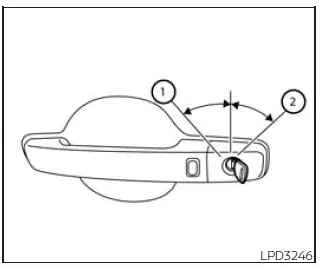
Driver's side
To lock the Nissan Frontier driver's door using the mechanical key, insert the key and turn it toward the rear of the vehicle 2. This action locks only the corresponding door and does not activate the vehicle security system.
To arm the Nissan Frontier security system, press the

button on the Intelligent Key after exiting the vehicle.
To unlock the door using the mechanical key, turn the key toward the front of the vehicle 1. This action unlocks only the corresponding door and does not automatically deactivate the security system.
Locking with inside lock knob
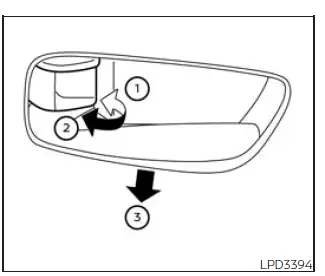
Inside lock
To lock a door from inside the Nissan Frontier without using a key, move the inside lock knob to the lock position 1 and then close the door.
To unlock a door manually, move the inside lock knob to the unlock position 2.
For added convenience, the front doors can also be unlocked and opened without operating the lock knob directly. Pull the interior door handle 3 once to unlock the door and pull it a second time to open the door.
This two-stage operation helps improve convenience while maintaining vehicle security.
Locking with power door lock switch
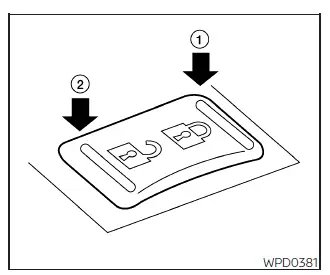
To lock all doors simultaneously without using a key, press the power door lock switch located on either the driver's side or front passenger's side to the lock position 1.
When using this method, always verify that the Nissan Frontier Intelligent Key is not left inside the vehicle before locking the doors.
To unlock all doors, press the power door lock switch to the unlock position 2.
The centralized locking system allows quick and convenient control of all vehicle doors from the front seating area.
Rear doors (King Cab models) Nissan Frontier SUV
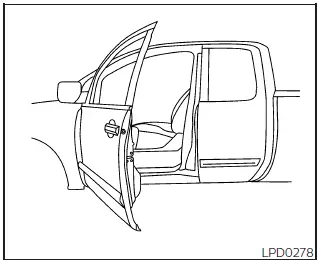
1. Open the driver's door or front passenger's door.
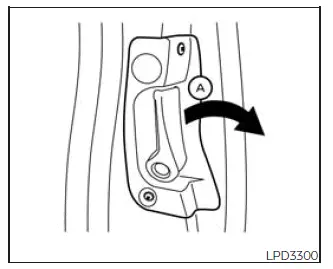
2. From outside the vehicle, pull door handle A toward you.
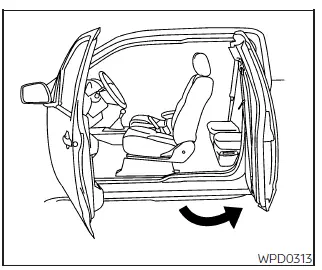
3. Open the rear door to the desired position.
The rear access doors on Nissan Frontier King Cab models provide improved access to the rear seating area and cargo storage space while maintaining a practical and durable cabin design.
Automatic door locks
- All Nissan Frontier doors automatically lock when vehicle speed reaches approximately 15 mph (24 km/h), helping enhance occupant safety while driving.
- All doors automatically unlock when the transmission is shifted into the P (Park) position or when the ignition switch is moved to the OFF position, depending on the settings selected within the "Vehicle Settings" menu.
NOTE:
The Auto Door Unlock function can be customized through the Nissan Frontier vehicle information display using the available Vehicle Settings menu options.
Child safety rear door lock
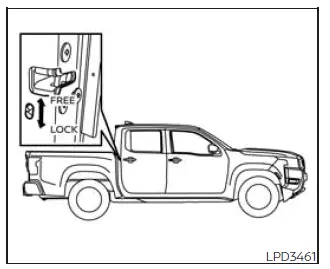
Child safety rear door locks help prevent accidental opening of the rear doors from inside the vehicle, making them especially valuable when transporting children.
The child safety lock levers are positioned along the edge of each rear door and can be easily activated or deactivated as needed.
When the child safety lock is enabled, rear passengers cannot open the door using the interior door handle.
When the lever is in the LOCK position, the rear door can only be opened from the outside of the Nissan Frontier.
This feature provides an additional level of protection for families and helps reduce the risk of accidental door opening while the vehicle is moving.





