



Nissan Frontier: Instruments and Controls - Wireless charger
Basic Information
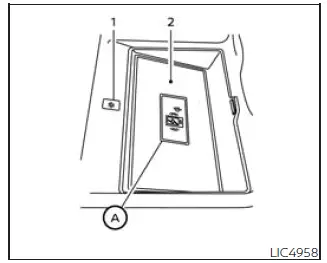
- Indicator
- Charging pad
The wireless charging system in the Nissan Frontier provides a convenient cable-free method for charging compatible smartphones. The charging pad is located in the center console behind the gear selector, allowing easy access for both driver and front passenger.
To begin charging, simply place a compatible smartphone on the charging pad. Charging starts automatically once the device is correctly positioned. As long as the ignition switch remains in the ON position, the smartphone will continue receiving power.
NOTE:
The wireless charger requires all vehicle doors to be closed before charging can begin. If a door remains open, the charging function may not operate until the doors are fully closed.
WARNING
- Never place metallic objects between the wireless charging pad and the smartphone.
- Individuals using pacemakers or other implanted medical devices should consult the equipment manufacturer regarding possible electromagnetic interference before using the wireless charging system.
- Do not cover the smartphone with cloth, paper, or other materials while charging.
- Never attempt to charge a smartphone that is wet or exposed to moisture.
- Do not place metallic objects or small items such as an Intelligent Key, coins, memory drive, or other conductive materials on the charging pad.
CAUTION
- Do not place RFID cards, NFC cards, access cards, or credit cards between the wireless charger and the smartphone. Doing so may result in data corruption or card damage.
- Do not operate the wireless charger if dust, dirt, or debris has accumulated on the charging surface.
- Avoid striking or applying excessive force to the wireless charging pad.
- Do not spill water, beverages, or other liquids on the charging surface.
- Do not use grease, oil-based products, solvents, or alcohol when cleaning the charging pad.
Wireless charger indicator
The indicator (1) illuminates in orange when wireless charging begins.
Once charging is complete, the indicator changes to green, confirming that the smartphone battery has reached a charged state.
If a malfunction occurs or charging is interrupted, the indicator will flash orange for approximately eight seconds before turning off.
Wireless charger operation
For proper operation of the Nissan Frontier wireless charger, position the smartphone carefully within the charging area. Maximum charging efficiency is achieved when the device is centered directly above the "Qi" logo A located on the charging pad.
Because charging coil locations vary between smartphone models, slight repositioning may be required to achieve the best charging performance. If charging does not begin immediately, adjust the phone position until the indicator confirms charging operation.
Some protective cases, magnetic accessories, wallet attachments, or decorative covers may interfere with charging performance. Removing these accessories before charging is recommended whenever possible.
For best results, disable the smartphone vibration function before beginning the wireless charging process. Repeated vibration may cause the phone to move away from the optimal charging position.
NOTE:
- Only smartphones that support the Qi wireless charging standard can be charged using this system.
- The smartphone may become warm during charging. If the device temperature rises excessively, the Nissan
Frontier wireless charger protection system may temporarily stop charging. This is normal operation and
does not indicate a malfunction.
If this occurs, allow the smartphone to cool before restarting the charging process. During this condition, the indicator may flash orange and then turn off.
- Charging may also stop depending on the smartphone's operating status, battery temperature, software management functions, or other internal conditions.
- If radio interference occurs during charging, reposition the smartphone directly over the center of the charging pad near the "Qi" logo.
- The wireless charging process may be temporarily interrupted while the vehicle searches for the Intelligent Key.
- The wireless charging function will not operate if a USB cable is connected to the smartphone.
The indicator may still illuminate or flash orange when a connected device is placed on the charging pad, but wireless charging will not occur while the cable remains connected.
- Depending on smartphone design and charging management software, the indicator may continue displaying orange even after the device has reached a fully charged state.
This device complies with Part 15 of the FCC Rules and RSS-Gen requirements of Industry Canada regulations.
Operation is subject to the following two conditions:
(1) This device may not cause harmful interference.
(2) This device must accept any interference received, including interference that may cause undesired operation.
Any changes or modifications not expressly approved by the party responsible for compliance may void the user's authority to operate this equipment.
RF Radiation Exposure Statement: This equipment complies with FCC RF exposure limits established for an uncontrolled environment.
This device and its antenna must not be co-located or operated together with any other antenna or transmitter.
This equipment should be installed and operated with a minimum distance of 15 cm between the radiator and the user's body.
ISED Compliance Statement
This device complies with RSS-Gen requirements of Industry Canada regulations.
Operation is subject to the following two conditions:
(1) This device may not cause harmful interference.
(2) This device must accept any interference received, including interference that may cause undesired operation.
Any modifications not expressly approved by the responsible compliance authority will void the user's authorization to operate the equipment.
ISED RF Radiation Exposure Statement: This equipment complies with ISED RF exposure limits established for an uncontrolled environment. This device and its antenna must not be co-located or operated together with any other antenna or transmitter. The equipment should be installed and operated with a minimum distance of 15 cm between the radiator and the user's body and arms.
The Nissan Frontier wireless charging system offers a convenient and modern solution for keeping compatible mobile devices powered while reducing cable clutter inside the cabin, making every journey more comfortable and connected.





