
Ford Focus Service Manual: Instrument Cluster (IC) - Description and Operation
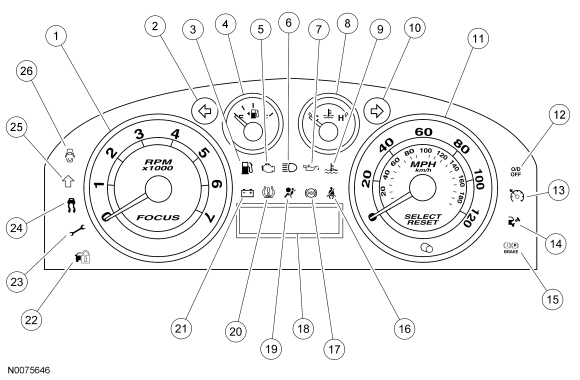
| Item | Part Number | Description |
|---|---|---|
| 1 | — | Tachometer |
| 2 | — | LH turn indicator |
| 3 | — | Low fuel warning indicator |
| 4 | — | Fuel gauge |
| 5 | — | Malfunction Indicator Lamp (MIL) |
| 6 | — | High beam indicator |
| 7 | — | Low engine oil pressure warning indicator |
| 8 | — | Engine coolant temperature gauge |
| 9 | — | Engine over-temperature warning indicator |
| 10 | — | RH turn indicator |
| 11 | — | Speedometer |
| 12 | — | Overdrive (O/D) off |
| 13 | — | Cruise control indicator |
| 14 | — | Check fuel cap indicator |
| 15 | — | Brake warning indicator |
| 16 | — | Safety belt warning indicator |
| 17 | — | ABS warning indicator |
| 18 | — | Message center display area |
| 19 | — | Air bag warning indicator |
| 20 | — | Tire Pressure Monitoring System (TPMS) warning indicator |
| 21 | — | Charging system warning indicator |
| 22 | — | Anti-theft indicator |
| 23 | — | Powertrain malfunction (wrench) warning indicator |
| 24 | — | Traction control indicator |
| 25 | — | Upshift indicator |
| 26 | — | Door ajar warning indicator |
The Instrument Cluster (IC) contains gauges, informational indicators and warning indicators that are designed to provide the driver with system status and to alert the driver that certain conditions exist in the vehicle.
The IC uses a 2-line display of basic informational items such as the odometer and trip odometer and for the message center display information.
All indicator lamps are LEDs, which are not replaceable. The only replaceable item is the IC lens assembly.
MyKey™
The MyKey™ feature allows the customer to program a restricted driving mode that is tied to one or more keys known as a MyKey™. When a MyKey™ is in use, the IC provides the following functions:
- At beginning of vehicle start up, as part of the welcome strategy, the message center greets the MyKey™ driver with MYKEY ACTIVE DRIVE SAFELY displayed in the message center. If the MyKey™ speed limiter feature is turned on, the message center also displays SPEED LIMITED TO 80 MPH (or 130 km/h).
- The IC continuously provides a periodical Belt-Minder® warning chime until the driver and passenger safety belts are buckled. When the Belt-Minder® is issued, the Audio Control Module (ACM) is muted and the message center displays BUCKLE UP TO UNMUTE RADIO.
- If the MyKey™ speed limiter feature is turned on and the vehicle speed approaches 130 km/h (80 mph), the message center displays VEHICLE SPEED 80 MPH MAX along with a chime.
- If the MyKey™ speed limiter feature is turned on and the vehicle speed approaches 120 km/h (75 mph), the message center displays VEHICLE NEAR TOP SPEED along with a chime.
- If the speed warning is selected at one of the pre-set values (75, 90, 105 km/h [45, 55, 65 mph]) and the vehicle approaches the pre-set speed, the message center displays CHECK SPEED DRIVE SAFELY along with a chime.
- If the traction control always on feature is turned on and the MyKey™ driver presses the traction control switch to disable traction control, the message center displays ADVTRAC ON MyKey™ SETTING.
- At 120 km (75 miles) to empty, the IC illuminates the low fuel indicator (if equipped) and the message center displays 75 MILES TO EMPTY along with a chime
- MyKey™ mileages driven by the MyKey™ user can be found in the INFO display and in the system check function of the message center.
- The number of MyKey™ programmed and admin keys can be found in the system check function of the message center.
When an admin key is in use, the IC provides the following functions:
- The message center provides a menu that guides the user to create a MyKey™. When the maximum MyKey™ limit is reached, the MyKey™ creation menu is no longer available.
- The message center provides menus for setting 4 optional MyKey™ features:
- MyKey™ 80 MPH speed limiter
- MyKey™ pre-selected speed warning
- MyKey™ radio volume limiter
- AdvanceTrac® on/off
- The message center provides a menu to clear all MyKey™ programmed keys at once.
- MyKey™ mileages driven by the MyKey™ user can be found in system check function of the message center.
- The number of MyKey™ and admin keys can be found in the system check function of the message center.
Refer to Section 419-01B for additional information on the MyKey™ features.
Gauges
Gauges provide information to the driver indicating the status of systems. The systems that use gauges are as follows:
- Engine coolant temperature
- Engine rpm
- Fuel level
- Vehicle speed
Informational Indicators
Informational indicators provide information to the driver of conditions that exist in the vehicle. The informational indicators are grouped into the following systems/subsystems:
- Engine/powertrain control
- Evaporative emissions (check fuel cap)
- Malfunction Indicator Lamp (MIL)
- Powertrain malfunction (wrench)
- Transmission (overdrive)
- Lighting
- High beam
- Turn signal
- Vehicle control
- Anti-theft
- Cruise control
- Traction control
- Upshift
Warning Indicators
Warning indicators provide information to the driver of conditions that could potentially cause personal injury or alter vehicle performance. The warning indicators are grouped into the following systems/subsystems:
- Engine/powertrain control
- Charging system
- Engine over-temperature
- Low engine oil pressure
- Occupant/driver safety
- Door ajar
- Low fuel
- Safety belt
- Tire Pressure Monitoring System (TPMS)
- Supplemental Restraint System (SRS) (air bag)
- Vehicle control
- ABS
- Brake system
Hardwired Inputs
The hardwired inputs are provided from the following systems or components:
- Compass
- Engine oil pressure switch
- Fuel level
- Message center switch
- Network communications High Speed Controller Area Network (HS-CAN) and Medium Speed Controller Area Network (MS-CAN)
- Passive Anti-Theft System (PATS)
- Traction control disable switch
Network Messaged Inputs
Module messaging has increased over time and is becoming the standard for sending and receiving information required to operate the IC . For a complete list of module messages with the message origination sources, refer to Section 418-00.
The status and information messages that the IC requires from other vehicle inputs are grouped into the following systems/subsystems:
- ABS
- Traction control
- Base brake system
- Brake fluid level status
- Parking brake status
- Lighting system
- LH/RH turn
- High beam
- Powertrain
- Engine emission system
- Engine rpm
- Engine coolant temperature
- Overdrive (O/D) off
- Vehicle speed
- SRS
- TPMS
 Gauges
...
 Instrument Cluster (IC) - Removal and Installation
Item
Part Number
Description
1
W707628
Instrument Cluster (IC) finish panel screws (2 required)
2
54044D70
IC finish panel
3
W70 ...
More about Ford Focus:
Ford Focus Special Tool(s), General Equipment, Material
Special Tool(s)
Aligner, Clutch Disc
308-006 (T71P-7137-H)
Aligner, Crankshaft Sensor
303-1417
Alignment Plate, Camshaft
303-465 (T94P-6256-CH)
Compressor, Piston Ring
303-D032 (D81L-6002-C ...
Nissan Frontier - Instrument Panel - Keys - Brake system
