
Ford Focus Service Manual: Compass Zone Adjustment
Compass Calibration Zone Map
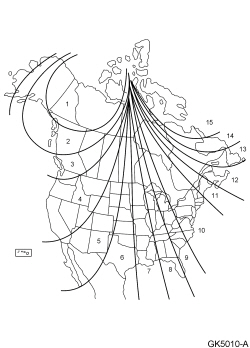
- Refer to the compass calibration zone map to select the correct compass zone setting for the geographic location of the vehicle.
- With the key in the ON position, press and hold the Front Controls Interface Module (FCIM) preset buttons 7 and 9 for approximately 5 seconds until the compass display shows the current zone setting (ZONE XX). Release the 7 and 9 buttons.
- NOTE:
Approximately 5 seconds after the buttons have been released, the compass display exits the zone setting mode.
Before the zone setting mode turns off, momentarily press and release the FCIM preset buttons 7 and 9 to increase the zone increment by one. Set the zone display number to match the vehicle geographical location that is shown on the compass calibration zone map.
- To exit the zone setting mode, release all FCIM buttons for 5 seconds.
 Compass Calibration
NOTE: For optimum calibration, drive to an open, level location
away from large metallic objects or structures such as bridges, steel buildings,
etc. Switch off all non-essential electrical a ...
 Electronic Compass
The compass signal originates from the compass module, which is integrated into
the interior rear view mirror.
The compass display is incorporated into the Front Display Interface Module (FDIM)
...
More about Ford Focus:
Ford Focus Audio Control Module (ACM) - Removal and Installation
Audio Control Module (ACM)
Item
Part Number
Description
1
W790110-S
Audio Front Control Module (ACM) screws (4 required)
2
18806
ACM
Removal and Installation
NOTE: It is not necessary to remove the Audio Front Control Module
...
Nissan Frontier - Instrument Panel - Keys - Brake system
